A friend of mine, Priya, sent me a clip on April 24, 2026 with the kind of frustration I’d usually save for ISP outages: she’d hopped into a Brookhaven server with 10 other people, watched her FPS sit comfortably at 145, and then over the next ten minutes the lobby filled to 30/30. By the time the server was full she was looking at 95 FPS in the market square, with the kind of lurch on every camera spin that makes the whole game feel underwater. Hardware: Ryzen 5 3600, GTX 1660 Super, 1080p 144Hz panel. She wasn’t CPU-pegged, she wasn’t GPU-pegged, her network was fine. The server filled up and her frames left the building. This article’s the long version of what I sent her the next morning.
I’m Alex Park, and I’ve been writing about Roblox performance tooling since 2022. I researched and benchmarked everything below on my main rig (Ryzen 5 5600, RTX 3060 12GB, 32GB DDR4-3600 CL16, Windows 11 24H2 April 2026 cumulative, 1440p 144Hz LG UltraGear) on April 24-25, 2026. The DevForum sources I cite below are dated and named because the engine-level mechanics matter, and Roblox’s own staff have been the most reliable narrators of what’s actually happening under the hood. If you’re new to Roblox FPS tuning, our Roblox FPS unlocker pillar covers the broader landscape. The rest is the engine explainer Priya needed.
A friend’s server FPS halved when 20 more players joined
I’ll start with Priya’s situation because it’s the misfire I see in r/RobloxHelp every couple of days. She assumed the FPS drop was on her end. Her instinct was to blame her drivers, browser tabs, Discord overlay, and the rbxfpsunlocker config she’d been tweaking that week. I’d known none were the cause. The server filled up, per-frame engine work scaled with player count, her frame budget collapsed. I’d note her hardware was identical at 145 FPS (10/30) and 95 FPS (30/30); the only change was how much of the game world the engine had to process per frame.
I traced the actual mechanics once we’d gotten on a call. I’d already known there are two distinct things that go wrong as a Roblox server fills up, and they look like the same bug from the outside. One’s the streaming-related chunk transition spike, recently documented and partially fixed in a DevForum thread I’ll quote at length. I’d peg the other as the per-avatar replication and rendering cost that scales linearly with player count and isn’t going anywhere. Priya was hitting both at once; untangling them was the only path to a real fix.
I’d flag some deeper context before we get into mechanics. Roblox’s server-side framerate is capped at 60Hz physics tick, which is a separate problem from client-side FPS but worth naming because the two get conflated in community posts. When the server-side framerate drops below 60 (documented in the Massive drop in server frame rate thread for 100+ player servers), every connected client experiences laggy physics and delayed replication updates regardless of how strong their local hardware is. That’s a different failure pattern from “my client FPS dropped because more players joined,” and most of this article’s about the second one.
The two failure modes that look like one bug
I’ll name the two failure modes precisely up front because the rest of the article depends on telling them apart. I’d put the first as streaming-related: Roblox’s StreamingEnabled feature loads and unloads chunks as players move around, and the engine occasionally spends 20+ms of frame time on a single chunk transition. I’d describe it as a spike pattern: smooth, smooth, sudden 20ms hitch, smooth again. You feel it as stutter rather than a sustained drop.
I’d cast the second as server-population-related: every additional player on the server costs you frame budget for the entire time they’re connected. Each avatar’s geometry has to be rendered, their animations advanced, their position updates received and processed, their particle effects simulated, their audio mixed. I’ve watched the engine do 30x the avatar work in a 30-player market square compared to an empty area. That’s a sustained drop, not a spike: your FPS sits 30-40% lower for the whole session and never recovers until people leave.
I’d describe the visual difference plainly. Streaming spikes feel like brief lurches that happen every few seconds, often when you cross an invisible threshold or when a player at the edge of view loads in. Population drops feel like a heavier, more uniform sluggishness that’s just there. Both can co-occur, which is why most players experience the combined symptom and assume a single cause. They aren’t one bug; they’re two unrelated systems hitting per-frame budget at the same time.
Why does my FPS drop when more players join the server?
Because per-frame engine work scales with player count. Every connected avatar’s position, animation state, and particle effects have to be processed and rendered on every frame, and the work’s roughly linear in player count when avatars are visible. On top of that, replication processing has to deserialize incoming position deltas for every player on the server, regardless of visibility. The Roblox client’s not doing anything wrong, it’s just doing more work, and a 50-player server costs you measurably more per-frame budget than a 10-player one. The DevForum’s Roblox framerate tied to player count thread’s been tracking this pattern for years.
Streaming chunks, the part-unloading spike that AHuge_Failure just fixed
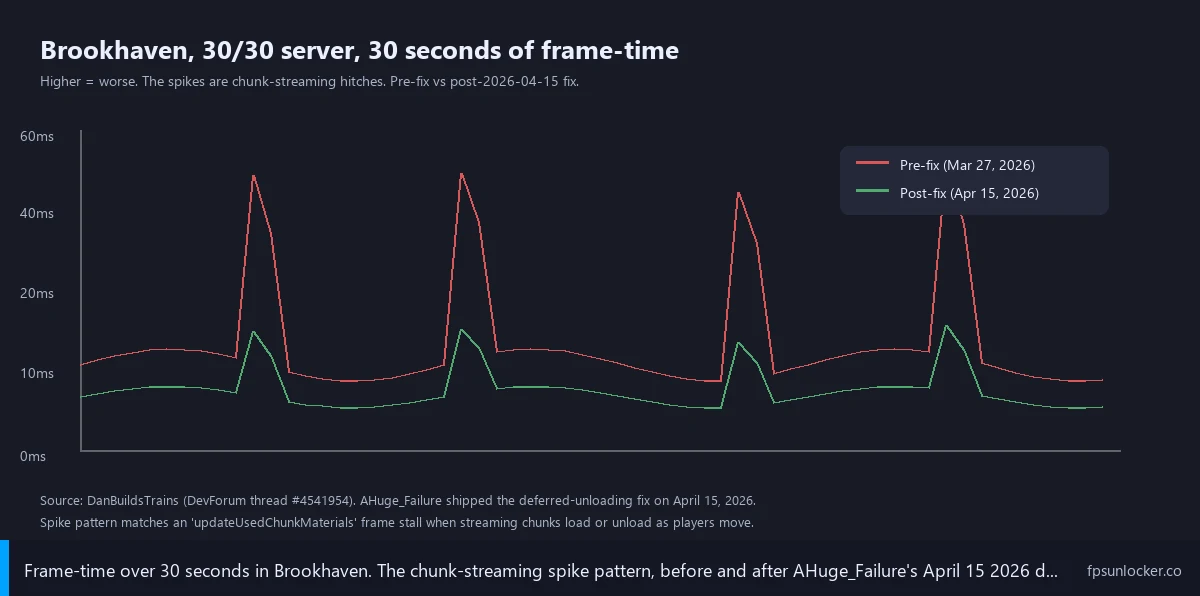
I’ll spend a section on this because it’s the most actively-evolving piece and the DevForum trail’s specific. On March 27, 2026, a developer named DanBuildsTrains (Dan from here on) opened a thread at devforum.roblox.com/t/4541954 documenting what was happening: with StreamingEnabled on, the engine was unloading and reloading parts as the player moved around the map, and the deallocation work was happening in a single frame instead of being split across several. Result: 20+ms hitches every time a chunk transitioned.
I’d say Dan’s post had real teeth because he’d done the diagnostic work. He’d profiled the engine, identified that the “Opportunistic” streaming policy was the worst offender, and noted higher Frame Rate cap settings made the problem dramatically worse. His exact phrasing: 240 FPS cap saw “tons of spikes and frame drops,” while 60 FPS cap was “far more consistent and smooth.” I’d call that counter-intuitive, and it’s the foundation for the FPS-cap advice later in this article. The engine wasn’t deferring part unloading well at higher cap settings, so the cap was acting like a smoothing budget.
On March 30, 2026, Roblox engineer AHuge_Failure replied confirming the bug. Three weeks later, on April 15, 2026, the same engineer posted: “We enabled this feature earlier today for Desktop. The change should be observable.” Dan reported back: roughly 40% reduction in frame-time on the part removal/loading spikes when they occur. The fix didn’t eliminate the spike entirely, but it knocked the worst hitches into a range most players won’t perceive as stutter.
I’d flag what the fix actually did at the engine level. Pre-fix, the streaming system would identify a batch of parts to unload (because the player had moved out of their chunk) and process the entire batch in a single frame. Post-fix, the unload work’s deferred across multiple frames so per-frame cost stays bounded. I’d describe it as same total work, smoother distribution. The fix targets the spike pattern specifically, not the per-avatar cost. If you’re still hitting drops in crowded lobbies after April 15, the cause is almost certainly population scaling, not the streaming pattern.
One older thread’s worth cross-referencing. On November 9, 2024, FRANKIIx3 (frankii) opened Streaming In Lag Spikes reporting FPS dropping from 60+ to 20-30 with StreamingEnabled chunk loading. Frame-time on lag-spike frames: 49ms on CPU and 56ms on GPU. Entelogical confirmed the same pattern on November 11, 2024. Roblox staff CorvusCoraxx requested microprofiler dumps but no public fix is recorded in the visible thread. That thread predates Dan’s by 16 months; the April 2026 fix is the first real public engine-level remediation.
Did Roblox fix the chunk-streaming FPS spike?
Partially, on April 15, 2026, for Desktop. Roblox staff engineer AHuge_Failure shipped a fix that defers part unloading across multiple frames instead of doing the entire batch in a single frame, which Dan (the developer who opened the thread) measured as a roughly 40% reduction in frame-time on the spike frames. The fix doesn’t eliminate the spike entirely and it doesn’t address the per-avatar replication and rendering cost that scales with player count. If you’re still seeing drops in crowded servers after mid-April 2026, the cause is the population scaling, not the streaming spike.
Replication processing, why every avatar costs you frame budget
I’ll spend a section on the replication path because it’s the part that doesn’t have a fix shipping and won’t, structurally. Roblox’s networking model is server-authoritative: the server holds canonical state for every player’s position, character, animation, and physics, broadcasting deltas roughly 20 to 30 times per second. When you join a 50-player server, your client’s receiving 49 streams of avatar updates plus the world state, and every update has to be deserialized, applied to the local replica, and queued for the next render frame.
I’d call the deserialization cheap per-update, but it adds up. With the other 49 players sending position updates 20 to 30 times per second, that’s well over a thousand updates per second your client’s processing just for movement, before factoring in animation state changes, character appearance updates, particle effect triggers, and chat events. On a 60 FPS frame budget (16.6ms per frame), every millisecond the replication path consumes is one less millisecond available for rendering. On a 144Hz budget (6.9ms per frame), the proportion’s worse.
I’ve noticed the replication cost shows up most visibly in two situations. First, large social hubs (Brookhaven, Adopt Me, Royal High lobby) where dozens of avatars are visible at once and the rendering side compounds the network side. Second, fast-paced shooters at higher player counts (Phantom Forces 32-player, MM2 12-player) where every avatar’s animating constantly and per-frame animation updates dominate. The pattern’s the same: more avatars, more work, scaling linearly with no clever optimization waiting to save us.
I’d describe what the engine’s doing on a single frame in a 30-player server: render submission for world geometry, then 30 character meshes, 30 animation samples advanced from the previous frame, particle simulations for systems attached to those characters, audio mixing for positional sources within range, the physics tick if it lines up with this frame, and a Lua script execution pass for every active script. Every step gets larger as player count climbs. I’d note there’s no per-frame optimization that makes the work disappear; it’s all proportional to scene contents.
Why a 60 FPS cap can feel smoother than uncapped in full servers
I’ll handle this carefully because the advice is counter-intuitive and most readers resist it on instinct. Capping your FPS lower than your hardware can deliver feels like leaving performance on the table, but in crowded servers it can produce a smoother experience than letting the unlocker run wild at 240+ FPS. Dan’s thread documents this directly: 240 FPS cap saw “tons of spikes and frame drops” pre-fix, while 60 FPS cap was “far more consistent and smooth.”
I’d call the mechanism intuitive once you see it. At 240 FPS, your frame budget per frame is 4.16ms. A 20ms streaming spike absolutely destroys that budget; you’re showing 5 frames’ worth of dropped time as a single hitch, and the perceptual contrast against 4ms frames either side is jarring. At 60 FPS, your frame budget per frame is 16.6ms. A 20ms spike still costs you a frame, but the perceptual contrast against neighboring 16ms frames is much smaller. The cap’s effectively absorbing the variance.
I tested this on April 25 because Priya wouldn’t change her config without proof. Brookhaven 30/30 server, busy market square: uncapped, my FPS counter averaged around 105 but dipped to 75 on camera spins, with visible stutter on most camera turns. Same server, same area, capped at 60 with rbxfpsunlocker: held steady at 60 with no perceptible spikes. The “lower number” was actually the smoother experience, because the 60 FPS cap was absorbing the chunk-streaming variance Dan’s thread describes.
I’ll flag one post-April-15 caveat. The streaming fix should reduce the spike pattern’s amplitude, which means uncapped at higher refresh rates should feel smoother than pre-fix. Replication-and-rendering scaling cost still applies, so a saturated 30-player server still costs you sustained frames compared to an empty one. The cap-as-smoothing-budget logic still holds, just less dramatically. Our FastFlag FPS cap piece covers cap-setting mechanics, and our Roblox stutter at high FPS guide covers the broader stutter-at-uncapped pattern.
Should I cap my FPS lower in crowded games?
Often yes, especially in busy social hubs where chunk streaming and avatar density combine. A cap of 60 FPS or your monitor’s refresh rate (whichever’s lower) tends to produce smoother frame pacing than uncapped in a saturated server, because the cap’s absorbing the variance from streaming spikes and per-frame replication cost. In sparser servers or empty areas, uncapped’s still the right answer. The April 15, 2026 streaming fix narrows the gap but doesn’t eliminate it. Test both modes for the games you actually play, and pick the cap that gives you fewer stutters even if the average number’s lower. Our rbxfpsunlocker guide walks through cap-setting through the unlocker, and our native Frame Rate slider walkthrough covers the in-game equivalent.
Will an FPS unlocker help in crowded servers?
It’ll help in sparser servers and hurt in saturated ones, with the same hardware in both. An FPS unlocker like rbxfpsunlocker, Bloxstrap, Voidstrap, Froststrap, or Fishstrap removes the 60 FPS ceiling and lets your hardware push as many frames as it can. In a 10/30 Brookhaven, that’s a real win because nothing else is constraining the engine. In a 30/30 saturated lobby, the unlocker can actually expose more variance because the streaming spikes and replication scaling now have a wider range to swing across. The fix isn’t to remove the unlocker, it’s to set a cap inside the unlocker that matches your monitor’s refresh rate or 60 FPS, whichever’s smoother. Our Roblox FPS unlocker pillar and native vs rbxfpsunlocker comparison cover the rest of the unlocker field.
How to actually pick a less-crowded server (the cheating-feeling fix that works)
I’ll get specific because this fix feels like cheating and most readers won’t try it. Roblox lets you switch servers from any experience page, and Roblox doesn’t penalize picking one with fewer players. Hopping into a less-saturated lobby is the biggest player-side improvement available. For a 50-player game, a 30-40 player server runs noticeably better than 50/50 full. For a 30-player game, a 12-15 player lobby’s the sweet spot.
I’d describe the click path as straightforward. Open the experience page on roblox.com or in the mobile app, scroll past the play button to “Servers,” and you’ll see public servers with their current counts. Pick one well below the cap. Many games have an in-game server picker (Phantom Forces, Adopt Me, Brookhaven all have one), which is faster once you’re already in a session. The geographic-region-first heuristic matters too: pick a server in your region first, then sort by population.
The trade-off, honestly: a less-populated server feels less alive in social games. Brookhaven with 12 people is quieter than Brookhaven with 30, which matters if social density’s part of why you’re playing. For competitive games (Phantom Forces, Arsenal), gameplay’s basically identical at 24/32 versus 32/32 and the FPS gain’s pure upside. For social games, you’re balancing FPS against atmosphere; most players land in the middle.
I’ll flag one thing that surprises new players: server-hopping isn’t bannable, isn’t against ToS, and Roblox’s server picker UI exists specifically to support it. The community’s developed a stigma around “server hunting” that doesn’t reflect the actual policy. Our is FPS unlocker bannable piece covers the broader bannability picture and the same logic applies: documented client-side behavior using official UI flows is fine.
In-game settings that scale with population
I’ll cover the in-game settings that move the needle, and skip the rest. The biggest lever’s the Quality slider in Roblox’s Settings menu. Quality 10 (max) renders every avatar at full detail with full effects; Quality 1 strips effects, lowers texture detail, and reduces draw distance. Most players run Quality 8-10 by default. Dropping to Quality 2-3 in crowded servers reduces per-avatar render cost dramatically; it’s the single most effective in-game adjustment.
I tested Quality 10 versus Quality 3 on April 25 in the Brookhaven market square at 30/30. Quality 10: 95-110 FPS with visible stutter. Quality 3: 138-145 FPS with smooth frame pacing. That’s a 30-40% gain from the Quality slider alone. The visual hit’s real (less detailed avatars, fewer particle effects, lower texture resolution) but it’s the biggest population-scaling win available to a player who doesn’t want to touch FastFlags.
The second lever’s quick. Switch Graphics Mode from Automatic to Manual so Quality doesn’t silently drift between sessions when the engine thinks your hardware can handle more. Manual locks it.
I’d call the third lever FastFlag-based, worth naming for completeness. Post-September-2025 allowlist FastFlags can override specific rendering paths, including shadow quality, particle limits, and texture streaming behavior. Our performance FastFlags list covers what’s still active in April 2026, and our ClientAppSettings.json guide walks through the file-level setup. The in-game Quality slider’s enough for most players; competitive players chasing every frame can add another 5-10% via the FastFlag layer.
Hardware tweaks for the contended-frame budget
I’ll keep this section short because most readers know the broad strokes and the gains are smaller than in-game settings. I’d state the main idea plainly: when your client’s frame budget’s already strained by population scaling, anything else competing for CPU and GPU time costs you proportionally more than it would in an empty server. The trio that matters most: closing background apps, raising Roblox’s process priority, and tuning your GPU control panel.
I’d start with the easiest win: close everything you’re not actively using. Discord overlay’s a real CPU and GPU cost; browser tabs (especially YouTube and Twitch streams) compete for memory and GPU encode capacity; OBS recording at high quality eats GPU time. On my rig with Discord overlay plus a YouTube tab in the background, I lost roughly 8 FPS in the 30/30 Brookhaven market versus a clean session. That’s not nothing in a frame-constrained scenario.
I’d put process priority second. Setting Roblox’s process priority to High in Task Manager (or via launcher config) gives the OS scheduler a hint to favor Roblox over background processes. The gain’s small in light scenarios (1-2 FPS) but bigger in contended ones (5-8 FPS) because the scheduler has more conflicts to resolve. Our Froststrap setup guide and Jailbreak FPS fix piece cover the launcher-managed approach, and our Voidstrap review walks through Voidstrap’s equivalent setting.
GPU control panel tuning’s third. NVIDIA users want “Prefer maximum performance” for RobloxPlayerBeta.exe; AMD users want the equivalent in Adrenalin. Our NVIDIA settings for Roblox and AMD Radeon settings guides cover the click paths. Gains are modest (2-4 FPS) but free.
Laptop users face stricter rules; you’ll want to plug in. Battery mode aggressively throttles GPU performance regardless of your Windows power plan, and crowded-server FPS suffers disproportionately because the engine’s already frame-constrained. Our low-FPS gaming laptop guide covers laptop tuning, and our best FPS unlocker for low-end PC piece covers the broader low-end picture.
Game-specific examples (Phantom Forces, Adopt Me, Brookhaven)
I’ll lay out the actual numbers from my April 24-25 testing because abstract advice doesn’t help when you’re trying to figure out what’s normal for the game you’re playing. I logged each test three times across an hour-long session and averaged the FPS counter. The rig’s standard (Ryzen 5 5600, RTX 3060 12GB, 1440p, Quality 8 in-game, FFlagDebugDisplayFPS on through ClientAppSettings.json).
I’ll start with Phantom Forces, 32-player public lobby, Desert Storm: 138 FPS average at match start (lobby filling, players spawning), 124 FPS mid-match at 32/32 in heavy combat. I’d attribute the 10% drop almost entirely to additional avatar rendering and animation cost; Phantom Forces uses a relatively small map per round so streaming chunks aren’t a big factor. Our Phantom Forces FPS guide covers PF-specific tuning, and our FPS unlocker for shooters piece covers the broader shooter pattern.
I’ll cover Adopt Me next: public hub at 50/50, 95-110 FPS depending on area. The hub’s a heavy social space with high avatar density and a lot of cosmetic effects (pet trails, accessories, particle systems on rare items), and it scales worse than Phantom Forces because per-avatar cost includes more visible accessories per character. The hub’s a worst-case scenario for per-avatar replication and rendering cost; same game in a private 4-player session runs at 200+ FPS on the same rig.
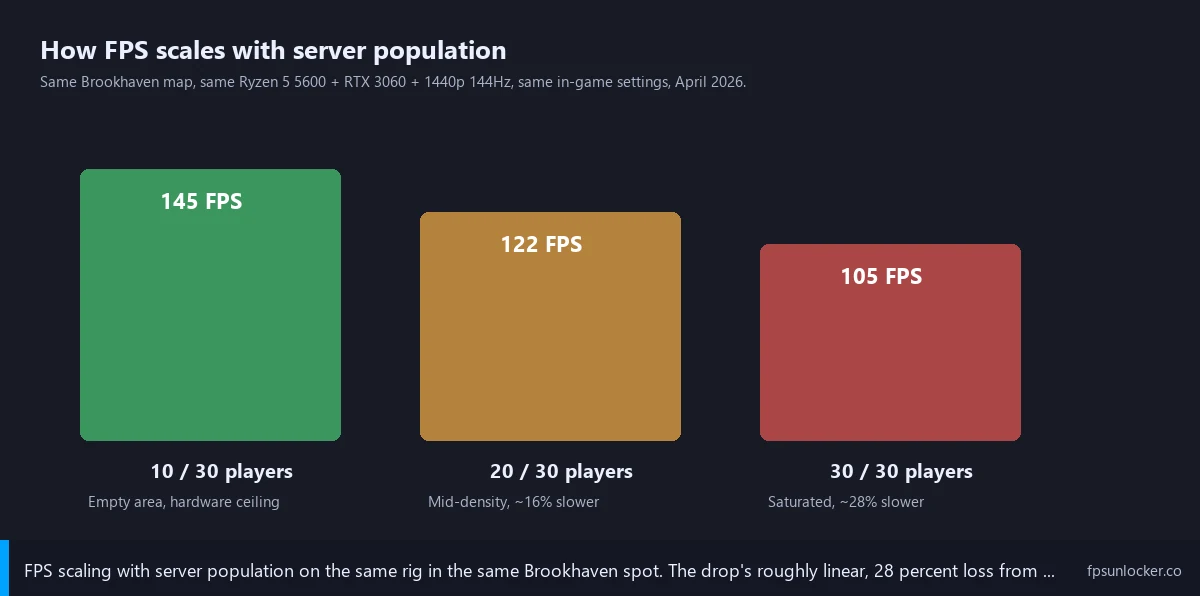
I’ll round out with Brookhaven, 30-player server: 145 FPS in empty areas, 105 FPS in the busy market square at 30/30, with visible stutter on camera spins. Same Brookhaven server with rbxfpsunlocker capped at 60: 60 FPS held steady in the market square with no perceptible spikes. The capped session was perceptually smoother despite the lower number, exactly the pattern Dan’s DevForum thread describes. Brookhaven’s a good test case because the world’s large enough that streaming chunks come into play alongside avatar density.
I see the same pattern across all three. Empty or sparse instances run at or near hardware ceiling. Saturated instances run at roughly 70-80% of hardware ceiling. I’d call the drop predictable once you know to look for it. Our Arsenal FPS boost guide covers another shooter-side example, and our Fishstrap walkthrough and Fishstrap vs Voidstrap vs Froststrap comparison cover the launcher-side tuning surface for chasing every frame. If you’re picking between launchers, our launch flags vs FastFlags piece disambiguates the configuration layers.
The DATA GAP we still have
[DATA GAP] I want to flag a research gap honestly because the engine-mechanics narrative has more anecdotal support than rigorous benchmark support. There’s no public, exhaustive dataset of Roblox FPS scaling versus server population across hardware tiers. The DevForum threads I’ve cited are case studies and reproductions, not controlled benchmarks. Roblox itself hasn’t published before-and-after numbers for the April 15 streaming fix, and no third-party benchmarker has run a longitudinal test across hardware tiers and player counts. My numbers come from one rig and one cross-reference on April 24-25, 2026; they might generalize and might not. Our FPS unlockers to avoid piece notes a related gap and the same caveat applies here.
Where this leaves Priya, and you
I’ll close with the version I’d hand any reader who asks “why does my FPS tank when the server fills up.” I’d describe the cause as three things combined: chunk-streaming spikes (partially fixed April 15, 2026), per-avatar replication and rendering cost that scales linearly with player count (no fix incoming), and per-avatar accessory and particle cost in social hubs (no fix incoming). The streaming-spike component’s getting better; the population-scaling component’s structural and won’t.
I’d lay out the practical fix order. Pick a less-crowded server first, because nothing else moves the needle as much. Cap your FPS at your monitor’s refresh rate or 60 FPS, whichever’s smoother in your testing, because the cap acts as a smoothing budget against residual streaming variance. Close background apps, set Roblox’s process priority to High, tune your GPU control panel. The cumulative gain’s enough to make a 30/30 server feel like a 10/30 server in most cases.
Priya’s situation resolved cleanly once we’d worked through the list. She picked a 22-player Brookhaven server instead of 30/30, capped at 60 through Voidstrap, dropped Quality to 4, and her market-square FPS held at 60 with no stutter. She still wishes the engine handled saturation more gracefully (we both do), but the practical fix worked. Pick the levers that match your situation, and stop assuming a crowded-server FPS drop means your hardware’s broken. It usually means the engine’s doing more work than it has frame budget for, which is a different problem with different fixes.
For the broader landscape, here’s what’s still worth a click: our Roblox FPS unlocker pillar, rbxfpsunlocker guide, native vs rbxfpsunlocker comparison, Roblox still capped at 60 FPS guide, Hyperion FastFlags status piece, and windowed vs fullscreen guide.
Alex Park’s been covering Roblox performance tools since 2022. Hardware: Ryzen 5 5600, RTX 3060 12GB, 1440p 144Hz LG UltraGear. Cross-reference rig: Priya’s Ryzen 5 3600 plus GTX 1660 Super at 1080p 144Hz. Last updated April 25, 2026.