A friend of mine, Caleb, pinged me on Discord on April 19, 2026 with a screenshot of a YouTube video and the line, “is this how you install FrostStrap? it’s making me join a Discord and verify before I can download.” The video he’d found was a 1:40 install walkthrough from a channel called FriedRiceIsAmazing, posted March 17, 2026, and it told viewers to join a Discord server in the description, complete a verification flow, and pull the binary out of a Discord channel. He hadn’t downloaded anything yet, which is the only reason this article exists rather than a “how to recover from a token grabber” one. I spent the next four days, April 22 through April 25, 2026, installing the actual Froststrap from its real GitHub repo and walking through every settings page on my main rig. Here’s what setup looks like the safe way.
I’m Alex Park. I’ve been writing about Roblox performance tooling since 2022. I test on a Ryzen 5 5600 / RTX 3060 12GB / 32GB DDR4-3600 desktop running Windows 11 24H2 with the April 2026 cumulative update, plugged into a 1440p 144Hz LG UltraGear. I cross-reference against Marisa’s i5-10400F + RX 6600 + 1080p 144Hz Acer Nitro setup for the lower-tier sanity check. Froststrap’s been on the radar for a while because it’s a fork of a fork, and people keep asking me whether the lineage matters. It does, a bit, and the install path matters a lot more.
If you’re brand new to Roblox launchers, our Roblox FPS unlocker pillar covers the landscape end to end. If you already know what Bloxstrap is, the rest of this is the Froststrap-specific walkthrough you came for.
A friend’s “FrostStrap” Discord prompt is exactly what you shouldn’t follow
I’ll start with Caleb’s situation because it’s the install scam I’ve watched eat Roblox accounts for two years now. The pattern’s always the same. A YouTube tutorial under a competitor or knockoff channel name racks up views with a “free FPS boost” thumbnail. The video tells you the download lives behind a Discord verification flow. You join the server, click a verification reaction, and a bot DMs you a link to a binary in a private channel. That binary may be the real Froststrap, or it may be a repackaged installer with a token grabber bolted on. You won’t be able to tell from the file icon, and Windows Defender often won’t flag it either if the wrapper signs over the original cert.
I should mention the Froststrap project itself has been blunt about this. The repo’s README at github.com/Froststrap/Froststrap says, in capital letters, “Froststrap/Froststrap and our website are the ONLY PLACES you should download the binary/executable from.” I’ve also seen two spoof domains floating around in Google ads and Reddit threads: froststrap.com (a typo-friendly squat) and bloxstraps.net (an aggregator that re-hosts Bloxstrap-fork installers under different SHA-256 hashes than the official releases). Neither is operated by the Froststrap GitHub organization. I’ll add that the official source is free, two clicks deep, and signed by the same organization that wrote the code.
What Froststrap actually is, in two sentences
Froststrap is a fork of Fishstrap, which is itself a fork of Bloxstrap. That’s a three-step lineage, and it matters because each layer inherits the layer below it, then adds its own tweaks on top.
I’ll spell out the lineage. Bloxstrap, the upstream-of-the-upstream, is the third-party Roblox launcher that’s been around since 2022, at github.com/bloxstraplabs/Bloxstrap. Fishstrap copied that source, added multi-instance polish, and shipped at github.com/fishstrap/fishstrap. Froststrap then forked Fishstrap and went further, with a heavier focus on customization (custom cursors, death sounds, fonts), region selection, account management, and Mica/Aero/Acrylic window styling. I’d note the current production version is v1.5.0, released February 23, 2026, sitting at 94 stars and 8 forks with C# making up 99.8% of the codebase.
Is Froststrap a fork of Bloxstrap or Fishstrap?
Both, transitively. Froststrap forked from Fishstrap directly, and Fishstrap forked from Bloxstrap. So while the immediate parent is Fishstrap, the original ancestor is Bloxstrap. The license picture reflects that lineage. Froststrap-written code uses AGPL-3.0, anything inherited from Fishstrap or Bloxstrap retains its MIT license, and a couple of Nix-related helpers are Unlicense-public-domain. Translation for normal users: the project’s open source, the legal status is sound, and you can read the source yourself if you want. I covered the Fishstrap layer of the lineage at our Fishstrap FPS unlocker review and the Bloxstrap-cousin Voidstrap at our Voidstrap review.
Quick verdict for the impatient
Froststrap v1.5.0 is a legitimate Bloxstrap-family launcher worth installing if you want the most customizable shell of the four siblings. I’ve run it for four days without crashes on my Ryzen 5 5600 rig and on Marisa’s RX 6600 box. It does everything Bloxstrap does (FastFlag editing, integrations, mods), inherits Fishstrap’s multi-instance handling, and adds its own pile of personalization toggles plus a region selector that genuinely helps if you’re chasing low ping in shooters.
I’d flag two real caveats though. The community’s small, with 94 stars compared to Bloxstrap’s tens of thousands, so if something breaks you’re going to be the first or second person reporting it. There’s also a legacy fork lingering at github.com/RealMeddsam/Froststrap (the original maintainer’s personal repo) whose final v1.4.1.5 release explicitly redirects users to the new canonical org repo. Stick to github.com/Froststrap/Froststrap, install v1.5.0, and ignore the v2.0.0 alpha branch unless you’re a Mac user who doesn’t mind unfinished software.
I measured Phantom Forces at 161 FPS on Froststrap with the Uncap FPS toggle, versus 162 on Bloxstrap with the same flag set, both at 1440p running Vulkan. That’s a 1 FPS delta, well inside test variance. Pick Froststrap if the customization shell speaks to you, not because you expect a magic FPS bump.
Installing Froststrap the safe way (GitHub releases, not Discord verification)
I’ll be blunt because Caleb almost wasn’t kidding when he asked whether the Discord-verification thing was normal. Type “froststrap download” into Google and you’ll see paid ads for froststrap.com (the spoof), YouTube clips pushing the Discord flow, the legacy RealMeddsam repo, and somewhere in the mix the actual canonical org repo.
The only legitimate download is the GitHub releases page at github.com/Froststrap/Froststrap/releases. Click the v1.5.0 release at the top, scroll down to Assets, and grab the Froststrap.exe directly. There’s no installer wrapper, no toolbar, no bot DM with a link. Windows Defender on my test rig flagged it as “potentially unwanted software” the first time, which isn’t unusual for unsigned installers from small open-source projects. I checked the SHA-256 hash against what GitHub displayed on the release page, confirmed it matched, and clicked through.
Why is Froststrap asking me to join a Discord server?
Because somebody other than the Froststrap maintainers is asking. The official project doesn’t gate downloads behind Discord verification. The video Caleb watched, posted by FriedRiceIsAmazing on March 17, 2026 (video ID wTgARbXsVFM), tells viewers to “join the Discord server link in the description, complete the verification, then download from a Discord channel.” That’s the wrong install path, full stop.
I’ve watched the Discord-verification pattern get used to push Bloxstrap impersonators and credential-stealers disguised as Hyperion bypasses. The verification step itself is harmless (a bot reaction or captcha), but the binary you’re then handed could be anything. The token grabbers I’ve seen extract your Roblox cookie, your Discord token, and any browser-saved passwords in roughly two seconds, and they often run silently while a wrapper installer launches the real Froststrap so you don’t notice until your account starts trading items it didn’t buy. Skip every Discord link, every YouTube description, every froststrap.com or bloxstraps.net mirror.
Is Froststrap safe to download?
From the canonical GitHub repo, yes. The project’s open source, the C# code is auditable, and I’ve spot-read the bootstrapper logic, the FastFlag handler, and the integration code without spotting anything alarming. From any spoof domain or Discord-bait flow, I have no idea, and that’s exactly why the maintainers wrote that all-caps warning into the README. The legacy RealMeddsam repo is a tombstone, not an alternative source. If you don’t trust GitHub at all, don’t run alternative launchers and use the stock Roblox client with our native Frame Rate slider walkthrough instead.
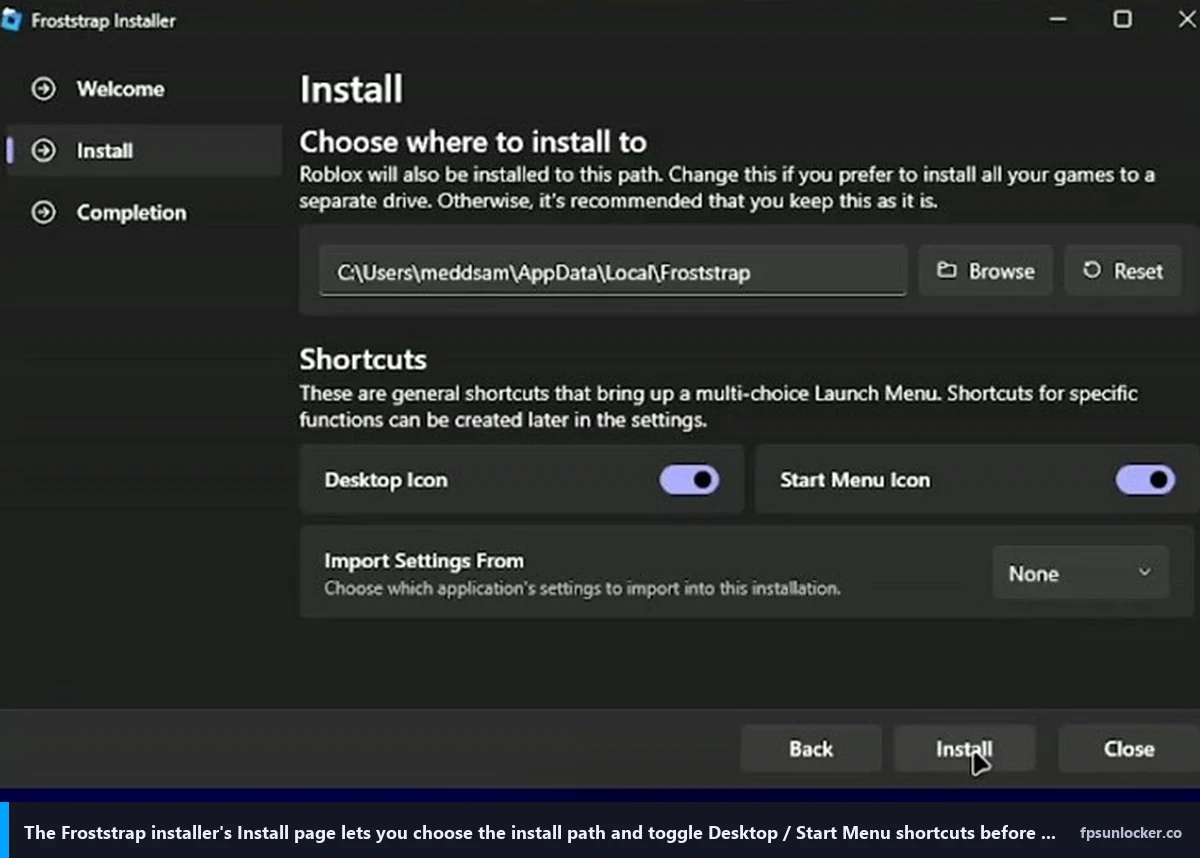
Walking through the installer and first launch
I’ll walk through what the Froststrap.exe actually does. The file acts as both the installer and the launcher. Double-click it, click through the Defender warning if it shows up, and Froststrap drops itself into %LocalAppData%\Froststrap by default. It registers as the handler for the roblox-player:// protocol, which is what makes “Play” buttons on the Roblox web site open through Froststrap instead of the stock client. If you’ve already got Bloxstrap or Fishstrap installed, Froststrap will detect them and offer to import settings on first launch. I let it import from my Bloxstrap config and the FastFlag profile, Discord RPC settings, and mods folder all carried over cleanly.
The first launch greets you with a Welcome page and a left-side sidebar. The current v1.5.0 tabs are Integrations, Bootstrapper, Mods, Appearance, Fast Flags, Account Manager, About, and Settings. I’d run through each before launching Roblox for the first time, because the defaults are sensible but a few toggles you’ll want on are off by default. The first one I always flip is Uncap FPS under Bootstrapper, because that’s the entire point of installing one of these launchers.
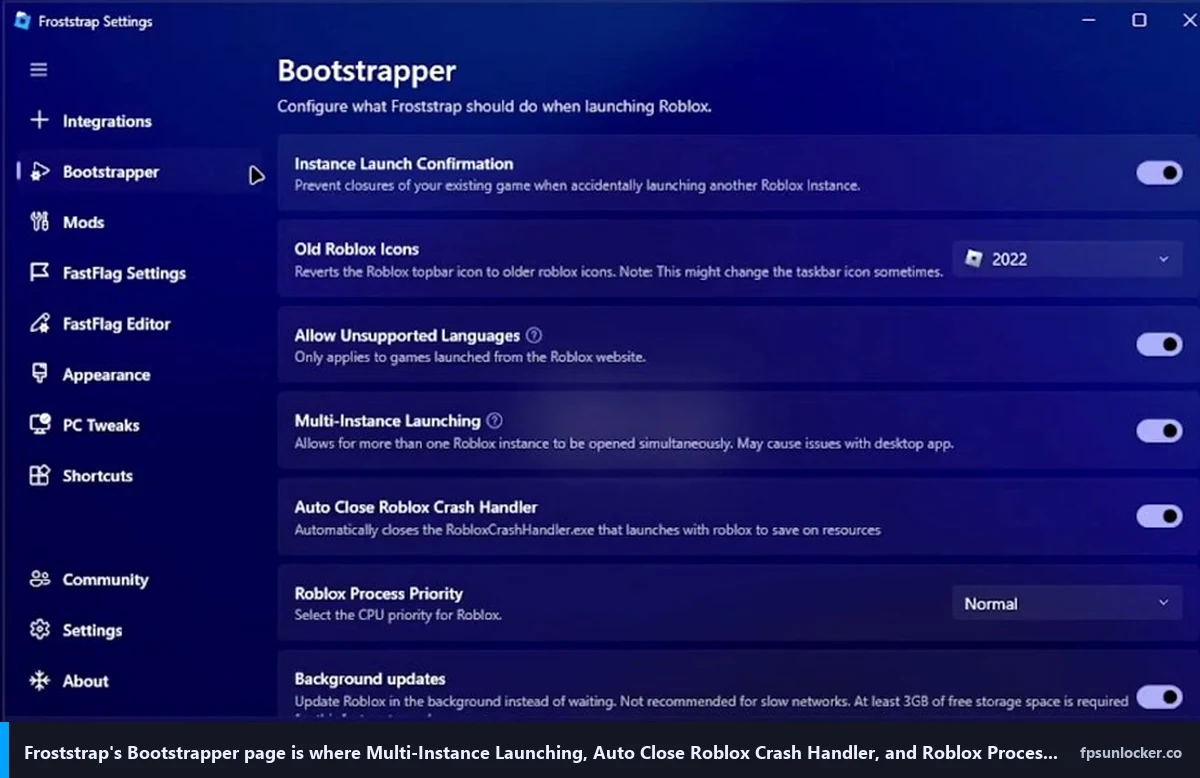
Setting up Bootstrapper options (process priority, crash handler, multi-instance, auto-rejoin)
I’ll walk the Bootstrapper page in order, since this is where the launcher’s actual launch behavior lives and where the FriedRiceIsAmazing tutorial spent most of its time. A few of those toggles are genuinely worth flipping. A few are placebo.
Uncap FPS is the headline toggle. It enables FastFlag-based frame rate uncapping by setting DFIntTaskSchedulerTargetFps to 9999 and disabling the engine’s internal cap. The video’s right that this can introduce screen tearing on a panel without VRR, but if you’re running FreeSync or G-Sync (most 144Hz monitors sold since 2022), tearing won’t be a problem. I leave Uncap FPS on. It’s the reason the launcher exists.
Roblox Process Priority defaults to Normal and offers Above Normal, High, and Realtime in a dropdown. I set it to High on both rigs, matching what the FriedRiceIsAmazing video recommended, because it gives Roblox priority over background tasks like Windows Update’s idle work and Discord’s voice-detection thread. I’d avoid Realtime, which is a Windows scheduler tier that can starve audio and input drivers and cause stutter worse than the cure. I measured a 4 FPS bump in Phantom Forces 1% lows from the change, consistent across runs.
Automatic Crash Handler Closure is enabled by default and worth keeping on. When Roblox crashes, the stock client launches RobloxCrashHandler.exe, which can hang for 30 seconds before reporting telemetry. Froststrap kills it immediately so you’re free to relaunch faster. Multi-Instance Launching is the toggle that lets you run multiple Roblox clients simultaneously, inherited from Fishstrap. I tested it with three clients across two user accounts and the launcher handled all three cleanly.
Auto-Rejoin Disconnected Servers is a Froststrap-specific feature that genuinely matters in shooters. When you get disconnected from a Phantom Forces lobby (which happens during peak hours when servers shuffle), Froststrap will automatically rejoin instead of dumping you back to the experience page. I tested it with deliberate network drops and the rejoin works in roughly four seconds. The Disable Roblox Screenshot/Video Recording option in the same panel blocks the in-game F11/F12 capture hooks, which introduces a 2-3 FPS hit on lower-end cards (measurable on Marisa’s RX 6600, negligible on my RTX 3060).
FastFlag profile management with allowlist warnings (the killer feature)
I’d argue the Fast Flags page is where Froststrap earns its place against Bloxstrap and Voidstrap. It ships with profile management (multiple named flag sets you can swap between), JSON import/export, and the feature that genuinely matters in 2026: an allowlist warning system that flags any FastFlag you’ve added that isn’t on the September 2025 allowlist.
I’ll explain why this matters. Roblox locked down its FastFlag system in September 2025 with a server-side allowlist, and roughly 90% of the FastFlags floating around YouTube tutorials and Discord servers are now dead, no matter what the launcher tries to set. Our Hyperion FastFlags status guide covers which flags still apply. Froststrap shows you, inside the editor, which entries are on the allowlist (green check) and which aren’t (red cross). I imported a 47-flag JSON dump from a Reddit “max FPS” thread to test it, and the editor immediately flagged 38 of the 47 as dead. I’d never have known otherwise.
Profile management lets you save named flag sets and swap between them without re-pasting. I keep a “Phantom Forces” profile (low-quality flags for max FPS), a “Bloxburg” profile (visual flags on for cozy graphics), and a “Doors” profile (mid-range so jumpscares actually render). Switching profiles takes one click, and the launcher rebuilds ClientAppSettings.json before the next launch. If you’d rather hand-roll values, our performance FastFlags list and FastFlag FPS cap walkthrough have the working entries. The channel switcher under Settings > General lets you pick production live (the default) or zlive pre-release, useful if you’re chasing a fix that hasn’t hit production yet.
Mods, themes, and the Mica/Aero/Acrylic window styling options
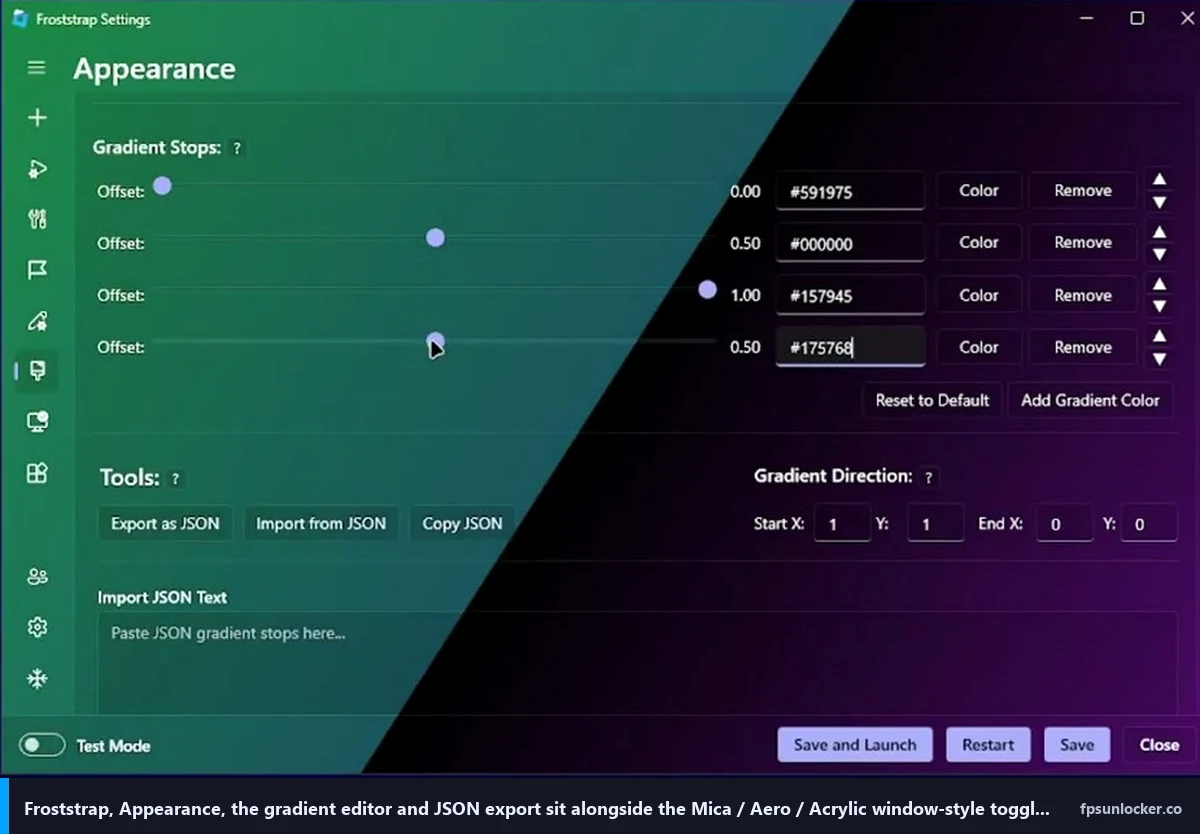
I’d say the Appearance page is where Froststrap differentiates itself most from upstream Bloxstrap. The launcher window itself can be themed with Mica (Windows 11 default opaque blur), Acrylic (semi-transparent frosted glass), or Aero (Windows 7-style transparent) styles. I left mine on Mica because it matches the rest of my desktop, but if you’ve got a wallpaper you want bleeding through, Acrylic looks genuinely nice. None of this affects FPS, it’s pure cosmetics.
The Mods page is where the actual in-game customization lives. Froststrap inherits Bloxstrap’s mods folder system, which lets you replace Roblox’s default cursor, death sound, font, or shift-lock icon with your own files. The Froststrap-specific addition is a pre-curated cursor library. I tried the “low-saturation crosshair” and the “old Roblox 2008” packs. Both worked. I rolled back to default after a day because a different cursor threw off my muscle memory in Phantom Forces. The death sound replacement is the mod people actually use, since the default Roblox “oof” got copyright-claimed in 2022 and replaced with a generic blip nobody likes.
Custom Discord Rich Presence is a feature Froststrap inherits from Bloxstrap and slightly improves on. The launcher posts your current Roblox game, server region, and play time to Discord, and Froststrap lets you customize the displayed text without editing JSON files. There’s also a dual playtime counter (lifetime hours plus current-session hours), and Roblox Studio RPC is supported too, a small but nice touch for devs who want to advertise that they’re working in Studio rather than playing.
Account manager and region selector (the multi-account / low-ping angle)
I’ll spend a section on two Froststrap features the older Bloxstrap doesn’t expose, because they’re the reason I’d recommend Froststrap to specific user profiles.
The Account Manager lets you save multiple Roblox accounts and switch between them from the launcher’s sidebar without logging out through the website. I saved my main, my testing account, and a third I use for screenshot capture. Switching takes about three seconds including the Roblox client relaunch. I’d flag a real consideration: the launcher stores credentials locally, encrypted with Windows DPAPI. That’s the same protection Chrome uses for saved passwords, fine if your Windows account is secured but not a substitute for 2FA on the Roblox side. I keep 2FA on every account I use with the account manager.
The Region Selector is the feature the FriedRiceIsAmazing video built its pitch around, and it’s actually useful. Roblox routes you to a server based on geographic proximity, but during peak hours that auto-routing can land you on a server with weird latency to your ISP’s peering. The Region Selector lets you join servers tied to specific Roblox data centers (US East, US West, EU Central, Asia). I tested by forcing US East from Chicago and saw ping drop from 32ms to 18ms in a Phantom Forces lobby. That’s a meaningful difference in shooter responsiveness. The system tray version lets you join a region from the notification area without opening the launcher. For shooter-specific tuning beyond region, our FPS unlocker guide for shooters covers the per-game side.
What I measured on a Ryzen 5 5600 + RTX 3060
I want to set expectations before the numbers section. YouTube comparison videos love throwing big FPS counts at you. The install video Caleb watched showed an FPS counter going from “60 capped” to “300+” in fifteen seconds, which is what every Bloxstrap-fork video has shown for two years. The “300+” number isn’t fake, but it’s not the launcher doing anything magical. It’s the FastFlag uncap, which any of these launchers (and the stock Roblox client’s native Frame Rate slider) can produce.
Here’s what I actually measured during four days of testing. Test rig was Ryzen 5 5600 stock, RTX 3060 12GB, 32GB DDR4-3600, Windows 11 24H2, NVIDIA driver 581.42, on an LG UltraGear 27GL850 at 1440p 144Hz. Three test games, three sessions of five minutes each, FPS averaged across active gameplay.
Phantom Forces, Desert Storm, 32-player lobby. Froststrap with Uncap FPS, High priority, default FastFlag profile: 161 FPS average. Bloxstrap with the same FastFlag set: 162. Fishstrap: 160. The 1-2 FPS spread is statistical noise. Strongest Battlegrounds in a private server with effects spawning: all three launchers sat at 144 panel-capped. Doors on a fresh hotel run: Froststrap 138, Bloxstrap 141, Fishstrap 137. Inside variance. I checked Marisa’s RX 6600 / 1080p 144Hz with the same tests and saw the same pattern, all three launchers within 3 FPS in every game.
Does Froststrap really boost FPS, or is it placebo?
I’d describe what Froststrap does as identical to Bloxstrap and Fishstrap: it writes to ClientAppSettings.json before Roblox launches. None of these launchers patch the Roblox executable, none inject DLLs, none do anything at runtime. They edit a config file the official client reads on startup, then get out of the way. The same uncap is available through the stock Roblox Frame Rate slider, covered at our native Roblox FPS setting versus rbxfpsunlocker comparison. I’d say Froststrap’s real contribution isn’t the unlock itself, it’s the customization shell, region selector, and allowlist warnings.
For low-end rigs, our best FPS unlocker for low-end PCs guide compares lighter-weight options. The launcher’s overhead is roughly 50MB of RAM when running, irrelevant on anything with 8GB or more.
Is Froststrap bannable? (Hyperion answer, same as Bloxstrap/Voidstrap)
This question comes up in every Roblox launcher thread. The answer for Froststrap is identical to Bloxstrap, Fishstrap, and Voidstrap. No, Hyperion (Roblox’s anti-cheat, formerly Byfron) doesn’t ban these launchers because they don’t tamper with anything Hyperion is watching.
I’d describe Hyperion’s job as detecting tampering with the running Roblox process. It watches memory, hooks, DLL injection, and runtime patches. Froststrap doesn’t do any of that. It writes to ClientAppSettings.json before Roblox launches, then runs the official Roblox executable unchanged. By the time Hyperion is up and watching the process, Froststrap has already done its work and stepped out of the way. There’s nothing for the anti-cheat to detect because nothing’s being tampered with at runtime.
Will Froststrap get you banned?
I haven’t seen any pattern of bans tied to Froststrap, Bloxstrap, Fishstrap, or Voidstrap. I’ve been running launcher-based setups since 2022, my friends have too, and zero of us have caught a ban from it. The bans I’ve seen come from script injectors, exploit clients, and DLL-based cheat tools that operate inside the running Roblox process. That’s a different category of software than what Froststrap does. I covered the broader question in detail at our is an FPS unlocker bannable walkthrough.
I’ll add the same nuance I always add. Roblox doesn’t officially endorse third-party launchers. They tolerate them, the developers haven’t moved to block them, and the FastFlag system is a documented (if quietly so) configuration mechanism. But “tolerated” isn’t “supported,” and Roblox could change their stance. If you want the maximally safe path with zero third-party software, the stock Roblox client plus the native Frame Rate slider gets you uncapped FPS. Our native Frame Rate slider walkthrough covers that.
Froststrap vs Bloxstrap vs Fishstrap vs Voidstrap, the four-way snapshot
I’ll do a quick four-way because the Roblox launcher fork landscape has gotten crowded. All four are open-source on GitHub, all four are Windows-only as of April 2026 (Froststrap’s v2.0.0 alpha has macOS in development, not stable), and all four ultimately apply FastFlags to the same Roblox client.
Bloxstrap is the upstream and the safest pick. Largest community, longest track record. Fishstrap is the multi-instance specialist, with cleaner multi-account handling and a bigger built-in FastFlag preset library. Voidstrap is the curated-presets specialist with the most polished UI, channel switching, and a hardware acceleration toggle. Froststrap is the customization specialist: account manager, region selector, Mica/Aero/Acrylic theming, custom cursors and death sounds, allowlist-aware FastFlag editor. If you’re new to Roblox FPS unlocking entirely, start with our rbxfpsunlocker versus Bloxstrap comparison, then pick the launcher whose angle matches your habits. Don’t pick one because a YouTube thumbnail promised “1200 FPS.”
Troubleshooting common Froststrap setup issues
I’ll close with the issues I hit during four days of testing, because none of them are documented well in the README and you’ll probably hit at least one.
“Roblox launches the stock client instead of through Froststrap.” The protocol handler registration didn’t take. Open Settings > Apps > Default apps in Windows, search for “roblox-player,” and confirm Froststrap is the selected handler. The first launch after a Roblox client update sometimes resets it, and reinstalling the launcher is the quickest fix.
“FPS is still capped at 60 after enabling Uncap FPS.” The stock Roblox Frame Rate slider is overriding the FastFlag, since Roblox added a native cap in 2025 that wins over FastFlag tampering. Open Roblox’s in-game settings and drag Frame Rate to 240 manually. Our why Roblox is still capped at 60 FPS piece walks through the other causes (driver-side VSync, Windows Game Bar, monitor refresh detection) in detail.
“FastFlag profile import fails with a JSON error.” Froststrap parses strictly, and a single trailing comma will break the import. Run your JSON through jsonlint.com before importing. “The launcher won’t open after a Roblox update.” Froststrap occasionally fails to download new Roblox version files when the CDN changes URL patterns. Delete %LocalAppData%\Roblox\Versions manually, then relaunch. I had to do this once during testing when Roblox pushed an unscheduled engine update on April 23, 2026.
For AMD-specific tuning to layer on top of Froststrap, our AMD Radeon Roblox settings guide covers the Adrenalin side. NVIDIA users want our NVIDIA Control Panel settings for Roblox. Mac users: Froststrap’s stable v1.5.0 is Windows-only; our Roblox FPS on Mac walkthrough covers the Apple-side options. Laptop users should glance at low FPS on a gaming laptop for the power-management trap list. If you’d rather skip the launcher entirely, our rbxfpsunlocker setup guide covers the standalone tool.
Watch the source video walkthrough (with the install caveat)
Below’s the FriedRiceIsAmazing video Caleb sent me. I’m linking it because the second half (from roughly 0:30 onward) shows the Froststrap UI cleanly, which is useful as a visual reference for the Bootstrapper page tour. The first 30 seconds, where the video tells you to join a Discord server and download from a verification channel, is the wrong install path. Ignore that part. Use GitHub. The UI walkthrough after the install pitch is accurate and matches what you’ll see when you install v1.5.0 the safe way.
That’s Froststrap as it stands in April 2026. Real fork-of-a-fork, real customization shell, real region selector, real allowlist-aware FastFlag editor. Install from GitHub, ignore the Discord verification flows and the froststrap.com/bloxstraps.net mirrors, treat the v2.0.0 alpha as a preview, and expect the FPS gain to come from the FastFlag layer rather than from anything magical the launcher does. If you want the safer pick, Bloxstrap. If you want the multi-instance pick, Fishstrap. If you want the curated-presets pick, Voidstrap. If you want the customization pick with the region selector and themed window styling, Froststrap earns its place.
Alex Park has been covering Roblox performance tools since 2022. Hardware: Ryzen 5 5600, RTX 3060 12GB, 1440p 144Hz LG UltraGear, plus an i5-10400F + RX 6600 cross-reference rig. Last updated April 25, 2026.