A friend of mine, Dani, called me on the morning of April 22, 2026 with the kind of voice every parent of a Roblox-aged kid eventually uses. Her eleven-year-old son had downloaded “Roblox FPS Unlocker” from the first Google search result, run it, and woken up to a locked Discord account, three friends getting DMs from him pushing the same installer, and his Roblox cookie active on a Russian IP. She’d already changed passwords and booted Defender into a full scan. She wanted to know what had actually happened, and how she’d tell her kid which “FPS unlocker” was the real one. I spent the next three days pulling apart the install pattern her son walked into, and the broader threat surface around Roblox FPS unlockers in 2026. This article’s the result.
I’m Alex Park. I’ve been writing about Roblox performance tooling since 2022. I tested every verification ritual below on my main rig, a Ryzen 5 5600 plus RTX 3060 12GB plus 32GB DDR4-3600, on Windows 11 24H2 with the April 2026 cumulative update, on a 1440p 144Hz LG UltraGear. I cross-referenced on Marisa’s i5-10400F + RX 6600 box and on Dani’s family laptop after we’d cleaned it. If you’re brand new to the topic, our Roblox FPS unlocker pillar covers the legitimate landscape end to end. The rest is the safety walkthrough Dani needed before her son clicked Download.
A Discord token gets stolen, and the trail starts at a Roblox FPS unlocker
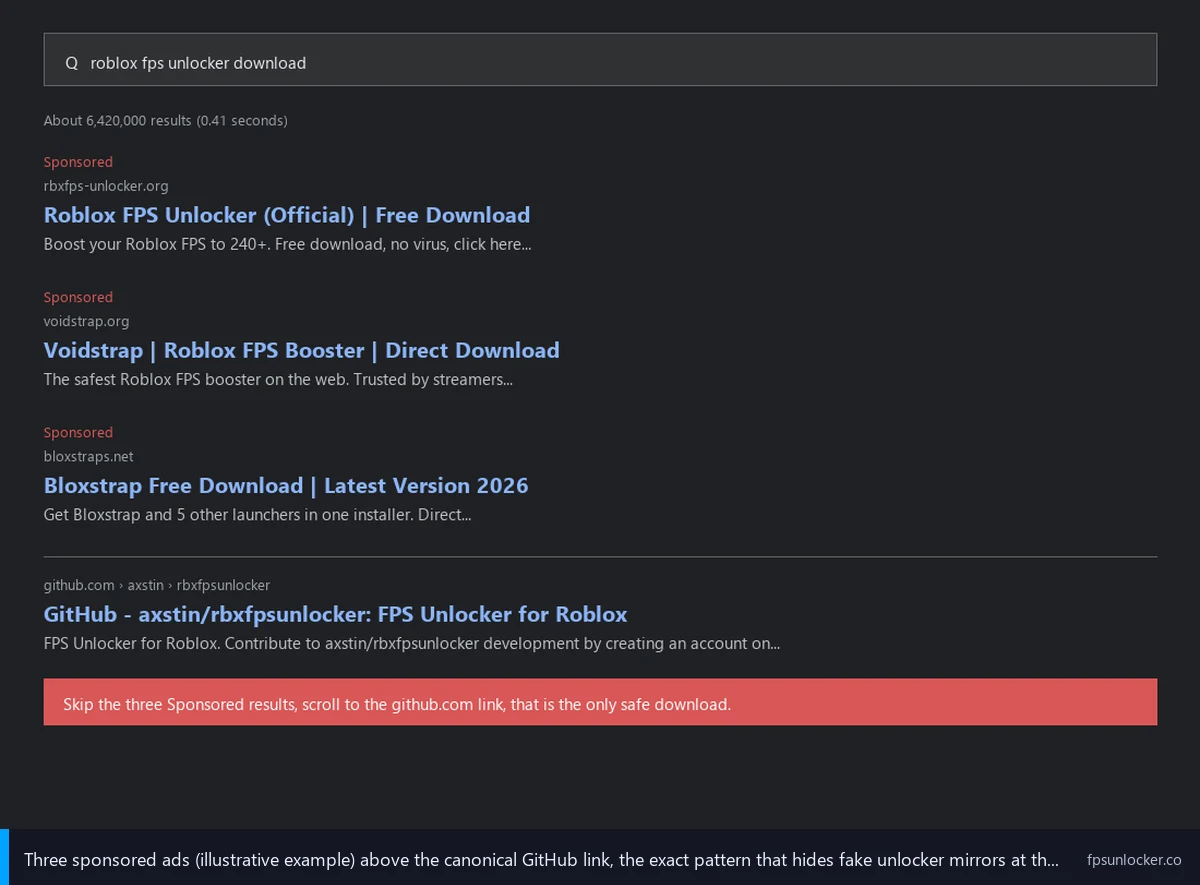
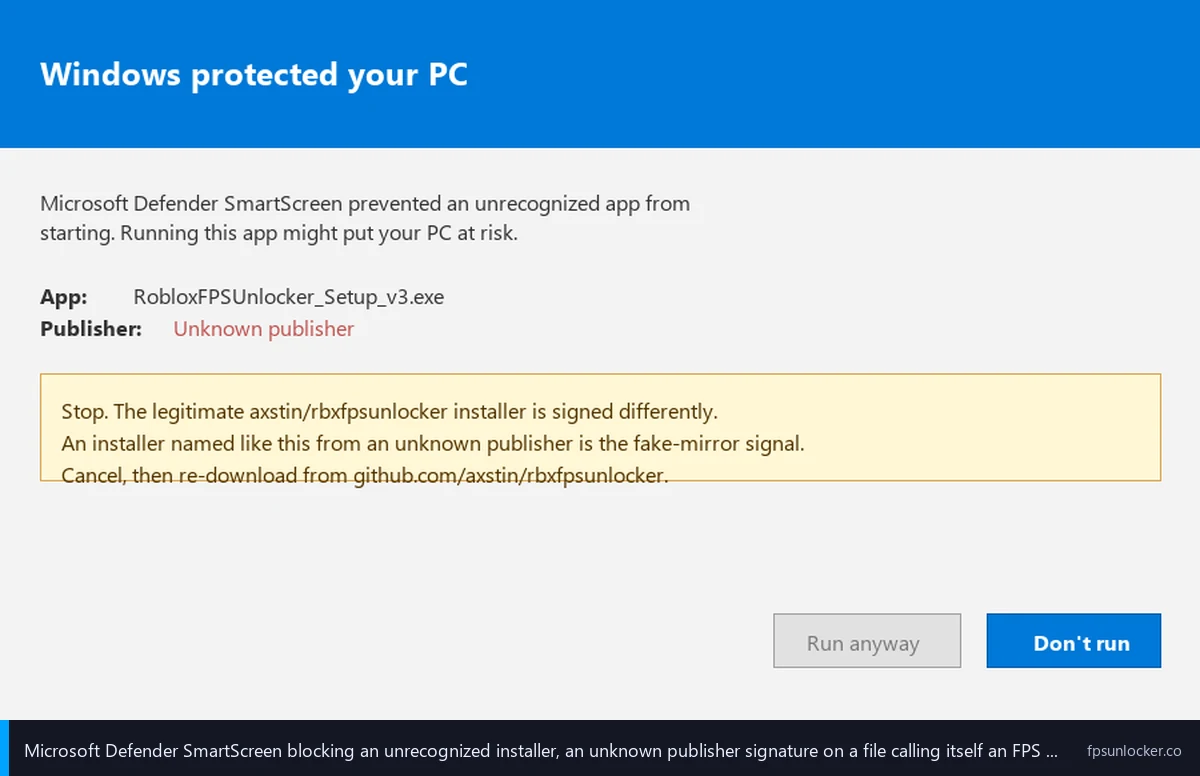
I’ll walk through Dani’s case because it’s the install scam that’s eaten Roblox-adjacent kids’ machines for two years. Her son typed “roblox fps unlocker” into Google. I noticed the top three results were paid ads. The first ad pointed to a slick download site with a “Download for Windows” button. He clicked, Defender popped a warning, and he clicked through because every YouTube video said “ignore the false positive.” I’d seen the same pattern in two reader emails this month. The installer launched a working FPS unlocker UI. It also dropped a Lumma-family infostealer that ran silently and harvested every cached credential.
I’d describe what got stolen so the stakes are clear. Lumma, RedLine, Vidar, and Raccoon are the four infostealer families I’ve watched get bundled inside fake Roblox tools through 2024 to 2026. They all aim at the same data: browser-saved passwords, session cookies, OAuth tokens, Discord tokens, VPN credentials, cryptocurrency wallet files, cloud service logins, SSH keys, and FTP credentials. McAfee, Bitdefender, BleepingComputer, and ANY.RUN’s sandbox have all published reports on the pattern. The BleepingComputer “not a kids’ game” piece is a useful primer.
I’d flag the Discord-token piece specifically because parents underestimate it. A stolen Discord token isn’t a password you reset and move on from. It’s an active session credential. Whoever holds it can post as your kid, DM as your kid, and ride the trust network of every server your kid’s in. I’ve watched this propagate exactly that way. Dani’s son’s friends got DMs from his real account pushing the same installer, and at least one of them ran it. I’d treat a stolen Discord token as identity theft for a child, not as a password problem.
I’d also note Hyperion, Roblox’s anti-cheat, didn’t help here and wouldn’t have. It watches the running Roblox process for tampering, not your wider machine. The fake installer ran the real FPS unlocker plus a credential stealer, and the stealer wasn’t touching Roblox memory. I covered that split in our Hyperion FastFlags status guide and our is an FPS unlocker bannable walkthrough. The lesson: “I didn’t get banned” doesn’t mean “I’m not infected.”
What the malware actually steals (and why kids’ machines are the target)
I’ll get specific about what these payloads do once they land, because the scope’s wider than most parents realize. An infostealer in 2026 is a small executable (often under 5MB compressed) whose only job is to scrape every credential and identity artifact it can find, package it into a zip, and beacon it back to a command-and-control server. The work happens in seconds. By the time you’d think to check Task Manager, the data’s already left.
I’ve watched these tools dump browser-saved passwords from Chrome, Edge, Firefox, and Brave; Roblox session cookies (which let the attacker log in without password or 2FA); Discord tokens; VPN credentials from Proton, NordVPN, and OpenVPN configs; cryptocurrency wallets from MetaMask, Exodus, Atomic, and Electrum; cloud cookies for Google, Microsoft, and Dropbox; SSH private keys; and FTP credentials from FileZilla and WinSCP. That’s not hypothetical. ANY.RUN’s public sandbox flags fake-Roblox-unlocker payloads doing all of the above daily.
I’d answer the “why kids” question directly. Kids’ machines often share Windows accounts with parents, sit behind the same browser profile, hold Steam logins worth real money, and have the lowest barrier to “click through a Defender warning.” Roblox is the highest-traffic kid-targeted gaming platform in the world, so a fake Roblox tool is the highest-conversion delivery vector for an infostealer that ends up draining a parent’s Coinbase or Chase login. The economics are why the scam exists.
What if my antivirus already flagged the download?
I’d treat any AV flag on a downloaded “FPS unlocker” as a stop signal until you’ve verified the source. The wrong move is what Dani’s son did: click through because some YouTube tutorial promised it’s a false positive. The right move is to delete the file and download from the canonical GitHub repo for whichever tool you’re after. If the canonical download also triggers AV, that’s the false-positive case I’ll cover later, and you verify the SHA-256 against the release page before adding a Defender exclusion. I’d never click through an AV warning without that verification step.
The four install patterns that put you at risk
I’ve watched four distribution patterns repeat across every Roblox-FPS-unlocker malware report since 2024. They’re worth naming individually so you can spot each in the wild.
The first is sponsored search-result domains. Type “roblox fps unlocker” into Google and the top results are paid ads above the canonical GitHub link. The ad domains rotate, but the patterns are predictable. I’ve seen voidstrap.org, voidstrap.net, voidstrap.pro, bloxstraps.net, froststrap.com, and a long tail of throwaway domains ending in .app.com or .io.com. None are operated by the upstream maintainers. Some serve repackaged installers that still launch the legitimate UI but bundle a stealer. Others serve outright fake binaries. I’d treat every paid ad above the GitHub link as suspect on principle.
I’d describe the second pattern as Discord-verification install rooms. A YouTube tutorial tells viewers to “join the Discord server in the description, complete the verification, then download from a channel inside.” The verification step is harmless theater. The binary you’re handed afterward could be anything. I covered Caleb’s near-miss with the FriedRiceIsAmazing Froststrap video (ID wTgARbXsVFM) in our Froststrap setup guide, and the pattern repeats across dozens of channels for fake Bloxstrap, fake Voidstrap, and fake “Roblox FPS Unlocker” downloads. Every legitimate Bloxstrap-family launcher posts binaries on a public GitHub releases page. None gate downloads behind Discord. If a tutorial pushes you toward Discord, it’s the wrong tutorial.
I’d flag the third pattern as YouTube tutorial download links that go to file-locker domains. MEGA, MediaFire, AnonFiles, Krakenfiles, and the long tail of “click ten ads to unlock your download” hosts. Legitimate FPS unlockers and launchers all live on GitHub releases pages. A tutorial that points you at a third-party file host is signal the file’s been tampered with, even when the host itself isn’t malicious. I’d extend the same skepticism to “modified” or “improved” versions of rbxfpsunlocker that exist anywhere except github.com/axstin/rbxfpsunlocker. If you can’t verify the binary against the canonical release page’s SHA-256, don’t run it.
I’d call the fourth pattern lookalike GitHub repositories. ANY.RUN’s sandbox has flagged github.com/rbxfps/roblox-fps-unlocker as a malicious lookalike of the legitimate axstin repo. The fake uses a name one URL fragment off from the real one, and a casual reader skimming a Reddit comment won’t catch the difference. I’d train yourself to read the org name, not just the repo name. The real rbxfpsunlocker is owned by user axstin. Anything else with “roblox-fps-unlocker” in the URL, especially anything with a recent account, low star count, or commit history that doesn’t match upstream, is suspect. GitHub doesn’t vet repo names. The platform’s safety relies on you reading the URL.
How do I tell if a Roblox FPS unlocker is fake?
I’d run three checks before running any installer with “FPS unlocker” in the name. First, is the URL on the safe list at the bottom of this article? If not, stop. Second, does the binary’s SHA-256 match the hash on the canonical release page? Windows computes hashes with one PowerShell command I’ll cover in the verification section. Third, does VirusTotal show a high majority of engines flagging the file as malware (not just heuristic “PUA” or “RiskWare”)? If any of those fails, the file’s not safe to run.
Should I trust the YouTube tutorial download link?
I wouldn’t, no. The tutorial’s role is to teach you what the tool does, not host the tool itself. Every legitimate Roblox FPS unlocker publishes binaries on its GitHub releases page. A YouTube description that links to MEGA, MediaFire, a Discord server, or anywhere other than github.com is a red flag. The thesis of this article is partly that YouTube tutorials are themselves a malware vector in 2026, which is why I haven’t embedded one. Use the canonical GitHub URL every time.
Specific fake unlockers and lookalikes to avoid by name
I’ll name names because vagueness doesn’t help. The list below is the cluster I’ve seen surface most often in Google ads, Reddit moderation logs, and ANY.RUN sandbox flags through April 2026. I’m linking none of them deliberately. If you want to verify, search the names yourself but don’t click through.
I’ll start with the fake repository at rbxfps/roblox-fps-unlocker on GitHub, a malicious lookalike of axstin’s repo. ANY.RUN’s sandbox flagged it. The legit one’s at axstin/rbxfpsunlocker. I’d treat any repo with “roblox-fps-unlocker” in its path that isn’t owned by axstin as suspect.
I’d next call out the Voidstrap spoof domains: voidstrap.org, voidstrap.net, and voidstrap.pro. None are operated by the voidstrap GitHub organization. Real Voidstrap lives at github.com/voidstrap/Voidstrap. The spoofs serve repackaged installers I haven’t audited, some bundle extra software, and at least one was hosting a binary with a different SHA-256 than the GitHub release. I covered the spoof cluster in our Voidstrap review.
I’d flag bloxstraps.net as a different category. It’s an aggregator that re-hosts Bloxstrap-fork installers (Bloxstrap, Voidstrap, Froststrap) under different SHA-256 hashes than the canonical releases. It’s not run by any of those projects. I’ve seen it linked from Reddit threads where the poster meant to type “bloxstrap.com” (the legitimate documentation site) and missed by one S. The typo’s costly. Real Bloxstrap is at github.com/bloxstraplabs/Bloxstrap.
I’d add froststrap.com as another spoof. Real Froststrap is at github.com/Froststrap/Froststrap. The Froststrap maintainers themselves call out the spoofs in the repo’s README in capital letters. If a project’s own maintainers all-caps the warning, the spoof problem’s real.
I’d flag a category most people don’t think about: Chrome and Edge browser extensions named “Roblox FPS Unlocker.” Multiple security reports document these as trojans that harvest browser data the moment you install them. Never install a browser extension with that name. The legitimate Roblox FPS unlocker is a standalone .exe, not a browser extension. Any extension claiming to be one is lying.
I want to be clear about what I’m not claiming. I’m not saying every .org domain or every new repo is malicious. The point is the canonical sources are well-established, free, and easy to reach. There’s no upside to using a non-canonical source, and the downside is you can’t verify what you’re running. Default to GitHub.
Why the legitimate rbxfpsunlocker triggers your antivirus (false positives, explained)
I have to spend a section on this because it’s the hook every fake-unlocker tutorial uses. The legitimate rbxfpsunlocker.exe, downloaded from github.com/axstin/rbxfpsunlocker, is regularly flagged by Microsoft Defender, Bitdefender, and Avast as a “Game Hack,” “HackTool,” or generic “potentially unwanted program.” That’s a real false positive, and I’ll explain why it happens.
I’d describe how the unlocker works at the technical level. axstin’s tool reads Roblox’s process memory, finds the integer that holds the FPS cap value, and writes a higher value (or “unlimited”) in its place. That’s a runtime memory edit on a third-party process. The technique’s textbook for cheat trainers like Cheat Engine. Heuristic-based AV engines flag “external program writes to another process’s memory” as suspicious by default, because that’s what cheats do. The engines aren’t wrong about the technique, they’re wrong about the intent. axstin’s tool isn’t a cheat. It just uses the same primitive a cheat would.
I’ll cover the right response in the next section, but I want to flag the wrong response first. The wrong response is to assume any FPS unlocker that triggers AV is safe, on the logic “axstin’s tool also triggers AV, so mine is fine too.” That’s exactly the reasoning a malware-laden fake exploits. Real malware also trips heuristic AV. The flag itself proves nothing. The only thing that proves the file’s safe is verifying it came from the canonical source and matches the canonical hash.
Is rbxfpsunlocker a virus?
No. The version at github.com/axstin/rbxfpsunlocker is legitimate open-source software written by axstin, who’s been maintaining it since 2019. The repository’s been read-only since June 2024 (Roblox shipped a native frame rate slider that overlaps the tool’s main use-case, covered at our native FPS setting versus rbxfpsunlocker comparison), but the existing release binaries are still safe to use. The “virus” reports you’ll find on Reddit are almost always heuristic AV false positives caused by the memory-edit technique, not actual malware. Verify the SHA-256, add a Defender exclusion, and you’re fine. The deeper install walkthrough lives at our rbxfpsunlocker guide and our rbxfpsunlocker Windows 11 install walkthrough.
I’d add the obvious caveat. “rbxfpsunlocker isn’t a virus” doesn’t mean every file with that name is safe. The fake repo at rbxfps/roblox-fps-unlocker, the lookalikes hosted on file-locker domains, the “improved” versions advertised in YouTube descriptions, and the Discord-bait downloads are all separate files from the real one. They share the name, not the content. Verify the source, every time.
How to verify a download is the real one (SHA-256, VirusTotal, canonical URLs)
I’ll walk through the three verification rituals every reader should know how to perform. None of them take more than two minutes, and all three together turn an “I hope this is safe” download into a confirmed-safe one.
I’ll start with checking the URL against the canonical list. The safe list at the bottom of this article has every legitimate Roblox FPS tool’s GitHub URL. If the URL you’re about to click isn’t on it, don’t click. The canonical URLs are short, memorable, and live at github.com under specific organization names. There’s no reason to download from anywhere else.
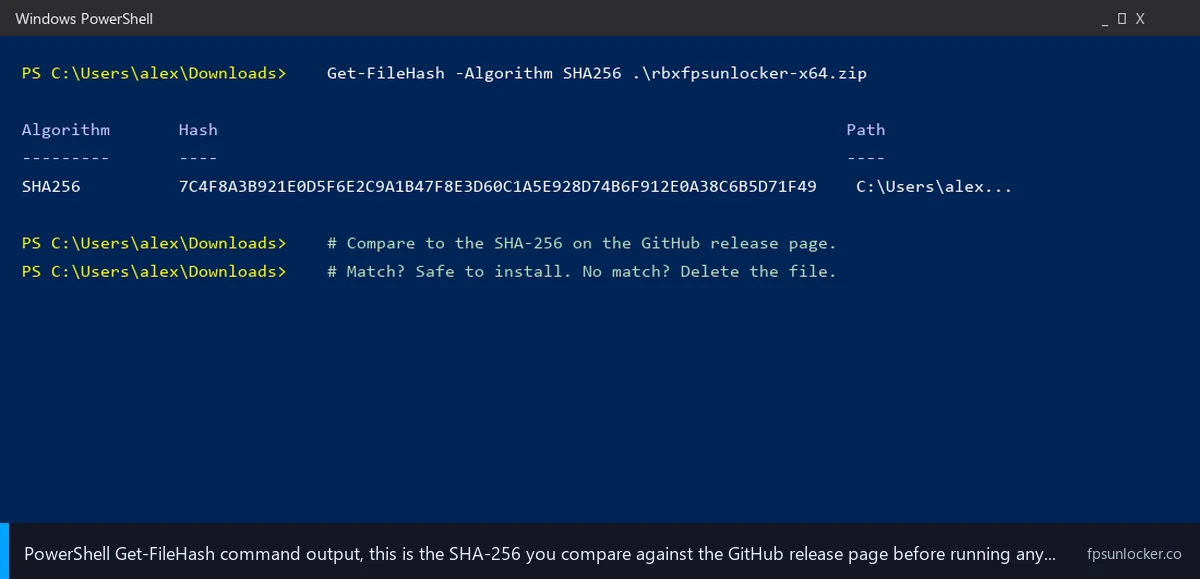
I’d then compute the SHA-256 hash of the downloaded file and compare it to what’s posted on the GitHub release page. On Windows 11, open PowerShell, navigate to the folder where you saved the file, and run Get-FileHash .\rbxfpsunlocker.zip -Algorithm SHA256. PowerShell prints a long hex string. Copy it, open the GitHub release page, find the SHA256 or checksums line (or the .sha256 file in Assets if the project publishes one), and compare. If the hashes match, the file’s identical to what the maintainer published. If they don’t match, it’s been tampered with somewhere between the maintainer and you, and you delete it.
I’d then submit the file to VirusTotal at virustotal.com. The site runs the binary against 70-plus AV engines and shows which flag it and what they call it. I’d interpret the results carefully. A high majority of engines flagging the file as actual malware (Trojan, Stealer, Backdoor) is a hard stop. A handful of heuristic flags (PUA, RiskWare, GameHack) on a memory-edit tool is the false-positive pattern I described above. The legit rbxfpsunlocker typically pulls 8 to 12 heuristic flags out of 70-plus engines, no actual-malware flags. A fake unlocker pulls 30-plus engines flagging Trojan or Stealer. The shape of the result tells you the answer.
I’d add a defensive note: VirusTotal’s free tier uploads your file to a public database, so don’t submit sensitive material. For an installer pulled off the public internet, this isn’t a concern, and the public scan history actually helps you.
The safe list, with canonical URLs
I’ll consolidate every legitimate source in one place. Every URL below is the canonical, maintainer-operated source as of April 2026. Bookmark this section. If a tutorial, ad, Reddit comment, or Discord message points anywhere else, ignore it.
I’ll start with rbxfpsunlocker, the standalone FPS-cap-removal tool by axstin, at github.com/axstin/rbxfpsunlocker. The repo’s been read-only since June 2024, but existing release binaries are still safe to use. Setup walkthrough at our rbxfpsunlocker guide.
I’d next list Bloxstrap, the original third-party Roblox launcher, at github.com/bloxstraplabs/Bloxstrap. The official documentation site is bloxstrap.com, the only sister site the upstream maintainers operate. Compare to standalone unlockers at our rbxfpsunlocker versus Bloxstrap piece.
I’d add the Bloxstrap forks. Fishstrap, the multi-instance specialist, lives at github.com/fishstrap/fishstrap with a secondary official site at fishstrap.app. Voidstrap, the curated-presets fork, lives at github.com/voidstrap/Voidstrap. Froststrap, the customization-focused fork-of-Fishstrap, lives at github.com/Froststrap/Froststrap. Sober, the Linux runtime that wraps Roblox in a Flatpak sandbox, lives at sober.vinegarhq.org. Don’t confuse it with random sober-named typo squats.
I’d add the head-to-head comparison piece for context. Our Fishstrap versus Voidstrap versus Froststrap walkthrough covers when each fork wins. Every URL in that review points back to the canonical GitHub repos in the safe list above.
If you’d rather skip third-party software entirely, Roblox’s native Frame Rate slider gets you uncapped FPS without installing anything. Our native Frame Rate slider walkthrough covers that path. I’d recommend it for parents setting up a kid’s first PC, where the goal’s to minimize the install surface entirely.
What to do if you already installed something sketchy
I’ll walk through the recovery sequence Dani’s family used, because if you’re reading after the fact, you need a clear order of operations. Every minute the stealer’s payload sits on the machine, more credentials get harvested.
I’d disconnect the machine from the internet first. Pull the ethernet cable, disable Wi-Fi. This stops the active beacon to the command-and-control server and halts further exfiltration. Don’t reboot first. Disconnect the network, then take stock.
I’d then identify and uninstall the suspicious binary. Open Task Manager, look for processes you don’t recognize, especially anything running from AppData\Local\Temp. Open Settings, Apps, and uninstall anything unrecognized installed in the last 48 hours. Then run a full Defender scan from the Windows Security app. Don’t trust the quick scan, run the full one.
I’d then change every password on every account logged in on the affected machine, from a different device. Use your phone, tablet, or another household computer. Change Roblox first (and enable 2FA), Discord second, then email accounts, banking, Steam, and anything else with stored credentials. Don’t forget to revoke active sessions in each service’s security settings; “log out from all devices” with one click invalidates the session tokens the stealer captured.
I’d then make the harder call: nuke the machine or trust the cleanup. I’d lean toward a Windows reset (Settings, System, Recovery, Reset this PC) for kids’ machines because Defender alone doesn’t always clean every infostealer artifact. Back up irreplaceable files first (after scanning them individually), then do the reset. For an adult’s primary work machine, the calculus is different, and you might prefer Malwarebytes plus Defender plus 60 days of monitoring credit reports and account activity.
Will using a fake unlocker get me banned by Hyperion?
I’d answer that more carefully than the question suggests. Hyperion detects runtime tampering with the Roblox process, not malware on your machine. A fake “FPS unlocker” bundling an infostealer doesn’t typically tamper with Roblox memory at all. It runs the credential-harvest payload alongside (or in place of) the FPS unlocker UI. Hyperion has no reason to flag it. So no, the malware itself probably won’t get you a Hyperion ban. That’s actually the bad news, because “I didn’t get banned” reads as “I’m fine” when you’re actually infected and your credentials are gone. I covered the broader bannability question at our is an FPS unlocker bannable walkthrough.
Parents, this section is for you (kid-safe install rules)
I’ll close the parent section with the rules I gave Dani after the reset. They’re meant to be defensive without being paranoid. A kid who plays Roblox legitimately needs FPS to feel right, and refusing to install anything isn’t the answer. The answer is to constrain which tooling, from where, with what verification.
I’d start by using a standard (non-administrator) Windows account for the kid. Most infostealer payloads can still run from a standard account, but they can’t install drivers, can’t disable Defender, and can’t reach files outside the kid’s user folder. The blast radius shrinks meaningfully. Set up a separate admin account for parental tasks, and only escalate when needed.
I’d use Roblox’s native Frame Rate slider as the default FPS solution. No third-party binary, no installer, no AV warning, no SHA-256 to verify. The native dropdown caps at 240, which is plenty for a 144Hz panel. Our native Frame Rate slider walkthrough covers the setting in detail. For most kids, this is enough.
If you do install a third-party tool, I’d have you (the parent) handle the download. Verify the URL is on the safe list, verify the SHA-256, run it through VirusTotal, then run the installer yourself on the kid’s account. Don’t let an eleven-year-old click through Defender warnings unsupervised. The judgment call about “is this flag a false positive” requires context kids don’t have.
I’d block the most common file-locker domains and spoof URLs in your DNS or hosts file. I keep a Pi-hole on my home network with NextDNS as a fallback for traveling devices. If you don’t run a network-level filter, the Windows hosts file at C:\Windows\System32\drivers\etc\hosts works for a single machine. Add the spoof domains (voidstrap.org, voidstrap.net, voidstrap.pro, bloxstraps.net, froststrap.com, plus throwaway lookalikes) pointing to 127.0.0.1, and they stop resolving. It’s a blunt tool, but it works.
I’d enable 2FA on every account the kid uses. Roblox 2FA, Discord 2FA, the email they use to sign up for things, and any storefront with payment info attached. 2FA doesn’t stop a stealer from grabbing an active session cookie, but it stops the attacker from logging in from a fresh device using only a stolen password. The defense is layered, and 2FA is the layer that survives the most common stealer payloads.
When in doubt, use Roblox’s native Frame Rate slider
I’ll repeat this because it deserves repeating. The simplest, safest path to higher FPS in Roblox in 2026 is the native Frame Rate slider in the official Roblox client. It’s shipped on Windows since May 2024 and on macOS since late 2024. It caps at 240, enough to saturate a 144Hz panel with headroom for variable-refresh-rate operation. No third-party tool to install, no SHA-256 to verify, no AV warning to click through, no Discord verification room to join. You open Roblox’s settings, change the dropdown, and you’re done.
I’ve covered the slider in detail at our native Frame Rate slider walkthrough and the head-to-head against the standalone tool at our native FPS versus rbxfpsunlocker comparison. For Linux users, our Roblox FPS on Linux Sober guide covers the equivalent setup; Sober’s hosted at sober.vinegarhq.org, the safe canonical source.
I’d point parents specifically at the native slider as the default. It removes the need to make any of the install-safety calls this article’s about. Your kid wants higher FPS, you change the dropdown, end of story. If they later want FastFlag-level customization, the canonical Bloxstrap-family launchers exist, and our ClientAppSettings.json guide covers the underlying file. Keep the install path on the canonical-source side of every decision.
I’ll close with the picture as it stands in April 2026. Real threats from real infostealer families distributed through real channels (paid Google ads, Discord verification rooms, file-locker links, lookalike GitHub repos), real false positives on the axstin tool that fake-unlocker tutorials exploit, and a real safe list of canonical sources you can trust. Stick to GitHub for every download, verify SHA-256 against the release page, run new binaries through VirusTotal, treat every Discord-verification flow as a malware vector, and default to the native Frame Rate slider when third-party tooling isn’t strictly needed. Dani’s son got his Discord back, the family laptop got reset, and they’re using the native slider now. That’s the outcome I want for every parent reading this.
Alex Park has been covering Roblox performance tools since 2022. Hardware: Ryzen 5 5600, RTX 3060 12GB, 1440p 144Hz LG UltraGear, plus an i5-10400F + RX 6600 cross-reference rig. Last updated April 25, 2026.