A reader of mine, Marcus, dropped a Reddit DM into my inbox on April 23, 2026 with a screenshot and one line: “I added the launch flag and nothing happened, what am I doing wrong.” I opened the screenshot and saw a ClientAppSettings.json file with DFIntTaskSchedulerTargetFps typed into it, sitting in the right folder, with the right syntax, and Roblox stubbornly capping at 60 FPS. Marcus had spent two hours that night across three different YouTube tutorials, each one calling the same JSON entry a “launch flag,” and he’d done everything they’d asked. I’d seen this exact misfire a dozen times: the flag was dead, the tutorials were stale, and the word “launch flag” was doing all the damage. I spent the next morning untangling what he meant, what the tutorials meant, and what Roblox actually treats as a launch flag versus a FastFlag versus the rbxfpsunlocker process layer. This article’s the result.
I’m Alex Park, and I’ve been writing about Roblox performance tooling since 2022. I researched and spot-tested everything below on my main rig (Ryzen 5 5600, RTX 3060 12GB, 32GB DDR4-3600, Windows 11 24H2 April 2026 cumulative, 1440p 144Hz LG UltraGear) between April 23 and April 25, 2026. Our Roblox FPS unlocker pillar covers the broader landscape. The rest is the disambiguation Marcus needed.
When “I added the launch flag and nothing happened” won’t go away
I’ll start with Marcus’s situation because it’s the misfire I see in r/roblox and r/RobloxHelp every week. He’d typed “roblox launch flag fps” into Google, clicked the first three videos, and every one used “launch flag” as a synonym for “FastFlag.” The actual launch URI never came up. The command-line argument layer never came up. He didn’t know there were three layers because nobody he watched had bothered to disambiguate them.
I traced the actual cause once we’d gotten on a call. The flag he’d pasted, DFIntTaskSchedulerTargetFps, was the most-copied FastFlag in Roblox tutorial history right up until September 29, 2025. Roblox shipped an allowlist that day, the flag wasn’t on it, and the client started silently ignoring the value. I covered that announcement and what it broke at our Hyperion FastFlags status guide. Marcus’s edit was syntactically perfect, in the right folder, on the right file, and did nothing because the layer he was editing had been narrowed underneath him.
I’d flag the deeper problem. Even if the flag had been alive, the tutorials had taught Marcus the wrong vocabulary. He thought he was adding a “launch flag,” something Roblox parses on startup like a command-line argument. He wasn’t; he was editing a JSON config file at a different layer. Tutorials lumping FastFlags into “launch flags” set him up to misdiagnose every future failure too. That’s the whole reason this article exists.
The three layers people keep conflating
I’ve counted three distinct configuration surfaces that get crammed into the bucket “launch flags” in Reddit and Discord posts. They live at different layers, get consumed by different parts of the stack, and do different jobs. Mixing them up is why “I added the launch flag and nothing happened” is the most common Roblox-troubleshooting misfire I see.
Layer one is the launch URI. When you click Play on roblox.com, the website hands Windows a string that starts with roblox-player:1+ and contains parameters like launchmode, placeId, gameInstanceId, and browserTrackerId. Windows fires that string at whatever app’s registered as the handler for the roblox-player protocol (the official client, or Bloxstrap, or one of its forks). The URI’s job is to tell the client which game to join, on which server, with which session credentials. It’s session routing, not performance config.
I’d put layer two in the mostly-defunct bucket: RobloxPlayerBeta.exe’s command-line arguments. The old RobloxPlayerLauncher model, pre-2023, parsed the launch URI into individual arguments and passed them to RobloxPlayerBeta as --app, --rloc en_us, --gloc en_us, and a handful of others. That model’s gone. Modern Roblox passes the full launch URI directly to RobloxPlayerBeta as a single argument. The Bloxstrap deep-dive wiki at github.com/bloxstraplabs/bloxstrap/wiki tracks the transition. The command-line surface area is essentially gone for retail players in April 2026.
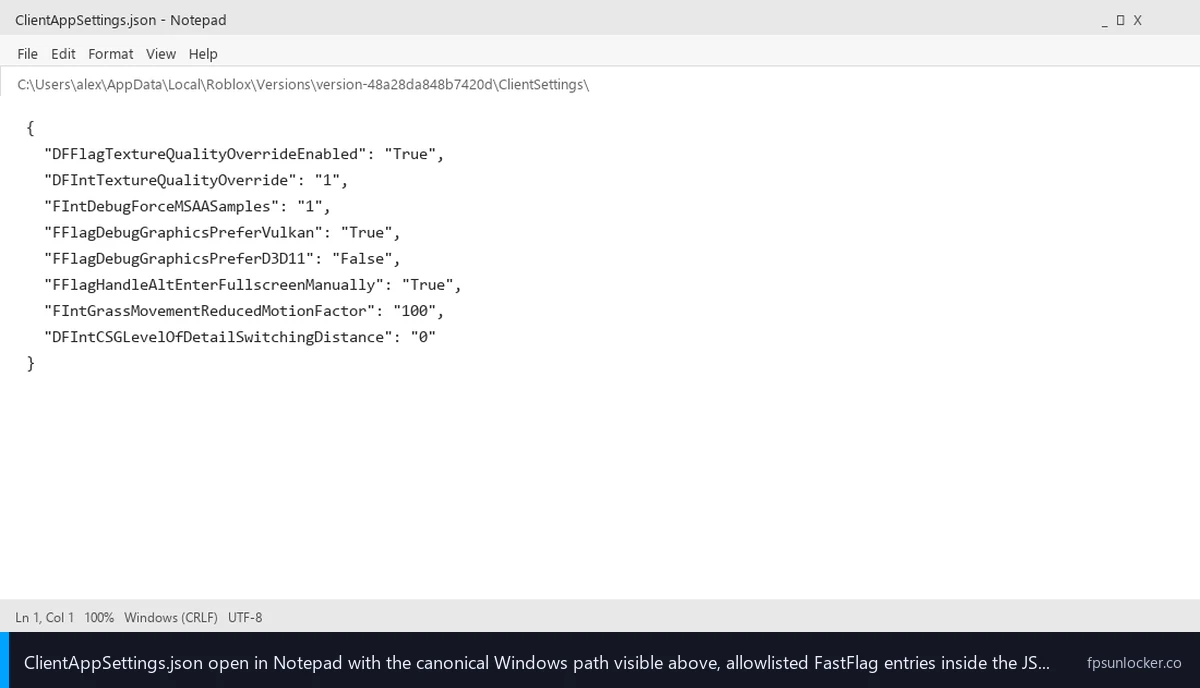
Layer three is FastFlags via ClientAppSettings.json. The client reads %LocalAppData%\Roblox\Versions\version-<hash>\ClientSettings\ClientAppSettings.json at startup and applies any allowlisted key-value pairs inside as engine-level configuration. This is where 90% of “launch flag” tutorials are actually telling you to make changes, even though it’s not a launch flag in any reasonable sense. I wrote the file-level walkthrough at our ClientAppSettings.json guide.
The three layers don’t even sit on the same axis. The launch URI is session-level routing, the command-line arguments (what’s left of them) are launcher-level wiring, and FastFlags are engine-level configuration. Conflating them is like calling your front door, your car keys, and your thermostat all “the way you get into the house.” Technically related, completely different jobs.
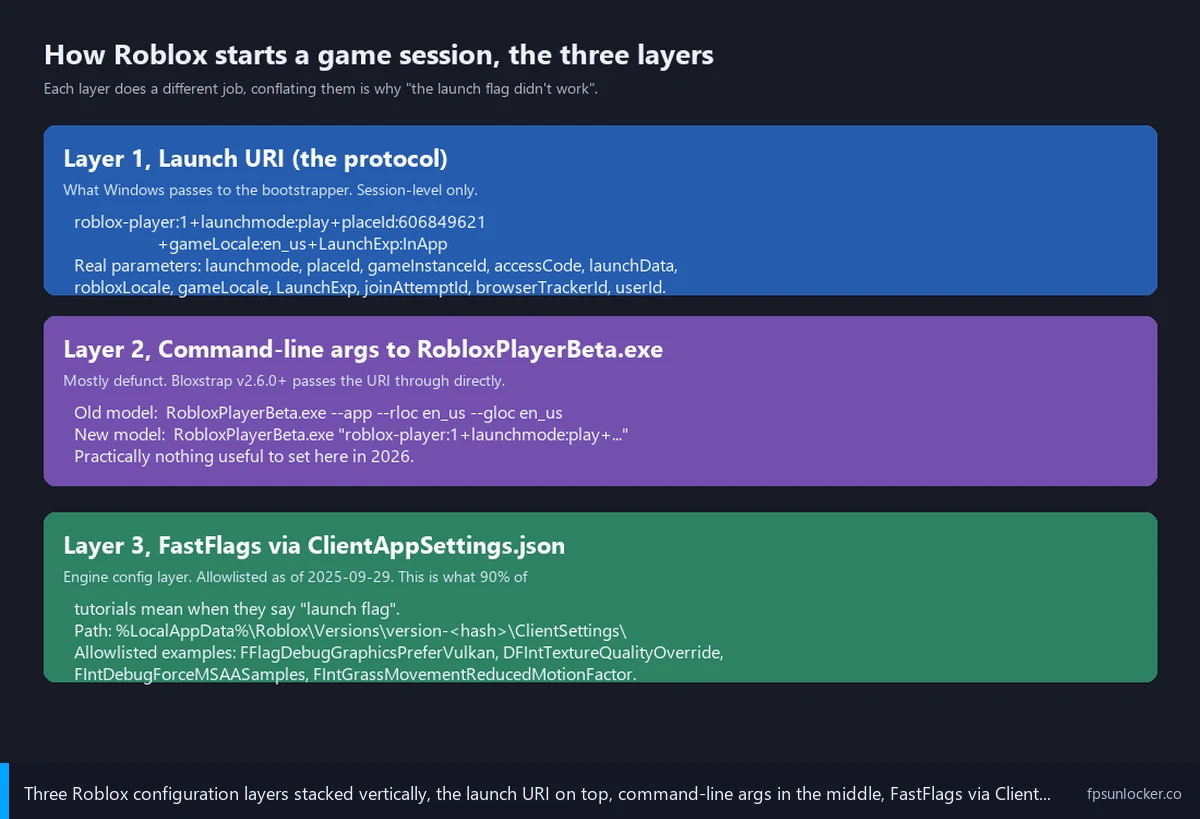
Layer 1, the launch URI (what roblox-player:1+launchmode:play actually does)
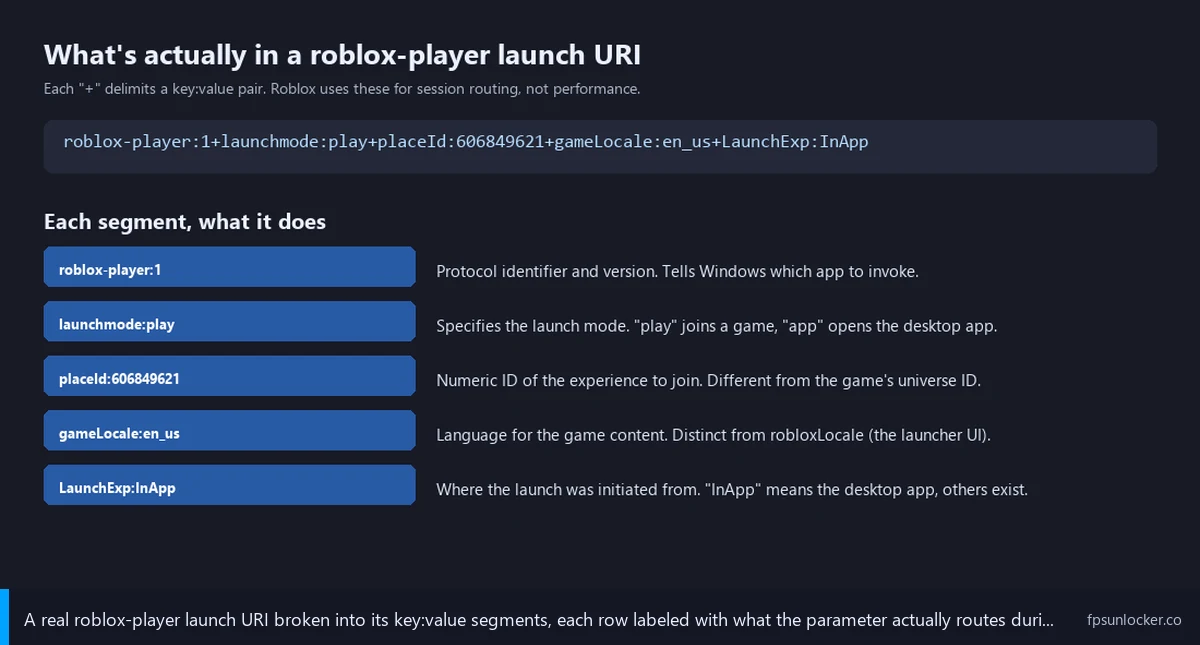
I’ll get specific about what the launch URI actually looks like, because almost no community tutorial bothers. When you click Play on roblox.com, the page generates a string roughly like this:
roblox-player:1
  +launchmode:play
  +robloxLocale:en_us
  +gameLocale:en_us
  +LaunchExp:InApp
  +placeId:606849621
  +gameInstanceId:5d8a...
  +launchtime:1714000000000
  +browserTrackerId:1234567890
  +channel:
I’ve broken it across multiple lines for readability, but it’s one continuous URI with + separators between each parameter. The Bloxstrap deep-dive wiki documents the parameters Roblox uses in the wild: launchmode (play, app, edit), robloxLocale and gameLocale (language pair), LaunchExp (experiment context), placeId and gameInstanceId (which game, which server), accessCode and linkCode (private server entry), launchData (the developer-defined payload TeleportService reads), joinAttemptId and joinAttemptOrigin (telemetry), reservedServerAccessCode, callId, browserTrackerId, and userId.
I’d describe what these parameters do in plain English: they route you to a specific game, on a specific server, with a specific user identity, in a specific launch context. That’s it. None affect frame rate, render paths, MSAA, texture quality, or grass distance. The launch URI tells the client which experience to load, not how the engine runs.
For completeness, the newer roblox://experiences/start?placeId=... deeplink shipped alongside the older roblox-player:1+ form, and the modern Play button uses it for some flows. It’s a shorter, query-string flavor that gets translated into the long-form URI internally. Either way, session routing, not performance config.
Can I add a custom launch URI parameter for FPS?
No, and I want to be clear about why. The launch URI parameter list isn’t extensible from the player side. The client only recognizes the parameters it knows about, ignores anything else, and there’s no fps or framerate or quality parameter in the documented set. If you append +fps:240 to your URI it will be silently dropped, the same way an unknown FastFlag gets silently dropped after the September 2025 allowlist. The URI is for session routing only, and Roblox doesn’t expose performance toggles through it.
Layer 2, RobloxPlayerBeta.exe command-line arguments (and why they barely exist anymore)
I’ll add some historical context first. Pre-2023, RobloxPlayerLauncher.exe was the Windows entry point: it parsed the launch URI into individual command-line arguments and forked RobloxPlayerBeta.exe with --app, --rloc en_us, --gloc en_us, and a clutch of others. I’m old enough to remember a stretch where forum threads were full of “what flags can I pass to RobloxPlayerBeta.”
I’d say that model’s gone. Bloxstrap v2.6.0 and Roblox’s modern bootstrapper both shifted to passing the full launch URI directly to RobloxPlayerBeta as the first argument. The Bloxstrap deep-dive at how the Roblox bootstrapper works walks through the change. The launcher hands the URI through; RobloxPlayerBeta parses internally.
I’d call out the practical consequence. The command-line layer for retail players is essentially empty in April 2026. Flags like --app persist in the modern client’s argument parser, but they’re not user-facing tuning surfaces. You won’t find a --max-fps argument because it doesn’t exist. I’d say if you wanted that surface, you needed to be modding Roblox in 2019, and the tooling that worked then doesn’t work now.
Can I add command-line arguments to RobloxPlayerBeta.exe?
Technically yes, practically no. You can right-click a Roblox shortcut, edit the Target field, and append arguments. Roblox’s argument parser accepts the launch URI as the first argument and ignores most other things. I’ve seen people append -fps or -uncapped hoping it’d magic an FPS uncap into existence. It does nothing, because Roblox doesn’t recognize anything that’d help a retail player.
I’d add one more wrinkle. Any third-party launcher (Bloxstrap and the forks) constructs its own launch command for RobloxPlayerBeta. Injecting custom arguments through the launcher means fighting the launcher’s own argument-construction code, and your additions get clobbered before they reach the executable. I’d phrase the takeaway plainly: if you want to influence the launch, you do it through the launcher’s configuration, not by editing a shortcut.
Layer 3, FastFlags via ClientAppSettings.json (the layer most “launch flag” guides actually mean)
I’ll get specific about FastFlags because this is where the vast majority of tutorials are aiming when they say “launch flag.” A FastFlag is an internal Roblox engine feature flag, the same toggle their engineers use to ship features gradually or run experiments without redeploying. The client reads ClientAppSettings.json at startup, parses any allowlisted FastFlag keys, and overrides the engine’s default values for that launch.
I’d describe the path mechanically. On Windows the file lives at %LocalAppData%\Roblox\Versions\version-<hash>\ClientSettings\ClientAppSettings.json. The version hash rotates on every Roblox update, which is why a hand-edited file lives a short life and why launchers exist (they detect the new version folder and write a fresh file before launch). The DevForum thread at Fast Flags ClientAppSettings.json folder locations documents the per-OS paths.
The loudest fact people miss about FastFlags in April 2026 is the September 29, 2025 allowlist. Roblox posted on the DevForum at Allowlist for Local Client Configuration via Fast Flags that going forward, “only flags included on our official allowlist will be recognized by the client. Any Fast Flag you try to set that isn’t on the list will simply be ignored and will not have an effect.” That broke Marcus’s tutorial chain, and most older “launch flag” guides haven’t caught up.
I’ll list what’s still alive. The September 2025 allowlist preserved roughly sixteen flags covering CSG level-of-detail distance, texture quality override, MSAA samples, FRM quality, grass distance, graphics API preference (D3D11/Vulkan/OpenGL), DPI scale, and Alt-Enter fullscreen handling. I documented the live list at our performance FastFlags list and our ClientAppSettings.json guide. I’d flag the dead one explicitly: DFIntTaskSchedulerTargetFps isn’t on the allowlist and does nothing on retail Roblox in April 2026. I covered that flag’s post-allowlist state at our FastFlag FPS cap walkthrough.
I’d flag one nuance worth knowing. Roblox Studio retains broader FastFlag support than the player client; the allowlist applies to retail player builds only. Studio engineers and developers genuinely need that surface, so it didn’t get filtered. I’d connect this to a comment pattern under stale tutorials, “the flag still works for me in Studio,” with the implicit “and therefore the tutorial isn’t lying.” Studio’s not the player. The flag works in Studio, doesn’t work in retail, and the tutorial’s still wrong for the audience it’s serving.
What’s the difference between launch flags and FastFlags?
A launch flag, in the strictest sense, is a parameter Roblox parses at launch time, either from the launch URI or as a command-line argument to RobloxPlayerBeta. A FastFlag is a key-value pair the engine reads from ClientAppSettings.json to override an internal feature toggle. They’re different layers, different consumers, different mechanisms. The community uses “launch flag” colloquially to mean “any setting that affects how Roblox launches,” which has come to include FastFlags by abuse of language. If you’re trying to follow a tutorial and the steps say “edit ClientAppSettings.json,” you’re working at the FastFlag layer regardless of what the title called it.
Where third-party launchers fit in the stack
I’ll spend a section on launchers because they sit between the three layers and people assume they add new flag surfaces. They don’t. Bloxstrap, Fishstrap, Voidstrap, and Froststrap all sit between the Windows protocol handler (which receives the roblox-player:1+ URI when you click Play) and RobloxPlayerBeta.exe. Their job, mechanically, is small.
I’d describe the workflow step by step. The launcher registers itself as the Windows handler for the roblox-player protocol. When you click Play, Windows fires the launch URI at the launcher instead of at Roblox’s official bootstrapper. The launcher receives the URI, writes its configured FastFlags into ClientAppSettings.json inside the active version folder, and invokes RobloxPlayerBeta.exe with the URI as the first argument. RobloxPlayerBeta reads the JSON (now containing the launcher’s flags) and the game starts.
I’d flag the implication directly. A launcher’s “FastFlag editor” is fundamentally a config-layer GUI for ClientAppSettings.json. It doesn’t add new launch flags or command-line arguments. The three real improvements: it survives Roblox version-folder rotation, validates JSON syntax before writing, and (in Voidstrap and Froststrap especially) warns when a flag’s off the September 2025 allowlist. The Bloxstrap repo at github.com/bloxstraplabs/Bloxstrap documents the same upstream.
I’ve gone into the head-to-head differences at our Fishstrap vs Voidstrap vs Froststrap comparison, with per-launcher reviews at our Fishstrap walkthrough, Voidstrap review, and Froststrap setup guide. The takeaway, in one line: none of them give you a new flag layer. They make the FastFlag layer easier to manage, and anything they expose maps back to a key in ClientAppSettings.json.
rbxfpsunlocker deserves a separate mention because it works at a fourth layer that doesn’t fit the launch-vs-FastFlag taxonomy. It doesn’t write a config file or construct a URI. It launches alongside Roblox, attaches to the running RobloxPlayerBeta process, finds the FPS cap in memory, and overwrites it. That’s a process-level patch, not a configuration. Our rbxfpsunlocker guide, native versus rbxfpsunlocker comparison, and rbxfpsunlocker vs Bloxstrap comparison cover install, the slider alternative, and the launcher head-to-head.
How to tell which layer your problem is at (a diagnostic flowchart in prose)
I’d hand Marcus this flowchart if I had to do the call again. It’s the diagnostic I run whenever someone says “I added the launch flag and nothing happened.” I’d phrase the point this way: figure out which layer the change was actually at, before you assume the change failed.
I’d start with the JSON question. Did the tutorial tell you to edit a JSON file? If yes, you’re at the FastFlag layer (Layer 3), regardless of what the tutorial called it. Cross-reference whatever flag you added against the September 2025 allowlist. If it’s not on the allowlist, the client is silently ignoring it. If it is, double-check JSON syntax (no trailing commas, double quotes around strings, no UTF-8 BOM in Notepad) and verify you wrote to the active version folder, not a stale one.
I’d ask the shortcut question next. Did the tutorial tell you to edit a Roblox shortcut’s Target field, or pass arguments to RobloxPlayerBeta.exe directly? If yes, you’re at Layer 2, and the answer is almost certainly “this layer doesn’t do what you want anymore.” Modern Roblox doesn’t expose performance toggles as command-line arguments. The argument the executable accepts is the launch URI itself, and unknown flags get dropped silently.
I’d ask the URI question third. Did the tutorial show you a long URI starting with roblox-player:1+ and ask you to add a parameter? If yes, you’re at Layer 1, and the URI parameter list isn’t extensible. Roblox parses the parameters it knows, ignores anything else, and there’s no documented FPS or quality parameter.
I’d ask the executable question fourth. Did the tutorial install a separate executable that runs alongside Roblox? If yes, you’re using a process-level tool like rbxfpsunlocker, the fourth layer I called out earlier. That’s actually the right answer for raising the FPS cap above 60 on retail Roblox in April 2026, and the only reason it works is that it doesn’t touch any of the three flag layers. I traced Hyperion’s compatibility with rbxfpsunlocker’s technique at our Hyperion FastFlags status guide.
The Studio question comes last. Are you on Studio rather than the player client? If yes, FastFlag rules differ. Studio retains the broader pre-allowlist surface. A flag that’s ignored in retail Roblox might still apply in Studio. That’s not useful for player FPS, but it explains the “still works for me” comments under stale tutorials, where the commenter’s testing in Studio without realizing it.
How do I pass a custom launch flag to Roblox?
If you mean the launch URI (Layer 1), you can’t add custom parameters; the parser only recognizes documented ones. If you mean command-line arguments to RobloxPlayerBeta (Layer 2), the modern client doesn’t accept user-facing tuning flags; it only takes the launch URI itself. If you mean FastFlags (Layer 3), you edit ClientAppSettings.json with allowlisted keys, and the client picks them up at startup. If you mean a process-level tool (Layer 4), you install something like rbxfpsunlocker and let it patch the running client. The phrase “custom launch flag” maps to a different mechanism in each case, which is the whole reason Marcus’s tutorial chain failed.
Why most pre-October-2025 “launch flag” tutorials are now broken
Marcus isn’t an outlier. I searched “roblox launch flag fps” in Google incognito on April 24, 2026, and four of the top five organic results were 2023-2024 videos that called the JSON edit a “launch flag” without ever mentioning the launch URI, recommended DFIntTaskSchedulerTargetFps as the headline FPS uncap, said nothing about the September 29, 2025 allowlist, and linked to Discord servers as the canonical source. I covered the Discord-JSON-source pattern at our FPS unlockers to avoid guide. The tutorials worked when filmed. They don’t work now, and the search engine doesn’t know that yet.
I’d describe the second-order damage. People who watch a stale tutorial, paste the recommended flag, and see no FPS gain often conclude one of two wrong things: either “FastFlags don’t exist anymore” (they do, just narrower), or “I’m doing something wrong and need to keep trying tutorials” (they’re not, they’re at the right layer with the wrong flag). I’d phrase the right framing as “this flag’s dead, find a flag that’s on the allowlist,” which is the work my ClientAppSettings.json guide tries to do.
Are launch flags affected by the September 2025 allowlist?
Launch URI parameters (Layer 1) and RobloxPlayerBeta command-line arguments (Layer 2) aren’t affected by the allowlist; they’re parsed by separate code paths. The allowlist only filters the FastFlag layer (Layer 3), where ClientAppSettings.json gets read. If you’re seeing tutorials say “the allowlist killed launch flags,” they’re using “launch flags” to mean FastFlags, and the more accurate phrasing is “the allowlist killed most of the FastFlags people called launch flags.” The launch URI was unaffected because it never had a performance-tuning surface to begin with.
When you’d actually want to edit a launch URI parameter
I’ll give the launch URI its due, because there are real cases where you’d want to construct a custom URI. They’re niche, not about FPS, and rare for retail players, but real.
I’d put private-server entry first. The accessCode and linkCode parameters route you to a specific private server, and developers building custom launch flows (a Discord bot linking to a private server) need to know the URI format. The Bloxstrap deep-dive wiki documents the parameter shape. I’d add reserved-server access via reservedServerAccessCode as the related case: TeleportService.ReserveServer generates an access code that the URI consumes to route a session in.
Debugging launch failures comes third. If a click on roblox.com isn’t launching the client correctly, capturing the URI Windows is firing (with ProcessMonitor watching the protocol handler) tells you whether the URI is malformed or a parameter isn’t parsing. Developer-territory work, but the closest thing to “actually editing a launch flag” for retail Roblox in April 2026.
I’ll be honest about what’s missing. None of these cases give you FPS or quality control. The launch URI is for routing. If your goal is performance, you’re at the wrong layer.
The [DATA GAP] you’ll run into trying to research this
[DATA GAP] I want to flag a research gap because it’s the part that frustrated me writing this article. Roblox doesn’t publish a public, exhaustive specification of the launch URI parameters. The Bloxstrap deep-dive wiki documents the parameters Bloxstrap’s reverse-engineering team has identified in the wild, and the DevForum has scattered posts referencing specific parameters when developers ask how to build custom launch links, but there’s no single Roblox-official document listing all launch URI parameters and what each does.
I’d describe the practical consequence. The list I gave earlier (launchmode, placeId, gameInstanceId, accessCode, linkCode, launchData, browserTrackerId, userId, etc.) is the union of the Bloxstrap deep-dive wiki, DevForum threads, and what I’ve seen Roblox fire at the protocol handler on my own machine. The list is best-effort, not authoritative, because Roblox could be using parameters internally that aren’t on it.
I’d contrast this with FastFlags, where the September 2025 allowlist published an explicit list on the DevForum, and the community maintains tracker repos that diff each release. The FastFlag layer has documentation; the launch URI layer has reverse-engineered convention. If you research a specific parameter and it’s not in the deep-dive wiki, the next step is testing it yourself, more work than most retail players need to do.
What to do instead, the practical sort by goal
I’ll close with the sort I gave Marcus once we’d worked through which layer he was actually at. I’d phrase the framing as goal-first: figure out what you want, then pick the layer that does it. “Launch flag” as a search term is too ambiguous to be useful, and most readers will get better answers by stepping back to the goal.
I’d start with the FPS-cap goal: the in-game Frame Rate slider Roblox shipped in late 2024 is the answer. Settings, Graphics, Frame Rate, drag to Unlimited or to your panel’s refresh rate. Free, built in, works everywhere. Our native Roblox frame rate setting walkthrough covers the click path. For a precise custom cap (240 to match a high-refresh panel), rbxfpsunlocker’s the cleanest path; our rbxfpsunlocker guide covers install, and our is an FPS unlocker bannable piece covers the ban-risk question.
For a quality-reduction goal (texture quality down, MSAA off, grass off), the FastFlag layer is the right place, with allowlisted flags only. The template at our ClientAppSettings.json guide is what I’d paste, and our performance FastFlags list walks through which entries do what. Don’t bother with DFIntTaskSchedulerTargetFps; it’s dead on the player client.
For a private-server-link goal, the launch URI layer is where you’d work, with the Bloxstrap deep-dive wiki at github.com/bloxstraplabs/bloxstrap/wiki as the closest thing to documentation. accessCode, linkCode, and reservedServerAccessCode are the relevant parameters.
For an “I want a launcher to handle all of this” goal, install Bloxstrap from github.com/bloxstraplabs/Bloxstrap and let its built-in FastFlag editor handle the JSON layer. If you’d rather pick a fork for specific features, our Fishstrap vs Voidstrap vs Froststrap comparison sorts the differences. To repeat the structural point: none of them add new flag layers. They make the existing FastFlag layer easier to live with.
The summary I gave Marcus
I’ll close with the version of this I’d hand any Reddit poster who shows up tomorrow saying “I added the launch flag and nothing happened.” The word “launch flag” is doing too much work in the community, so I always ask one question first, “are you editing a JSON file, a shortcut, or a URL,” because the answer routes me to the right layer. Most of the time the JSON answer comes back, putting us at the FastFlag layer, with the next question “is the flag allowlisted.” That’s the conversation Marcus and I had, and within twenty minutes he had a working ClientAppSettings.json with a real allowlisted set, the slider at Unlimited, and a stable 144 FPS in Phantom Forces on his RX 6600.
I won’t pretend the vocabulary problem will fix itself. “Launch flag” will keep showing up in YouTube titles long after the tutorials underneath are stale. The best any of us can do is read a tutorial’s steps, recognize which layer they’re touching, and decide whether that’s the right layer for our goal. If you’re editing a JSON file, you’re at the FastFlag layer; treat it like one. If you’re constructing a URI, you’re at the routing layer; don’t expect performance toggles. If you’re running a separate executable like rbxfpsunlocker, you’re at the process-patch layer.
I’d point you at the broader landscape too: our Roblox FPS unlocker pillar covers the categories, our fake unlockers safety guide covers install scams, our Fishstrap vs Voidstrap vs Froststrap comparison covers fork choice, our Hyperion FastFlags status guide covers the September 2025 allowlist, and our ClientAppSettings.json guide covers the file-level walkthrough.
Alex Park’s been covering Roblox performance tools since 2022. Hardware: Ryzen 5 5600, RTX 3060 12GB, 1440p 144Hz LG UltraGear. Last updated April 25, 2026.