It’s 11 p.m. on a Tuesday, you’ve just dropped into a Da Hood lobby on your new 165 Hz panel, and the frame counter is frozen solid at 60. Your GPU fans aren’t even spinning up. Something is clearly wrong, because the game isn’t hard to render and your hardware isn’t the bottleneck.
I’ve watched three of my friends hit this exact wall in 2026, and every single time the fix conversation starts the same way. “Just grab rbxfpsunlocker.” That phrase has been the default answer inside the Roblox PC community for roughly seven years now, and it’s still the first suggestion when somebody posts an FPS screenshot on r/roblox. But the game has changed a lot since axstin wrote the original tool, and Roblox itself now ships a native Max Frame Rate slider inside the in-game menu. So the real question isn’t “how do I install rbxfpsunlocker,” it’s whether you actually need it anymore. I’ve been running both the native setting and axstin’s utility side by side on my Ryzen 5 5600 / RTX 3060 build for months, and the answer is more interesting than a yes or no.
The 60 FPS ceiling and why it even exists
Before getting into the tool, it’s worth understanding what you’re actually fighting against. Roblox’s client has historically hard-capped the render loop at 60 frames per second. That wasn’t a mistake or a bug, it was a deliberate design choice from a studio whose audience includes a massive population of low-spec laptops, Chromebooks, and older desktops. Capping the frame rate kept thermals sane on cheap hardware and made the simulation behave predictably across every platform Roblox shipped on.
The cap lives inside a piece of code called the task scheduler. That scheduler decides how often the client wakes up to run a frame, and it reads a target frame rate value from memory to figure out how long to sleep between frames. On a stock client, that value gets set to 60. You can have a 360 Hz OLED and an RTX 4090, and it doesn’t matter, because the engine is literally telling itself to take a nap for about 16 milliseconds between each frame.
What rbxfpsunlocker actually does under the hood
Here’s the part that most tutorials skip. I think it matters because it explains every weird behavior the tool has, including why antivirus software sometimes yells at it.
rbxfpsunlocker is a small Windows executable written in C++. When you launch it, it sits quietly in your system tray and watches for a Roblox process to appear. The moment one shows up, it does two things in sequence. First it scans the memory of the Roblox process, looking for a recognizable fingerprint (a “signature” in reverse-engineering terms) that identifies the task scheduler function. Roblox updates its client every week or so, and that function moves around in the binary, so the signature has to be maintained by axstin every time Roblox ships a meaningful patch. Second, once the scheduler is located, the tool reaches into Roblox’s memory and overwrites the target frame rate value with whatever cap you’ve selected (240, 360, unlimited, or your monitor’s refresh rate).
That’s it. No injected DLL, no hook into the rendering pipeline, no modified game files. It’s literally one small write into another process’s memory. I’ve seen people describe rbxfpsunlocker as a “mod” and that’s misleading. It’s closer to a debugger tweaking one variable, then walking away.
The why behind this design is important. By only writing to live memory and never touching game files on disk, the tool leaves no persistent footprint. Close rbxfpsunlocker and relaunch Roblox and you’re back to 60 FPS instantly. That’s also the reason Byfron/Hyperion (Roblox’s anti-cheat) has historically left it alone. Anti-cheats care about modifications that affect gameplay logic, wall hacks, or network traffic. A write to the render-loop timer doesn’t fall into any of those buckets.
Who axstin is and why the project still exists
The tool has one maintainer, a developer who goes by axstin on GitHub. The repository lives at github.com/axstin/rbxfpsunlocker, it’s MIT licensed, and the full source is public. I’ve poked through the code a few times out of curiosity. It’s genuinely small (a handful of C++ files, a tray icon resource, and the signature definitions), which is part of why it’s been so easy to audit and trust across the community.
The repository was marked read-only on GitHub in mid-2024, which caused a small panic in the community. I remember the Reddit thread. People assumed the project was dead. That’s not quite what happened. Releases have continued to ship, with v5.2 landing in November 2025 (notable because it removed memory-write support for Hyperion-protected web and Microsoft Store clients and added flag-file based unlocking for the Windows Store app). The “archived” badge just reflects that axstin isn’t accepting outside pull requests or issues anymore, not that the binary stopped getting rebuilt when Roblox pushed breaking changes. If you want the latest release, grab it straight from the releases page on GitHub.
Is it still relevant in 2026?
This is where the answer gets layered. In late 2024, Roblox rolled out a native Max Frame Rate slider inside the in-game settings menu (the setting writes to a user config file called GlobalBasicSettings_13.xml on Windows). On paper, that killed the main reason to install a third-party tool. I remember thinking axstin’s work had finally been retired by Roblox itself. That turned out to be half right.
The native setting works for most casual players. You open settings, drag the slider up to 240, and you’re done. If that’s what you want, you probably don’t need rbxfpsunlocker at all, and I’d recommend the native path first. I’ve covered the cases where the native slider mysteriously doesn’t take effect (corrupted XML, conflicting launchers, Hyperion mismatches) in depth over at our still-capped-at-60 fix guide, which is worth reading if your frames stay pinned at 60 after you’ve set the slider to something higher.
Where rbxfpsunlocker still beats the native slider
There are three concrete scenarios where I still reach for axstin’s tool in 2026, and they’re not edge cases.
- Syncing the cap to your actual monitor refresh. The native slider gives you preset values (30, 60, 75, 120, 144, 165, 240, 360). rbxfpsunlocker has an “Exclusive Fullscreen” toggle and a cleaner relationship with VRR/G-Sync panels because you can pin the cap one frame below refresh. On my 144 Hz panel I run it at 141, which keeps the pipeline inside the VRR window. The native slider jumping to 144 exactly plays less well with G-Sync in my experience.
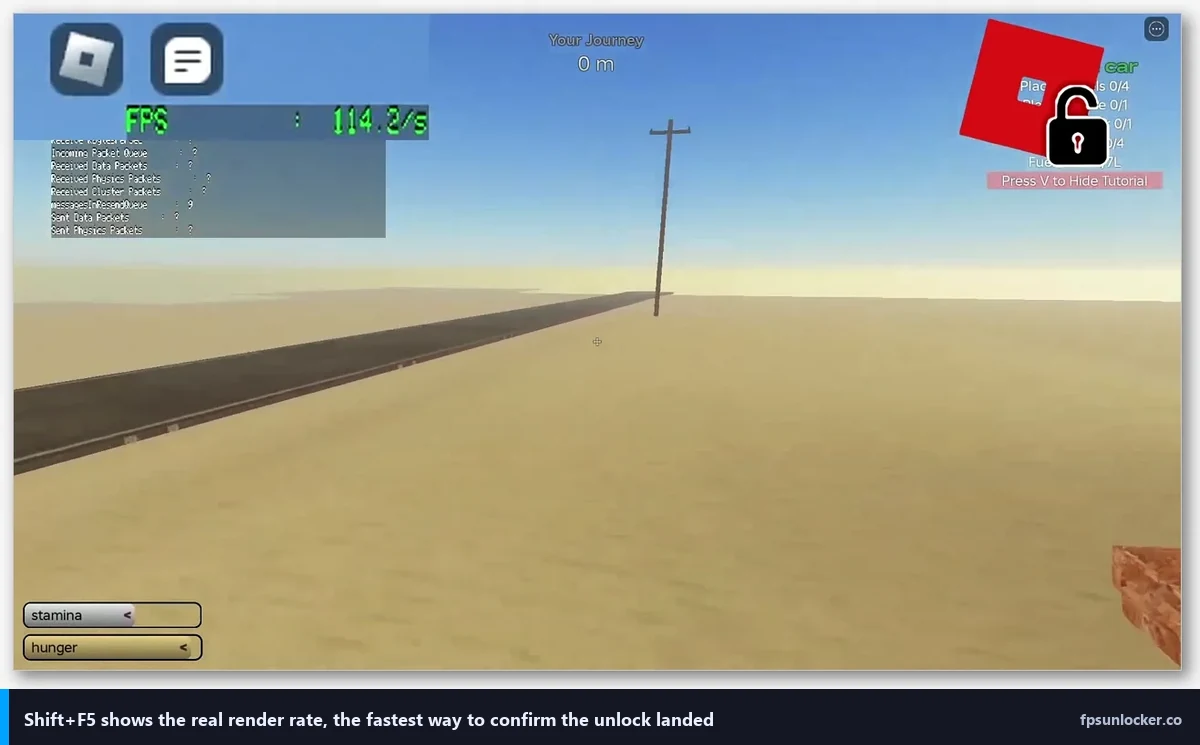
- The FPS overlay. rbxfpsunlocker shows a small counter that reads the actual frame rate the client is hitting. Shift+F5 inside Roblox technically does the same thing, but the unlocker’s readout feels more stable and survives window focus changes.
- Multiple Roblox processes. If you’re a developer flipping between Studio and the live client, or you multi-box two accounts, rbxfpsunlocker will unlock every Roblox process it sees simultaneously. The native setting is per-install, and managing that across two running clients gets annoying fast.
Installing it in 2026, step by step
I’ll keep this part short because the process hasn’t changed much in years. Head to the releases page and download rbxfpsunlocker-x64.zip for any modern 64-bit Windows 10 or 11 machine. Extract the zip somewhere permanent. I keep mine in C:\Tools\rbxfpsunlocker\ because the Downloads folder gets nuked during my monthly cleanups and I’ve lost the executable twice that way. Don’t make my mistake.
Double-click rbxfpsunlocker.exe. The first time you do this, Windows SmartScreen will throw up a blue “Windows protected your PC” dialog because the binary isn’t digitally signed. That’s expected. Code signing certificates cost money every year, and axstin ships this as a free community tool, so there’s no signature. Click More info, then Run anyway. If your organization’s admin policy blocks unsigned executables, you’ll need the native setting instead.
Once it’s running, look at your system tray (the little arrow next to the clock). You’ll see the rbxfpsunlocker icon. Right-click it. That’s where all the real controls live.
Walking through the tray menu
The menu is intentionally minimal. You’ll see an FPS Cap submenu with a column of preset values from 30 all the way to unlimited. I’d push back on “unlimited” as a default. Uncapped Roblox on a 4090 can push 900+ FPS in a lightweight place, which does nothing for you visually and generates a lot of coil whine and heat. Pin it to your refresh rate or one frame below. You’ll thank me in July when your room is twelve degrees cooler.
The VSync option lets the tool hand frame timing back to the GPU driver. I don’t use it because I have G-Sync handling that job, but on a fixed-refresh 60 Hz panel without VRR it’s a reasonable pick. The Toggle Fullscreen entry is useful because Roblox’s own fullscreen sometimes goes into a borderless mode that interacts badly with exclusive fullscreen compositor flags.
Critical note: launch rbxfpsunlocker before you launch Roblox, not after. The tool needs to be running when the Roblox process spawns so its memory scan catches the scheduler early. Launching it after Roblox has been running for a while usually still works, but occasionally the signature scan misses and you’ll see the dreaded “unable to find task scheduler” message. Which brings me to the next section.
Why does rbxfpsunlocker say “unable to find task scheduler”?
This error has one boring cause in 90% of cases: Roblox just shipped an update and axstin hasn’t pushed a new signature yet. Roblox’s client gets rebuilt constantly, and the task scheduler function drifts to a new memory location with each build. When the signature in your installed version of rbxfpsunlocker no longer matches, the scan fails and you get the error.
The fix is almost always “download the newest release and replace the executable.” Check the releases page. If the latest build is from today or yesterday, that’s your answer. If it’s older than a week, something else is going on. The other 10% of causes: you launched rbxfpsunlocker after Roblox, you’re running the 32-bit version on a 64-bit Roblox install (don’t, use x64), or you’re trying to unlock the Microsoft Store version which uses Hyperion and blocks memory writes entirely.
Can rbxfpsunlocker get me banned?
No. I’ve been using it on the same account since 2019 and I’ve never received a warning, strike, or moderation action from it. I’ve also talked to Roblox developers who use it daily for performance testing without issue. Byfron/Hyperion doesn’t flag it because the tool doesn’t modify game files, doesn’t inject into the rendering pipeline, and doesn’t touch anything that affects gameplay outcomes or network traffic. Writing a single variable to change how often the client draws a frame isn’t cheating by any reasonable definition, and Roblox’s own native slider now does the same thing.
That said, I won’t give you an ironclad guarantee. Anti-cheat behavior is a moving target. If Roblox changes its stance tomorrow, it’ll be on everyone. For now, every piece of evidence I’ve seen points to rbxfpsunlocker being safe from a ban perspective.
Does it work on Mac or Linux?
Windows only. The tool uses Win32 memory APIs (OpenProcess, ReadProcessMemory, WriteProcessMemory) which don’t exist on macOS or Linux. Mac users have two decent paths. The Roblox native Max Frame Rate slider works fine on the macOS client, and for more control you can use Bloxstrap’s macOS-friendly alternatives. Linux users on Sober (the Wine-based Roblox launcher for Linux) can typically use the native setting inside Roblox itself, and Sober handles most of the compatibility layer transparently.
Why antivirus tools sometimes flag it
I should explain this because it confuses a lot of first-time users, and I’ve had more than one non-technical friend ping me saying “Defender says it’s a trojan, am I getting hacked?” You’re not. What’s happening is entirely explainable.
rbxfpsunlocker needs to read another running process’s memory and write to it. That capability is extremely useful for debuggers, memory editors, and performance tools, but it’s also exactly what malicious software does when it wants to inject code into a legitimate application. Antivirus heuristics can’t tell the difference between “this tool is patching a frame rate variable” and “this tool is injecting a keylogger into chrome.exe” just by looking at the behavior pattern. So some AV engines tag it with a generic label like HackTool:Win32/* or PUA:Modifies other processes. This is a known, documented false positive. The VirusTotal results on the official v5.2 binary are clean from every major vendor (Microsoft, Kaspersky, ESET, Bitdefender), with occasional noise from smaller heuristic-heavy engines.
If Windows Defender quarantines the file, the fix is to restore it from quarantine and add the folder to your Defender exclusions. If you’re nervous about doing that (reasonable instinct, honestly), build from source. The repository compiles cleanly in Visual Studio 2022, and you’ll end up with a locally-built binary that Defender has never seen before and therefore won’t flag.
How it stacks up against Bloxstrap’s built-in unlocker
If you’ve already got Bloxstrap installed as your Roblox launcher, you don’t need rbxfpsunlocker. Bloxstrap ships an equivalent unlocker baked into its launch flow, it’s been stable since 2023, and it configures automatically when you install the launcher. Running both at the same time isn’t harmful exactly, but it’s pointless. They’re patching the same variable.
I’m deliberately not going deep on Bloxstrap here because the full head-to-head comparison lives in our dedicated piece at rbxfpsunlocker vs bloxstrap. Short version for anyone on the fence: if you just want an FPS unlocker and nothing else, rbxfpsunlocker is smaller and does exactly one job well. If you want a fuller launcher replacement with modding, custom fonts, and Discord Rich Presence, Bloxstrap wraps all of that plus an unlocker into one package.
The FastFlag alternative, briefly
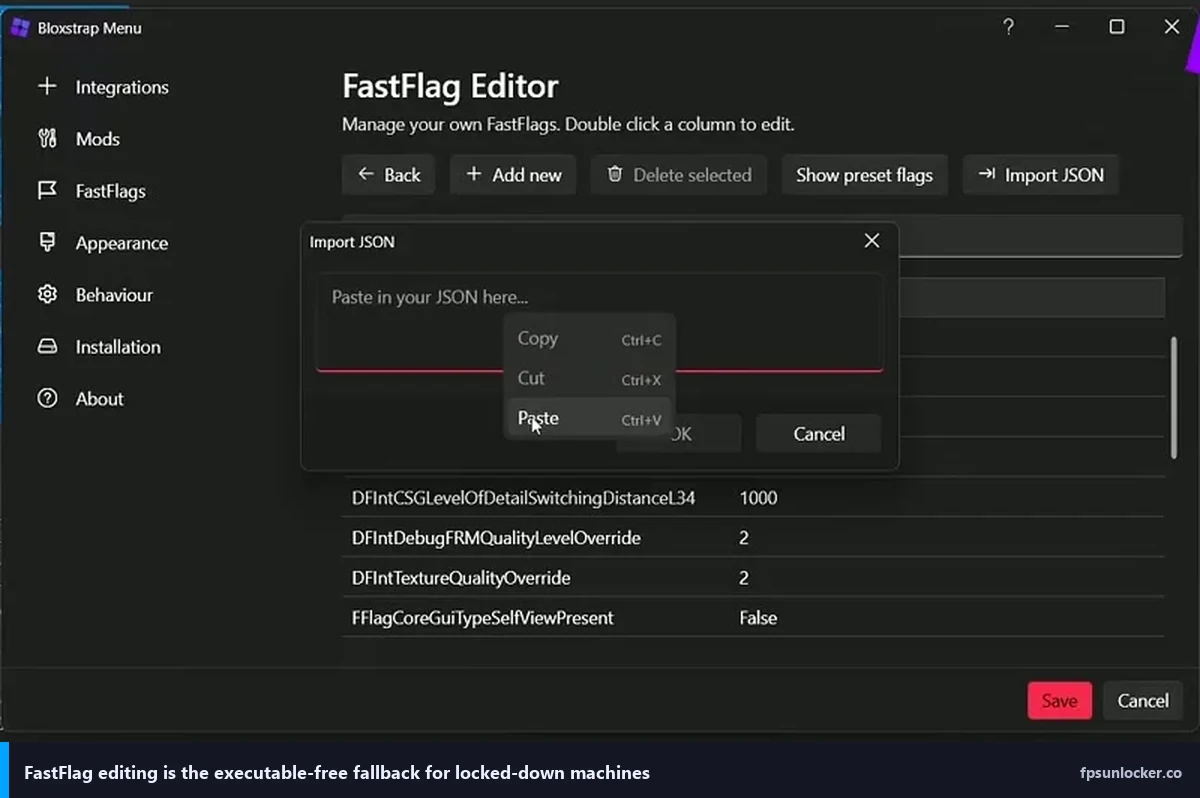
There’s a third path some power users prefer, called the FastFlag method. It’s a way to edit Roblox’s internal configuration flags directly using a small JSON file, and it can unlock the frame rate without any external process. It’s less convenient than rbxfpsunlocker or the native slider, but it’s useful in corporate environments where you can’t run unsigned executables. I’ve walked through the full procedure at our FastFlag FPS cap guide if you want the details.
Watch a full walkthrough
If you prefer video, this walkthrough covers rbxfpsunlocker with a clean screen recording, which is useful if you’re deciding between it and the native slider.
The 2026 verdict
I’ll boil it down to two camps. If you’re a casual Roblox player on a single PC with a fixed-refresh monitor and you don’t need an FPS overlay, just use the native Max Frame Rate slider inside Roblox’s settings. It’s cleaner, it’s officially supported, it needs zero downloads, and it won’t trip Defender. Save yourself the setup time.
If you’re any of the following, rbxfpsunlocker is still the better tool in 2026. You own a high-refresh G-Sync or FreeSync monitor and want to pin your cap one frame below refresh to stay in the VRR window. You multi-box accounts or flip between Studio and live client. You want a persistent FPS overlay that doesn’t require Shift+F5 every session. You’re troubleshooting a broken Roblox install where the native slider silently refuses to apply (that whole rabbit hole is covered at our still-capped-at-60 fix guide).
For my own setup on the 144 Hz 1440p panel, I still run rbxfpsunlocker every session. Old habits, honestly, but also because the one-frame-below-refresh trick genuinely matters for VRR, and the tray icon has become a mental shortcut I don’t want to give up. On the i5-1240P laptop I test on, which has a locked 60 Hz panel and integrated graphics that couldn’t break 60 FPS in Roblox anyway, I don’t bother. The tool hasn’t become obsolete in 2026. It’s just become a specialist’s tool instead of a beginner’s first install, which is fair given how far Roblox itself has come.
Either way, you’re not stuck at 60 anymore. That’s the part that actually matters.