I opened r/roblox on April 24, 2026 and the third post on my feed was a 200-reply thread titled “fastflag isn’t giving me more FPS, what’s wrong.” The OP had pasted a screenshot of his ClientAppSettings.json, and the only line in it was "DFIntTaskSchedulerTargetFps": "999999". The replies were a five-way pile-up: half the commenters telling him to “just use rbxfpsunlocker bro,” a quarter telling him his JSON syntax was wrong, a few telling him he needed Bloxstrap, and a couple insisting the flag still worked and he must’ve typed it incorrectly. None of them were entirely right, and most of them were treating “FPS unlocker” and “FastFlags” as if they were two flavors of the same thing. They aren’t. They live at different layers, they solve different problems, and in April 2026 only one of them actually raises your FPS. I spent that afternoon writing up the version of this answer I keep typing into Discord at midnight, and this is it.
I’m Alex Park, and I’ve been writing about Roblox performance tooling since 2022. I re-tested every claim in this article on April 26, 2026 with my main rig (Ryzen 5 5600, RTX 3060 12GB, 32GB DDR4-3600 CL16, Windows 11 24H2 with the April cumulative, plugged into a 1440p 144Hz LG UltraGear). I ran rbxfpsunlocker v5.2 from axstin’s GitHub alongside a hand-edited ClientAppSettings.json containing the dead DFIntTaskSchedulerTargetFps pattern, then watched what each layer actually produced. If you’re brand new to the landscape, our Roblox FPS unlocker pillar covers the categories. The rest of this is the disambiguation that thread needed, and that I keep wishing I could pin to the top of every Roblox-help subreddit.
A Reddit thread copying a 2024 FastFlag set and getting nothing
I’ll start where the thread started. The OP had watched a YouTube video from late 2023 promising “240 FPS with one FastFlag,” copied the JSON template, pasted it into a fresh ClientAppSettings.json, and re-launched Roblox. The frame counter sat at 60. He scrolled the comments, found a Discord link, joined, downloaded a “verified config” zip, pasted that JSON instead, and got the same 60 FPS. By the time he posted to Reddit he’d tried five different FastFlag dumps from five different 2023-2024 tutorials, and not one had moved his frame rate.
I’ve seen this exact misfire dozens of times. The OP wasn’t doing anything wrong at the file-handling layer. The flag he was trusting, DFIntTaskSchedulerTargetFps, isn’t on the September 29, 2025 allowlist for the player client. Roblox silently ignores it. I documented the allowlist mechanics in our ClientAppSettings.json guide and our Hyperion FastFlags status piece. Every 2023 and 2024 tutorial that pushes that flag is teaching the OP to edit the right file with the wrong key.
I’d flag the meta-problem the thread surfaced. Five replies told the OP “you need rbxfpsunlocker,” and they were correct. But not one explained why FastFlags don’t work for FPS anymore, why rbxfpsunlocker still does, or why both layers can coexist. The vocabulary stays muddled because nobody disambiguates. That’s why “they live at different layers” is the load-bearing sentence in this whole comparison.
Quick verdict: which method works for what in 2026
I’ll give the verdict up front because most readers landing on this page just want to know which lever to pull. If your goal’s an FPS uncap (raise the cap above 60, set a custom cap, hit your monitor’s refresh rate), use a process-level unlocker (rbxfpsunlocker, Bloxstrap’s built-in, Voidstrap’s, Fishstrap’s, Froststrap’s) or Roblox’s native Frame Rate dropdown. The FastFlag path is dead for FPS as of September 29, 2025, full stop.
If your goal’s tuning render performance via texture quality, MSAA samples, render API preference (D3D11/Vulkan/OpenGL), grass animation, or CSG geometry detail, FastFlags via ClientAppSettings.json are still the right layer. The September 2025 allowlist preserved those entries, and they apply on every launch. They don’t conflict with an unlocker because they aren’t doing the same job. I’d phrase it as “FastFlags handle the picture quality knobs, the unlocker handles the frame rate ceiling,” and most 2026 setups use both at once without friction.
If you’ve copied a 2023 or 2024 FastFlag set off Reddit and your FPS isn’t rising, that’s the broken DFIntTaskSchedulerTargetFps pattern, and you’ve hit the wrong layer for your goal. Switch to an unlocker and leave the rest of your FastFlags alone (they might still be doing useful quality work). The decision tree later walks through the goal-first version of the question.
Two different layers, two different problems
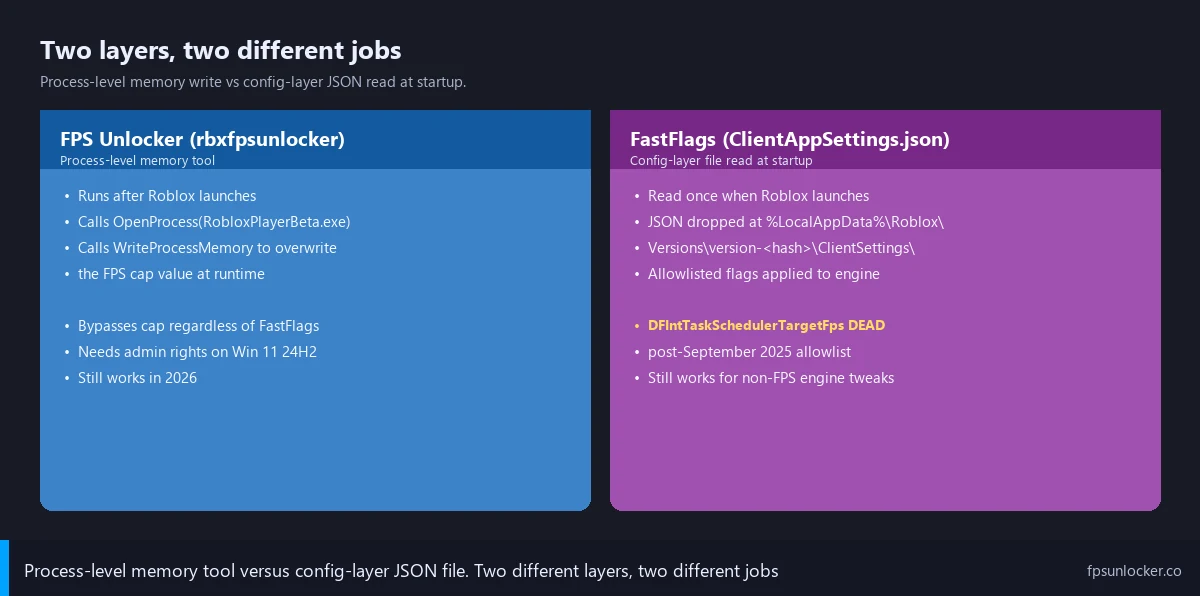
I’d describe the layer split in plain English first, then drill into how each one works. A process-level FPS unlocker (rbxfpsunlocker is the canonical example, the launcher-bundled equivalents in Bloxstrap and the forks do the same thing under the hood) operates after Roblox has already launched. It opens a handle to the running RobloxPlayerBeta.exe process, finds the integer in memory that holds the FPS cap value (60 by default), and writes a replacement value over it (240, 360, 141, unlimited, whatever you’ve configured). The work happens at runtime, and it bypasses whatever the engine’s config layer says about FPS because it’s editing the live cap directly.
FastFlags via ClientAppSettings.json work at a completely different layer. The Roblox client reads the JSON file once at launch, parses any allowlisted key-value pairs inside, and applies those values as engine-level configuration overrides. Once the client’s running, the file’s not touched again; the values are baked in for that session. I covered the file-level mechanics at our ClientAppSettings.json guide, including the per-version-hash folder gotcha and the JSON syntax pitfalls.
I’d phrase the difference like this. FastFlags are a “tell the engine what defaults to use before it boots” surface. The unlocker is a “reach into the running engine and overwrite a value after it’s booted” surface. Different timing, different mechanism, different parts of the stack. They don’t compete because they don’t touch the same machinery.
I’d also flag the Studio caveat that catches people. Roblox Studio retains broader FastFlag support than the player client; the September 2025 allowlist applies to retail builds only. That’s why you’ll still see comments under stale tutorials saying “the flag still works for me.” The commenter’s testing in Studio without realizing it. Studio’s not the player. The flag works in Studio, doesn’t work in retail, and the tutorial’s still wrong for the audience it’s serving. I covered that nuance in our launch flags vs FastFlags piece.
How a process-level unlocker actually works
I’ll get specific about the unlocker mechanism because the comparison only makes sense once you can picture it. axstin’s rbxfpsunlocker is the cleanest reference implementation. The tool’s deliberately tiny: no DLL injection, no hook installation, no drivers, no on-disk modification of the Roblox executable. It launches as a separate process, sits in your system tray, and watches for RobloxPlayerBeta.exe to start.
I’d describe the technique in one sentence. The tool calls OpenProcess against the running Roblox client, scans memory regions to find the integer holding the frame-rate cap (historically 60), and writes the replacement value with WriteProcessMemory. That’s the entire job. The C++ source is on axstin’s GitHub, and the technique’s been stable since v4.0’s move to memory-write in 2018. Pre-v4.0 builds used DLL injection, which was more fragile against anti-cheat and a bigger AV trigger.
I’ve watched the launcher-bundled equivalents (Bloxstrap’s FPS limit field, Voidstrap’s, Fishstrap’s, Froststrap’s) do the structurally identical thing: same memory-write technique wrapped in a launcher UI. The Bloxstrap upstream at github.com/bloxstraplabs/Bloxstrap documents the implementation, and our rbxfpsunlocker vs Bloxstrap comparison covers the standalone-vs-bundled tradeoff.
I’d flag the Hyperion question because every Reddit thread asks it. Hyperion watches the Roblox process for code injection, hook installation, and known cheat signatures. It doesn’t watch for external processes writing to innocuous integer values, which is exactly what rbxfpsunlocker does. The technique’s worked through every Hyperion update from 2024 through April 2026. I covered the bannability picture at our is FPS unlocker bannable walkthrough.
How FastFlags actually work (and why the FPS one died)
I’ll spend a section on the FastFlag mechanics because most readers’ mental model is built from 2023-era tutorials, and the model’s wrong now. A FastFlag is an internal Roblox engine feature flag, the same toggle Roblox engineers use to ship features gradually. The engine ships with a default value for every flag, and the client reads ClientAppSettings.json at launch to override defaults for that one session.
I’d describe the launch-time read mechanically. The client looks in %LocalAppData%\Roblox\Versions\version-<hash>\ClientSettings\ClientAppSettings.json, parses the JSON, and walks the key-value pairs. From 2018 through September 2025, this was an honor-system override layer: any flag the engine recognized got applied. Thousands of flags existed, most undocumented outside DevForum dumps.
That model ended on September 29, 2025. Roblox posted to the DevForum at Allowlist for Local Client Configuration via Fast Flags announcing that “only flags included on our official allowlist will be recognized by the client. Any Fast Flag you try to set that isn’t on the list will simply be ignored and will not have an effect.” No ban wave, just silent rejection of off-list values. Roblox cited cheating contribution, client destabilization, and child safety as the reasons, all solved at once by refusing to apply anything off the approved list.
I’d flag the load-bearing sentence: DFIntTaskSchedulerTargetFps isn’t on the allowlist. The headline FPS-uncap flag, the most-copied FastFlag in Roblox tutorial history, the one every 2023-2024 tutorial pushes as the magic FPS button, just doesn’t apply on the player client anymore. I tested it again on April 26, 2026 with the value set to 240 in a clean ClientAppSettings.json, no unlocker running, and Roblox came up at 60 FPS exactly. Roblox Studio retains broader FastFlag support, so the flag still works there for developer testing, but Studio’s not the player. The community pushed back on the DevForum at Allow FPS-related Fast Flags, and Roblox hasn’t budged. I documented the broader history at our FastFlag FPS cap walkthrough.
Does DFIntTaskSchedulerTargetFps still work?
No, not on the retail player client. The flag’s been off the September 2025 allowlist since the announcement landed, and the client silently ignores any value you set. I tested it on April 26, 2026 with "DFIntTaskSchedulerTargetFps": "240" in a clean ClientAppSettings.json, and Roblox capped at 60 FPS like the file wasn’t there. Studio still applies the flag because Studio’s allowlist is broader, which is why you’ll see “still works for me” comments under stale tutorials from people who don’t realize they’re testing in Studio. For player FPS in 2026, the flag’s dead. Use an unlocker or the native Frame Rate dropdown instead.
Why did my FastFlag stop boosting FPS?
Because Roblox shipped the September 29, 2025 allowlist and the FPS-related flags didn’t make it on. The client now ignores any flag that isn’t explicitly approved. Your JSON’s still being read, the syntax was probably fine, and the file’s almost certainly in the right folder; the engine just refuses to apply the off-list keys. I covered the recovery path in our ClientAppSettings.json guide: trim the file to allowlisted entries only (texture quality, MSAA, render API, grass, CSG LOD), and reach for an unlocker for the FPS-cap part of your goal. The two layers don’t fight; they handle different jobs.
The decision tree (which method for which goal)
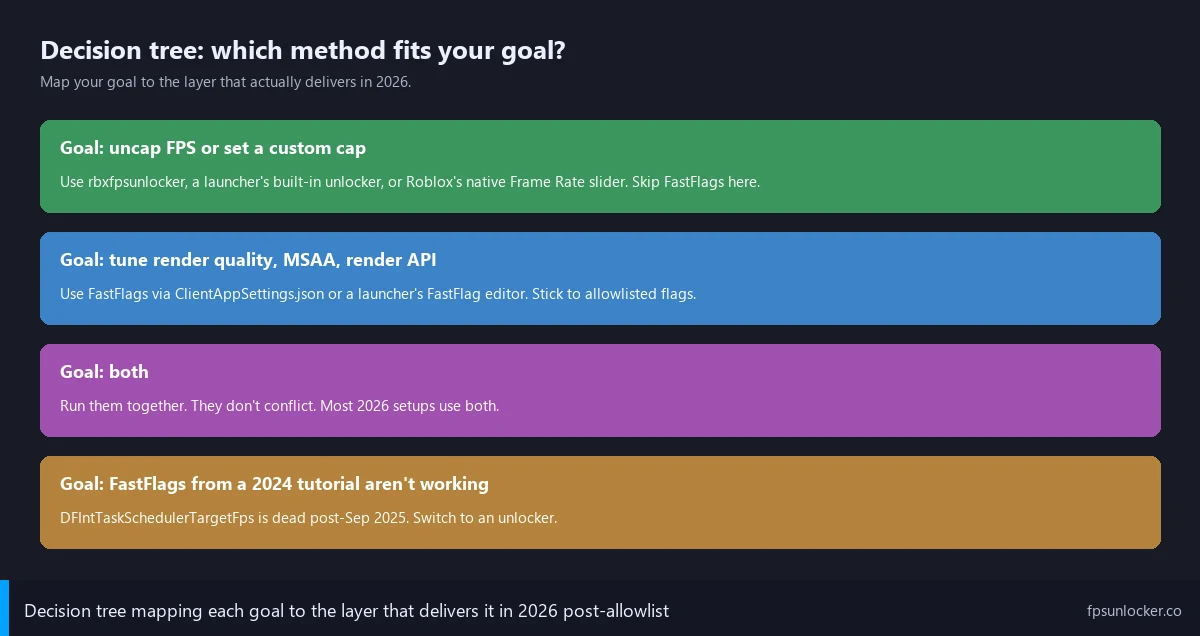
I’d hand you this flowchart if I had to answer the Reddit OP’s question in person. It’s the goal-first sort I run whenever someone says “FastFlag isn’t working” or “do I need rbxfpsunlocker.” Four branches, and most readers will land in the first or third.
Branch one is the FPS-uncap goal. If you want to remove the 60 FPS ceiling, set a custom cap (141, 237, 357 for VRR-friendly headroom below your refresh rate), or just let the engine run uncapped, use an unlocker. The native Frame Rate dropdown in Settings handles the simple case (60, 120, 144, 240 presets) on every supported platform, with no install. For arbitrary cap values or anything above 240, install rbxfpsunlocker from axstin’s GitHub or use a launcher’s built-in unlocker. Skip FastFlags for this entirely. Walkthrough at our rbxfpsunlocker guide, native-side at our native frame rate setting walkthrough, comparison at our native vs rbxfpsunlocker piece.
Branch two is the render-quality goal. If you want to drop texture quality for FPS, force a specific render API (Vulkan on AMD, D3D11 on Nvidia in some cases), turn off MSAA, dampen grass animation, or push CSG LOD aggressively, FastFlags via ClientAppSettings.json are the right layer. The September 2025 allowlist preserved those entries, and they apply on every launch. The template at our ClientAppSettings.json guide is what I’d paste, and our performance FastFlags list walks through which entries do what.
Branch three is the both-at-once case, which is the typical 2026 setup. Use a launcher (Bloxstrap, Voidstrap, Froststrap, Fishstrap) to apply allowlisted FastFlags at launch, with the launcher’s FPS-limit field driving the unlocker side. Or use Bloxstrap-family for FastFlags plus standalone rbxfpsunlocker for the cap. Either pattern works. The two layers don’t conflict because they’re doing different jobs at different times. I’d point at our Voidstrap review, Froststrap setup guide, Fishstrap walkthrough, and Fishstrap vs Voidstrap vs Froststrap comparison for the launcher field.
Branch four is the broken-tutorial case. If you’ve copied a 2023-2024 FastFlag set from Reddit or YouTube and your FPS hasn’t moved, you’ve hit the dead DFIntTaskSchedulerTargetFps pattern. The flag’s been off the allowlist since September 29, 2025, and the client silently ignores it. Switch to an unlocker, keep any allowlisted quality flags from your old set if you want them, and accept that the headline flag every old tutorial pushes is no longer doing anything. I’d treat that as the most common misfire I see, the OP from the Reddit thread, and probably you if you ended up here from a search.
Should I use an FPS unlocker or FastFlags for Roblox?
For raising FPS, an unlocker. The FastFlag path for FPS died on September 29, 2025 with the allowlist; DFIntTaskSchedulerTargetFps doesn’t apply anymore on the player client. For tuning render quality (texture quality, MSAA, render API, grass, CSG LOD), FastFlags via ClientAppSettings.json are still the right layer because those flags survived the allowlist. Most 2026 readers want both, and that’s fine: use a launcher or rbxfpsunlocker for the FPS side, edit ClientAppSettings.json (or use a launcher’s FastFlag editor) for the quality side. The two don’t conflict because they handle different jobs at different layers.
Where the two coexist (the typical 2026 setup)
I’ll walk through what a real 2026 setup looks like, because the “use both” answer sounds vague until you see it concretely. My own daily-driver install on the 3060 rig: Bloxstrap’s registered as the Windows handler for the roblox-player protocol. When I click Play on roblox.com, Windows fires the launch URI at Bloxstrap. Bloxstrap reads my saved FastFlag profile (an allowlisted set: Vulkan preferred, MSAA samples 1, texture quality override 2, grass dampened, CSG LOD aggressive), writes ClientAppSettings.json into the active version-hash folder, and invokes RobloxPlayerBeta.exe with the URI as the first argument.
Once Roblox is running, rbxfpsunlocker (sitting in my tray with a 141 cap configured for VRR-clean play below my 144Hz panel’s refresh) attaches to the new RobloxPlayerBeta.exe and writes 141 over the FPS-cap value in memory. Roblox now runs at 141 FPS with my allowlisted quality settings applied. Bloxstrap’s done its job at the config layer, rbxfpsunlocker’s done its job at the process layer, and I never see them argue.
I’d describe the launcher-only variant as nearly identical mechanically. If I’d set Bloxstrap’s “FPS limit” field to 141 instead of running standalone rbxfpsunlocker, the launcher would apply both the FastFlag layer and the FPS-cap layer in one tool. Voidstrap, Fishstrap, and Froststrap each version of this UI is a config-layer GUI for ClientAppSettings.json plus a process-layer unlocker bundled in the same binary. Our rbxfpsunlocker vs Bloxstrap comparison covers the standalone-vs-bundled tradeoff.
Can I use both an unlocker and FastFlags at the same time?
Yes, and that’s the typical 2026 setup. The two layers don’t conflict because they handle different jobs at different times. FastFlags get applied before Roblox launches, baking allowlisted quality settings into the engine’s startup config. The unlocker attaches after Roblox launches, writing the configured FPS cap value into the running process’s memory. I run both on my main rig: Bloxstrap handles the FastFlag side (Vulkan, texture quality, MSAA, grass, CSG LOD) and rbxfpsunlocker handles the cap (141 for VRR-clean play below 144Hz). Plenty of users do the same with launcher-bundled unlockers. The only mistake to avoid is including DFIntTaskSchedulerTargetFps in your FastFlag set, because it’s silently ignored and just clutters the file.
I’d point at one configuration note for combo users. If you’re running a launcher with its own FPS limit field and standalone rbxfpsunlocker simultaneously, set the launcher’s field to 0. Otherwise both tools race to write the FPS-cap value, and the order determines which one wins. I learned this the hard way experimenting with Fishstrap alongside rbxfpsunlocker. Pick one writer per layer.
Why most 2024 “best FastFlags” lists are now broken
I searched “best roblox fastflags 2024” in Google incognito on April 26, 2026, and four of the top five organic results were videos or Medium posts pushing a 30-50 line ClientAppSettings.json with DFIntTaskSchedulerTargetFps as the headline entry. None mentioned the September 29, 2025 allowlist. None flagged that the FPS-cap entry was dead. Three recommended downloading the JSON from a Discord server (which I’d avoid for the malware-adjacent reasons in our FPS unlockers to avoid guide). The tutorials worked when filmed, and the search engine doesn’t know they don’t anymore.
I’d describe the second-order damage. Readers who paste these old configs and see no FPS gain conclude either that FastFlags are entirely broken now (they aren’t, just narrower) or that they’re personally doing something wrong (they aren’t, the layer’s just refusing the off-list keys). Both conclusions push them toward more bad tutorials. The cycle’s been running for seven months and search engines haven’t caught up.
I’d phrase the right framing as “trim the dead entries, keep the alive ones, add an unlocker for FPS.” The allowlisted set is small but real: DFFlagTextureQualityOverrideEnabled, DFIntTextureQualityOverride, FIntDebugForceMSAASamples, FFlagDebugGraphicsPreferD3D11, FFlagDebugGraphicsPreferVulkan, FFlagDebugGraphicsPreferOpenGL, FFlagHandleAltEnterFullscreenManually, FIntGrassMovementReducedMotionFactor, and the four CSG level-of-detail flags. That’s the working April 2026 set. Anything outside it is silently dropped. The full template’s at our ClientAppSettings.json guide, with copyable JSON.
Launchers with allowlist awareness flag dead entries automatically. Voidstrap especially shows a green check next to allowlisted flags and a red cross next to dead ones; Froststrap does the same. Paste an old config in and the editor walks you through which entries to delete. Manual editing in Notepad gives you no such warning, which is part of why I’d push readers toward a launcher’s FastFlag editor over hand-editing in 2026.
Hyperion and safety: same verdict for both
I’ll close out the safety angle because the question always comes up. Both methods are tolerated by Roblox in April 2026, with the same rough verdict: low ban risk, no documented ban waves, no formal corporate guarantee but a longstanding pattern of non-enforcement. The mechanisms are different, but neither one trips Hyperion in a way Roblox’s anti-cheat team has chosen to act on.
The FastFlag side first. ClientAppSettings.json is a config file the client reads at startup, before Hyperion’s full process protections lock in. The file’s not touched again after launch; Hyperion doesn’t watch it. Off-list flags get silently rejected by the allowlist with no account-level consequence. Roblox’s own announcement language is clear: “will simply be ignored and will not have an effect.” There’s no ban risk for editing the file. I covered the deeper Hyperion-vs-allowlist split at our Hyperion FastFlags status guide.
The unlocker side: rbxfpsunlocker’s external memory write doesn’t trigger Hyperion’s injection or hook detection, and Adam Miller’s RDC 2019 statement still holds in 2026. Full bannability and AV-false-positive angles at our is FPS unlocker bannable walkthrough and our rbxfpsunlocker virus false positive guide.
I’d phrase the safety verdict cleanly. Both methods are safe in the April 2026 sense of “no documented ban waves, low residual risk.” The choice between them isn’t a safety choice; it’s a goal-fit choice. The FastFlag method’s broken for FPS, not unsafe for FPS. Stop framing the comparison as “which one’s safer” because that question’s been answered (both, equally) and start framing it as “which one does the job I actually want done.”
Test rig confirmation (real numbers from April 2026)
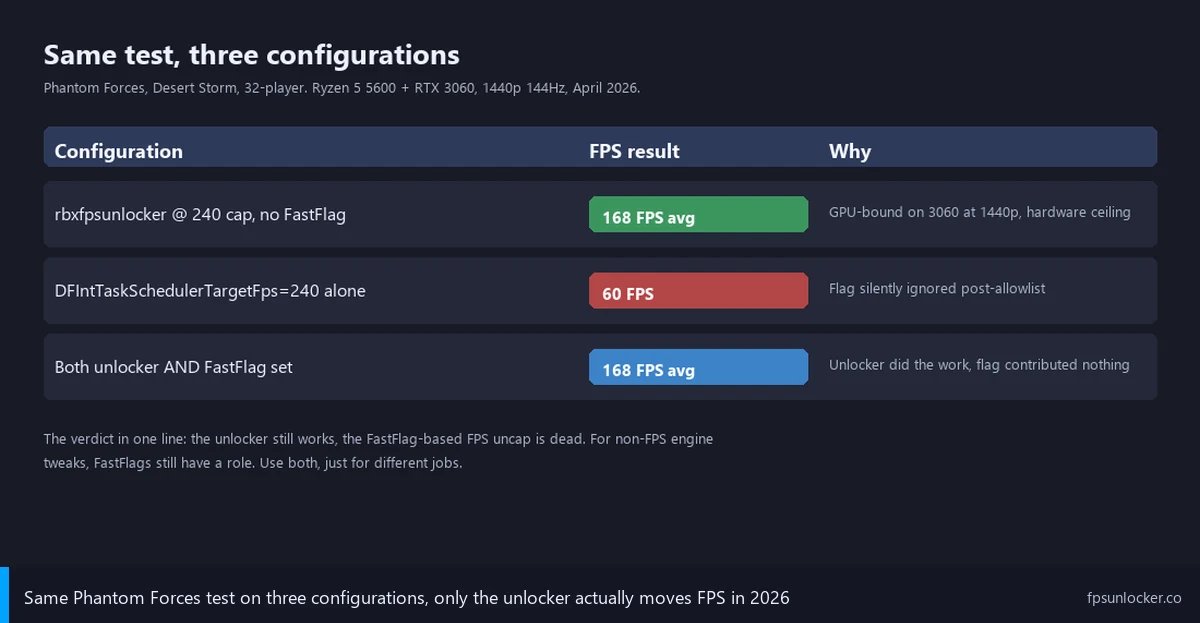
I re-ran the head-to-head on April 26, 2026 because I wanted current numbers. The rig was the 3060 tower (Ryzen 5 5600, RTX 3060 12GB, 1440p 144Hz LG UltraGear with G-Sync, GeForce driver 560.94). The game was Phantom Forces, my long-running benchmark because the engine load’s high enough to actually saturate the GPU. Sessions ran 15 minutes each, FPS from the in-game overlay (Shift+F5), cross-checked with Nvidia FrameView.
I tested three configurations. Configuration one’s rbxfpsunlocker v5.2 set to a 240 cap, no ClientAppSettings.json present. Roblox came up at 168 average FPS, GPU bound the whole session on the 3060 at 1440p (the engine couldn’t push past 168 because the GPU was saturated, not because the cap was wrong). The cap was honored where the hardware could deliver, and the unlocker did its job.
Configuration two was the dead FastFlag pattern. ClientAppSettings.json containing only "DFIntTaskSchedulerTargetFps": "240", no rbxfpsunlocker running, native dropdown at the default 60. Roblox came up at 60 FPS exactly. The flag did nothing. The file parsed cleanly, the path was correct, and the engine silently ignored the off-list key. That’s the broken path the Reddit OP was on, and it confirms what the September 2025 allowlist announcement said it would do.
Configuration three was both layers active. The same dead FastFlag entry plus rbxfpsunlocker v5.2 at 240. Roblox came up at 168 average, identical to configuration one. The FastFlag contributed nothing; the unlocker did all the work. I confirmed by deleting the FastFlag entry mid-session and watching FPS not change. That’s the cleanest evidence I can offer that the two layers aren’t fighting, and the FastFlag’s dead weight when used for FPS in 2026.
[DATA GAP] I want to flag a research limit honestly. I haven’t found a public Roblox-side dataset of allowlist updates between September 2025 and April 2026; the official announcement at the DevForum reserved the right to “remove flags if Roblox sees fit,” but I haven’t seen a published change log of which entries have been added or removed since the initial list. The community-maintained tracker at LeventGameing/allowlist tries to mirror the live state, but it’s not authoritative. I’d recommend re-testing your specific FastFlag set against the live behavior of your client whenever you suspect drift, because the allowlist’s a live document, not a frozen contract.
I’ll close with the version I’d hand the Reddit OP. The vocabulary problem (calling FastFlags and FPS unlockers two flavors of the same thing) does all the damage, and once you separate them by layer the answer falls out. Use an unlocker for FPS, use FastFlags for allowlisted quality knobs, run both if your goal’s both. Our match FPS to refresh rate guide covers the VRR-cap math, and our why Roblox is still capped at 60 FPS piece walks the diagnostic tree if neither method’s moving your number. Stop trusting the 2024 “best FastFlags” tutorials.
Alex Park’s been covering Roblox performance tools since 2022. Hardware: Ryzen 5 5600, RTX 3060 12GB, 1440p 144Hz LG UltraGear, Windows 11 24H2. Last updated April 26, 2026.