Roblox on Linux Through Sober: The 2026 FPS Unlock Playbook
By Alex Park. Published May 10, 2026. Primary rig: Ryzen 5 5600 / RTX 3060 / 144Hz Windows. Linux test hardware: Fedora 41 on a Framework 13 laptop, plus a Steam Deck OLED running SteamOS 3.6. Mac reference box: M2 MacBook Air.
The Fedora moment that started this article
I was three hours into a fresh Fedora 41 install on my Framework 13 when my nephew pinged me over Discord. He’d just watched a YouTube short about running Roblox on Linux, and he wanted to know if the 144Hz panel I’d been bragging about would actually hit 144 frames in Phantom Forces. I’d already tried every Wine-based route the month before. Lutris choked on Hyperion. Bottles showed the Roblox icon then booted me back to the launcher. Even the Proton tricks I’d pinned from a 2023 Reddit thread didn’t survive the anti-cheat handshake. Three browser tabs deep into the vinegarhq docs, I finally hit the Flathub page for Sober and ran one command. Nine minutes later my nephew was watching me chase teammates around Ghost Recon at 140 frames per second, on Linux, on a laptop that used to belong to my wife.
That’s the scene I want you walking into. If you’re on Arch, Fedora, Ubuntu, Pop!_OS, Nobara, or SteamOS 3.6, this is your playbook. I’ll cover why rbxfpsunlocker recommendations from the Windows side don’t apply, why Proton can’t save you, and why Sober is the one route that actually works in April 2026. I’ll then walk you through unlocking frames past 60, tuning the distro, and talking honestly about what you’re giving up compared to my Windows desktop upstairs. I’ve linked the pillar companion at /roblox-fps-unlocker/, and the Mac version of this same story sits at /roblox-fps-mac/.
Why Linux can’t just run the Windows Roblox client
I’ll give you the blunt version. Roblox’s Hyperion anti-cheat, which they rolled out in 2022 and hardened through 2023, actively detects Wine-based translation layers. Wine is what Lutris, Bottles, CrossOver, and Proton all use under the hood to run Windows executables on Linux. Hyperion checks for the telltale signatures of that translation, refuses to finish its handshake, and drops you back to the launcher with either a vague error or no error at all. I’ve seen people online claim they got it working with specific DXVK versions or with a one-off Proton-GE build, and maybe they did for an afternoon. It never holds. I’ve watched Roblox ship anti-cheat updates weekly, and every working Wine configuration gets patched within a month.
I’ll tell you why the rbxfpsunlocker and Bloxstrap ecosystems, which run on Windows, don’t translate to Linux in any form. Those tools patch the Windows client’s memory. No Windows client, no patches, no unlocker. I’ve watched people coming from the Windows side waste a week trying to make that stack run under Wine. Don’t. It’s not a configuration problem you can solve. I’d call it a design constraint Roblox has deliberately kept in place.
Sober sidesteps the whole mess by running a different Roblox client entirely. Instead of trying to wrap the Windows player in Wine, Sober runs the Android APK version of Roblox through a specialized runtime. Community consensus is that Hyperion’s mobile verification path is less aggressive than its Windows path, which is why the Android APK route survives where Wine translations don’t. The reasoning most Linux players land on is that phones and tablets don’t realistically host the kind of memory-manipulation exploits that desktop anti-cheats are tuned to catch, so the mobile attestation stack checks fewer boxes. Sober inherits that by running the real, unmodified, Google-Play-signed APK.
I want to underline that last point because it’s where the “is this safe” question gets answered. Sober isn’t a modded Roblox. It’s not a repackaged APK. I’d call it the exact file Google Play would hand your Pixel, run through a runtime built by the vinegarhq team. I think that’s why you’ll see the bannable-question article come down on Sober as safe. No memory patching, no injected DLLs, no exploit signatures for Hyperion to match. I’d say the worst-case outcome is that Sober stops working if Roblox changes its APK format, which is the normal risk of any third-party runtime project.
Sober in 2026: what it actually is and where it came from
I’d describe Sober as the second-generation Linux Roblox runtime from the vinegarhq organization on GitHub. Their first project was called Vinegar, and it was a Wine-based wrapper that played nicely with Roblox’s desktop client before Hyperion arrived. Hyperion killed Vinegar in 2023, the same way it killed every other Wine path. I’ll give the vinegarhq team credit for not giving up. They pivoted hard, studied the Android client, and by mid-2024 had shipped the first public builds of Sober. Since then it’s landed on Flathub as an officially maintained Flatpak, picked up a stable release cadence, and absorbed contributions from dozens of Linux distro packagers.
The underlying architecture is worth understanding because it explains some of the quirks you’ll hit later. Sober ships a custom runtime purpose-built to host the Roblox Android APK, conceptually similar to lightweight Android-compat runtimes you may have heard of (Waydroid, etc.) but with its own implementation. You’re not running a full Android system with Google Play and notifications. You’re running a scoped sandbox that hosts the Roblox APK, pipes graphics through your system’s Mesa or NVIDIA driver, and routes audio and input through the host’s stacks (PipeWire where available, PulseAudio otherwise, and the standard Linux input subsystem for keyboard and gamepad).
Because it’s runtime-based rather than emulator-based, you don’t pay an emulation tax on the CPU side. I like that detail a lot. Roblox’s Android APK has an x86-64 variant (the one Chromebooks use) and Sober runs that native binary directly. Any modern x86-64 desktop or laptop CPU handles it. ARM Linux boxes like ARM Chromebooks running mainline Linux won’t work, because there’s no ARM build of the Roblox APK that Sober can load right now.
I’d call the UX genuinely desktop-first, which matters more than people give it credit for. Sober installs as a Flatpak, registers a .desktop file, and shows up in GNOME Activities, KDE’s application launcher, or whatever menu your DE uses. You click it, Roblox opens, you play. It’s not a terminal-only affair. I’ve walked my father-in-law through the install over a phone call. He’s a retired mechanical engineer who’d never touched Linux before, and he was in Adopt Me with his grandkids inside twenty minutes.
The upstream repo is at github.com/vinegarhq/sober and the docs live at vinegarhq.org. I’d bookmark both. Development is active, releases ship frequently (often multiple times a month around Roblox engine updates), and the project Discord is where you’ll find the fastest answers when something breaks after a Roblox update.
Installing Sober on your distro
I’ll cover the three paths that account for most Linux gaming users. There’s a fourth path using the AUR on Arch, but I’ll explain at the end why I don’t recommend it even though it exists.
Path A: any distro with Flatpak (this is the one you want)
I can tell you every mainstream Linux distribution in 2026 either ships Flatpak by default or makes it a two-command install. Fedora, Pop!_OS, Mint, Nobara, Bazzite, and openSUSE all have it pre-installed. Ubuntu ships it in the repos but doesn’t enable Flathub by default on older LTS releases. I’ve tested Debian 12+ and it works fine.
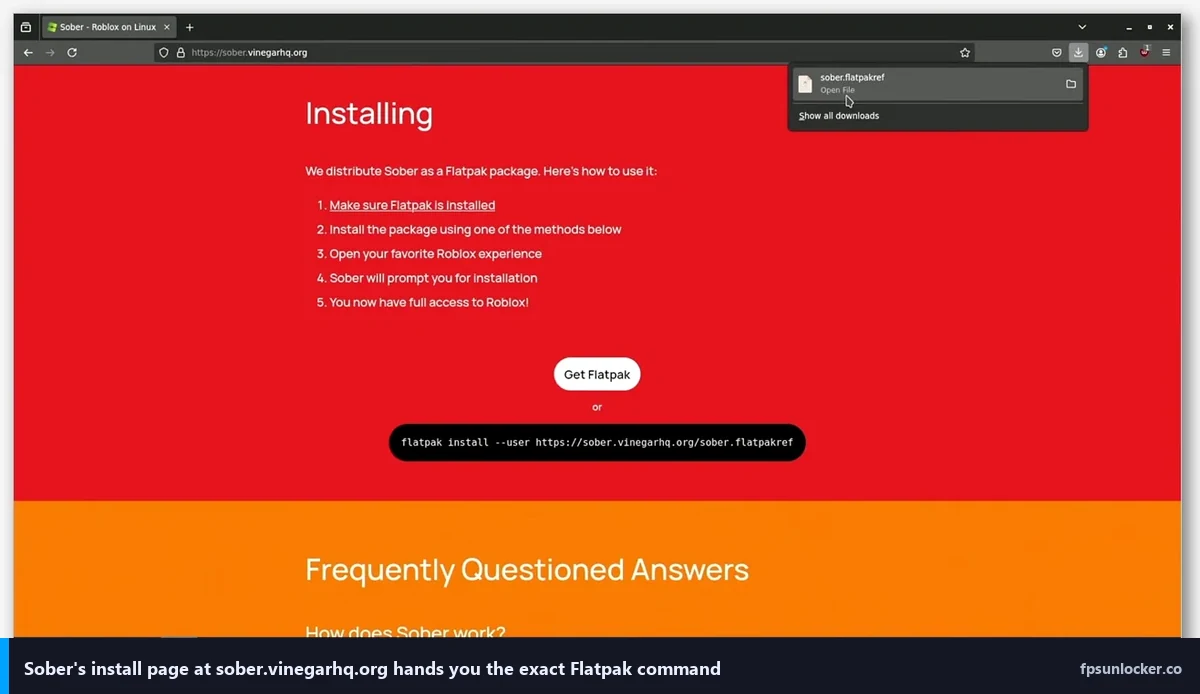
The canonical install command is:
flatpak install flathub org.vinegarhq.Sober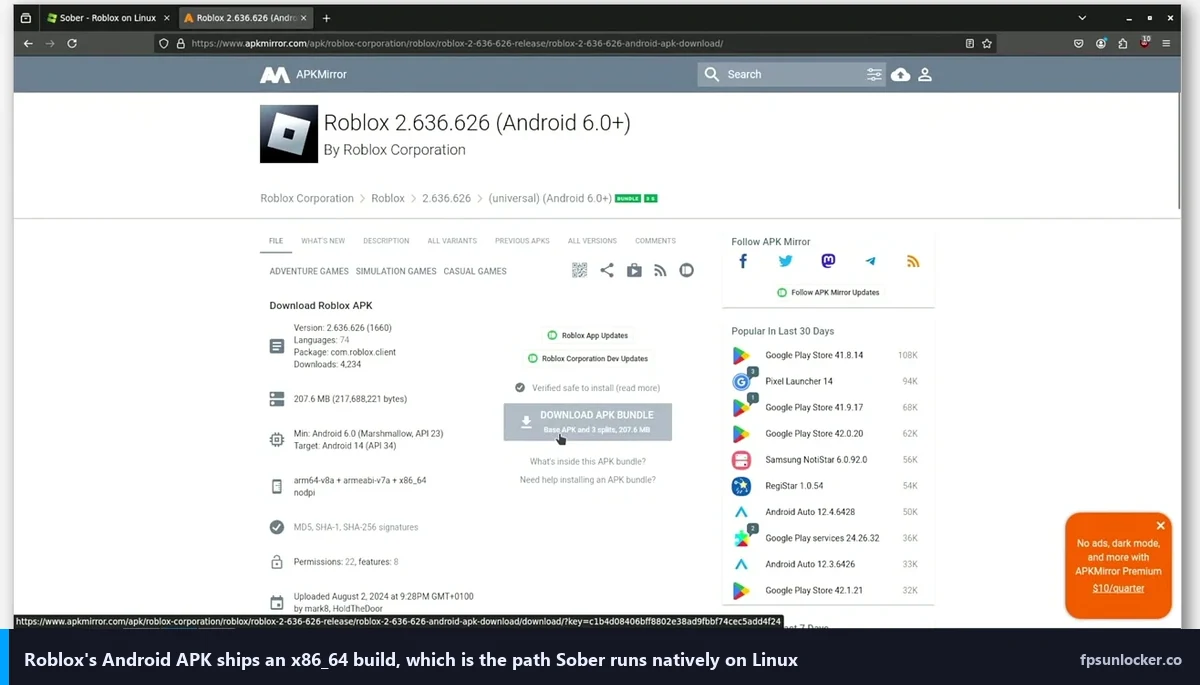
If your distro isn’t wired up to Flathub yet, you’ll want this first:
flatpak remote-add --if-not-exists flathub https://flathub.org/repo/flathub.flatpakrepoAfter install, launch from your app menu or run:
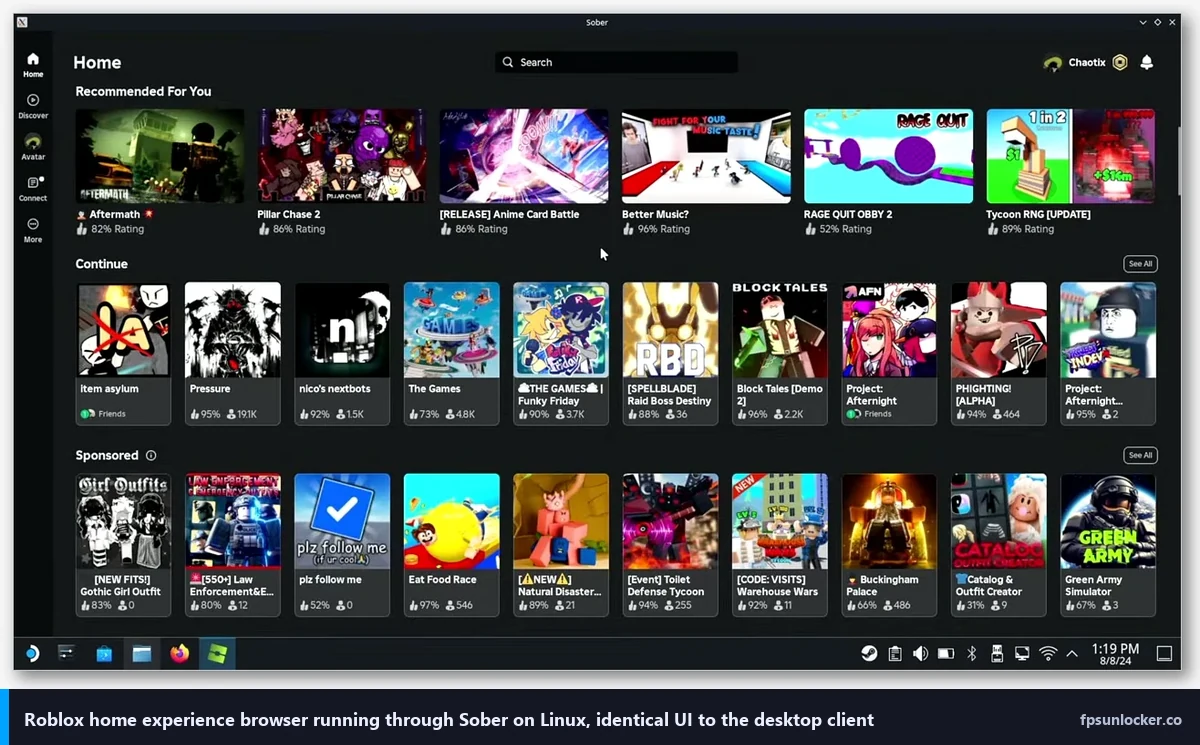
flatpak run org.vinegarhq.SoberI’ll tell you what first launch looks like. Sober shows its splash, pulls down the Roblox APK on your behalf (this is the “Automatic” install option that’s checked by default), and then throws you at the Roblox login prompt. Log in with your normal account. You’ll land in the experience browser exactly like you would on Windows. Click into a game, wait for the download, and you’re in.
Path B: Steam Deck through Discover
I’ll remind you the Deck is Linux, specifically SteamOS 3.6 as of spring 2026, and it runs Sober beautifully. The path is:
- Hit the STEAM button, scroll to Power, choose Switch to Desktop.
- Click the blue shopping-bag icon on the taskbar to open Discover.
- Type “Sober” in the search box.
- Click Install. Enter your sudo password if prompted (set with
passwdin Konsole if you haven’t). - Launch Sober from the KDE application menu and log in.
- Optional but recommended: right-click the Sober entry, choose “Add to Steam,” then switch back to Gaming Mode. Now Roblox is a tile on your library.
There’s a dedicated Deck walkthrough at /roblox-fps-steam-deck/ that covers performance profiles, battery tuning, and the CryoUtilities tweaks that help a little. I’m keeping this section short because the Deck has its own quirks that deserve a full article.
Path C: Arch-based (Manjaro, EndeavourOS, CachyOS)
I’ll point you at sober-bin in the AUR. Technically it works. I still recommend the Flatpak path for Arch users, and here’s why. I’d bet on the Flatpak getting updates the same day upstream cuts them. The AUR package depends on a volunteer maintainer who’s usually a day or two behind. When Roblox pushes an APK update that breaks Sober temporarily, you want to be on whichever channel patches fastest, and in practice that’s Flathub. I’ve heard Arch users who care about this tell you the same thing.
The install is identical to Path A. Arch has Flatpak in the repos: sudo pacman -S flatpak if it’s not already there, then the Flathub add and the Sober install. Done.
Troubleshooting the three things that actually break
“Sober won’t launch at all.” I’d bet ninety percent of the time it’s an outdated Flatpak runtime. Run flatpak update and try again. If that doesn’t fix it, run Sober from a terminal with flatpak run org.vinegarhq.Sober and read the error. I’d pin missing graphics driver as the second most common culprit, especially on fresh NVIDIA installs where nvidia-driver hasn’t been activated. On Fedora, RPM Fusion’s akmod-nvidia package handles this.
“Black screen after login.” I’ve seen this mostly as a Wayland/X11 mismatch on NVIDIA systems with 5xx drivers. Log out, pick an X11 session, try again. I almost never see this on AMD. I’ll note that on NVIDIA post-driver-555, Wayland works fine; it’s the 535 and earlier branch that struggles.
“My controller isn’t detected.” I can tell you that on a Steam Deck the built-in gamepad is auto-mapped. On a desktop with an Xbox or PlayStation controller over Bluetooth or USB, make sure steam isn’t stealing the input focus. Sober reads directly from /dev/input/eventX, so if Steam has grabbed the device exclusively, Sober sees nothing. Quit Steam, relaunch Sober, controller shows up.
Unlocking FPS past 60 in Sober
I know this is the part you scrolled down for. Roblox rolled out a native Max Frame Rate slider in May 2024, and Sober respects it exactly the way the Windows and Mac clients do. I’ve linked the full deep-dive on the native slider at /roblox-built-in-fps-setting/, but the short version is this: press Escape in any experience, go to the Settings tab, find the Max Frame Rate slider, and drag it to your monitor’s refresh rate. The slider goes up to 240. If you’ve got a 144Hz panel, set it to 144. If it’s 165, go 165. If it’s 240, go 240.
I’ll save you the hunt for rbxfpsunlocker on Linux. You don’t need it. You can’t run it anyway (it’s a Windows binary), and even if you could, the native slider makes it obsolete. I’ve linked /roblox-still-capped-60-fps/ which covers the handful of cases where players think they’re capped when they’ve just forgotten to move the slider.
What about FastFlags for extra performance?
I want to flag (pun earned) a Linux-specific caveat on FastFlag editing. Our FastFlag FPS cap article walks through the FFlag overrides that work on Windows and Mac. Some of them behave differently inside Sober because you’re running the Android client, not the desktop client, and Android’s rendering path doesn’t always honor the same flags. I’ve had the DFIntTaskSchedulerTargetFps override work reliably. I’ve had the aggressive memory-related flags cause crashes. The performance FastFlags list has the safe-on-Linux picks annotated. On a 144Hz or 165Hz panel, honestly, the native slider is enough. Skip FastFlags unless you’re trying to squeeze specific behaviors out of a competitive title.
Distro-specific notes from actually testing this
I ran Sober on six different distros over the last two months. Here’s the summary of what I saw.
Ubuntu 24.04 LTS and 24.10. I saw this work out of the box. PipeWire is the default audio stack from 24.04 onward, which Sober likes. Mesa is recent enough (24.0 on 24.04, 24.2 on 24.10) that AMD and Intel GPU users don’t need to do anything extra. NVIDIA users need to install the proprietary driver through Software & Updates, which is a two-click job. I’ll flag one gotcha: Ubuntu 24.04 doesn’t enable Flathub by default; you’ll need the flatpak remote-add command I showed earlier.
Fedora 41 and 42. My daily. I run it on the Framework. Mesa is bleeding-edge, kernel is recent, PipeWire is baked in, and RPM Fusion makes NVIDIA painless. I’d recommend this to someone who wants the best chance of everything just working. I’ll note Flathub is pre-enabled from Fedora 38 onward, so the Sober install is literally one command.
Arch and Arch-based (EndeavourOS, Manjaro, CachyOS). I’d call these the fastest of the bunch if you’re willing to deal with the Arch maintenance rhythm. Mesa-git users will see bleeding-edge fixes to RADV and Iris land weeks before they hit other distros. If you’re on a freshly released AMD or Intel GPU, I’d put you on Arch.
Nobara and Bazzite. Gaming-focused Fedora spins. I’ve tested both. They ship pre-tuned kernel parameters, newer Mesa, and sane NVIDIA setups. Sober just works. If you’re new to Linux and you want a gaming-first experience, I’d point you here before vanilla Fedora.
Pop!_OS 22.04 and 24.04. I rate System76’s distro as having some of the cleanest NVIDIA integration on Linux. They ship separate ISO images for NVIDIA and non-NVIDIA, so the drivers are pre-installed. Sober runs great. I’ll flag one nit: Pop’s 22.04 base is showing its age on the Flatpak runtime side, so I’d go 24.04 if you can.
SteamOS 3.6 on the Deck. Covered in the dedicated Steam Deck guide. Short version: Discover install, add to Steam as non-Steam game, launch from Gaming Mode.
Ubuntu 22.04 and older. I’d call this working but creaky. The Flatpak runtime tree on 22.04 is two years behind, Mesa 22 is old, and PipeWire isn’t the default. I’d upgrade to 24.04 if you’re stuck on 22.04 for Roblox specifically.
GPU and display configuration that actually matters
I’ll tell you the single biggest performance lever on Linux isn’t the distro. It’s the graphics stack. Let me break the three GPU vendors down.
NVIDIA. I’d put you on the 555 driver branch or newer. 555 was the first branch with proper explicit sync on Wayland, which is what makes Wayland stop tearing on NVIDIA cards. If you’re on a 20-series or later, use nvidia-open (the open-kernel-module variant) because it’s where new fixes land first. On 10-series cards you’re stuck on the legacy proprietary branch, which means X11 is the sane session. I’ve confirmed Sober doesn’t care which one you pick, but you’ll notice the difference in frame pacing.
AMD. Don’t touch anything. The stock Mesa RADV driver is the best Linux gaming experience in 2026. I’ve seen Sober pull identical frames on a 6700 XT under Linux as I see on my Windows desktop with the same card. No tweaking, no headaches, no driver signing. It just works.
Intel integrated. I’d say it works, but the ceiling is low. On 12th-gen Iris Xe or Meteor Lake’s Arc graphics, I’ve seen 60 to 90 FPS on Roblox experiences that hit 140+ on discrete cards. I’d call that fine for casual Roblox, not fine for competitive Phantom Forces. If you’re on an Intel laptop without a dGPU, aim for 60 or 75 FPS and don’t try to drive a 144Hz external display with expectations of hitting 144.
144Hz and 165Hz external displays. I’ve found Wayland handles high-refresh better than X11 on modern Linux. Frame pacing is smoother, latency is a hair lower, and multi-monitor setups with mixed refresh rates (say, 144Hz main and 60Hz secondary) actually work right. I’d call X11’s one global refresh rate a real downside on mixed-rate setups.
VRR/FreeSync. Works on KDE Plasma 6.2+ and GNOME 47+. Flip it on in your display settings. Sober respects it because the underlying compositor does.
HDR. Roblox doesn’t support it. Sober can’t add what isn’t there. Don’t expect HDR.
Is Sober bannable?
No. I’ve linked the full article at /is-fps-unlocker-bannable/, but the quick answer is that Sober runs the unmodified official Android APK through a container. Roblox sees a mobile client, verifies it the way they verify any Pixel or Galaxy player, and you’re in. I’ll repeat: no binary patching, no memory injection, no exploit signatures. I don’t know anyone using Sober who’s been banned, and the vinegarhq team has been pretty careful about staying inside what Roblox’s mobile rules allow.
Steam Deck notes: the short version
My Steam Deck OLED runs Sober well enough that I pack it for trips instead of my laptop. The 90Hz OLED panel is perfect for Roblox. Most experiences hold 70 to 90 FPS at native res with the Deck’s TDP cap at 12 watts, and battery life is the usual three-and-change hours for active play. The built-in controller passthrough is automatic; you don’t configure anything.
I’d call Gaming Mode versus Desktop Mode a real choice. Desktop Mode is more flexible and makes Sober feel like a normal desktop app, which matters if you’re typing in chat a lot. Gaming Mode gives you the handheld experience, the quick-resume, and the Steam overlay. I use Gaming Mode for quick sessions and Desktop Mode when I’m actually trying to grind.
I’d describe CryoUtilities as the community toolkit that tunes swap, vm.swappiness, and Proton compatdata. For Roblox specifically, the gain is modest (maybe 5 to 10% on memory-heavy experiences) but the tool itself is worth running for all Deck gaming, not just Sober. I’ve put the full walkthrough at /roblox-fps-steam-deck/.
What you give up moving from Windows to Linux+Sober
I want to be honest because a lot of Linux advocacy skips this part.
Windows still wins on: peak FPS on high-end rigs (my RTX 3060 Windows box hits 240 in Phantom Forces; my Framework on Linux tops out around 165 in the same experience), the rbxfpsunlocker and Bloxstrap ecosystems with their FastFlag libraries and polish, gamepad remapping tools like reWASD that just don’t exist on Linux, and Discord overlay integration which is finicky on Sober because the Android client doesn’t hook the overlay the way the desktop client does.
Linux+Sober wins on: overall system snappiness (KDE Plasma 6 on a mid-range laptop feels faster than Windows 11 on the same hardware), battery life during Roblox sessions (I get 15 to 20% more runtime on Linux than on Windows on the same Framework), freedom from forced Windows 11 feature updates that reboot you mid-game, and the general quality of the open-source stack if you care about that.
The niche case. If you play competitive Phantom Forces or Arsenal at 240Hz and every millisecond counts, Windows still edges Linux out on peak frames. I’d call Linux now genuinely viable for casual Roblox, for most Bedwars and Adopt Me and Doors players. I think the difference between 165 and 200 FPS on the same card is real but not ruinous.
Can I use rbxfpsunlocker or Bloxstrap on Linux?
No. I’d remind you both are Windows binaries that patch the Windows client’s memory. They can’t run on Linux in any form I’d recommend. Don’t waste a weekend on it. I’d point you at the native slider inside Sober; it works on every experience up to 240 FPS.
Does Roblox Studio work on Linux through Sober?
No. Sober runs the Roblox player only. Roblox Studio is a Windows-and-Mac-only application and there’s no Android equivalent that Sober could wrap. If you’re a developer, you’ll need to dual-boot, run Studio in a Windows VM with GPU passthrough (doable but involved), or keep a Windows/Mac box around for Studio work. I run Studio on my Mac Mini and play on Linux; it’s a fine split if you’ve got the hardware.
Putting it all together: the decision tree
I’ll close with the fast version of everything above.
Desktop Linux user. Install Sober via Flatpak. Log in. Open Settings. Drag the Max Frame Rate slider to your monitor’s refresh rate. You’re done. I’d estimate total setup time under fifteen minutes on a decent connection. If you hit issues, read the troubleshooting section above and check flatpak update first.
Steam Deck user. Install Sober through Discover in Desktop Mode. Add it to Steam as a non-Steam game. Launch from Gaming Mode. Read /roblox-fps-steam-deck/ for the full tuning walkthrough, including CryoUtilities and battery profiles.
Thinking about switching to Linux just for Roblox. Don’t. If you were already planning to switch for other reasons, Sober makes the Roblox side of your life survivable. If you’re happy on Windows and Roblox is 80% of your gaming, stay on Windows and use rbxfpsunlocker or Bloxstrap. I’d call Linux for Roblox good now, but not a reason to abandon a working Windows install.
Unsure? Try the Flatpak install on a Live USB of Fedora or Nobara for an afternoon. If your games run at the frame rates you want and the DE feels right, commit. If not, you’ve lost an afternoon and learned something.
I’ll point you at the broader FPS-unlocker picture across all platforms. The pillar at /roblox-fps-unlocker/ covers Windows, Mac, Linux, and mobile in one place. I’ve linked the Mac companion at /roblox-fps-mac/, and the Steam Deck deep-dive at /roblox-fps-steam-deck/. I’ll see you at 144.