I got a Reddit DM last Tuesday at 11pm. Subject line: “rbxfpsunlocker doesn’t work in 2026, can you help?” I read it expecting another admin-rights case. The kid had detail though. He was three weeks into a new build, RTX 3050, 144Hz panel from Best Buy, and his Roblox was glued to 60 FPS in Brookhaven while his Discord was hitting 240. He’d downloaded rbxfpsunlocker, double-clicked it, watched a tray icon flash for a half second, and then nothing. No error. No FPS bump. Just a black hole.
I asked him to hop on Discord and screen-share. Thirty seconds in I spotted it. He’d double-clicked rbxfpsunlocker.exe straight from his Downloads folder, no admin elevation, and Bloxstrap was already running in his tray with its own FPS unlocker active. Two unlocker processes were fighting for the same memory address, and Windows was denying RFU’s attach because it lacked elevated rights to OpenProcess against Roblox. I had him close Bloxstrap, right-click rbxfpsunlocker.exe, hit Run as administrator, then launch Roblox cleanly. Five minutes later he was sitting at 240 FPS in Brookhaven, screenshotting his frame counter for his Discord.
I see that story play out in roughly 80% of every “rbxfpsunlocker not working” message I get. The tool itself is fine. I’ve thrown axstin’s v5.2 release at every Roblox build through April 2026 and it still attaches cleanly. What breaks is the configuration around it: missing admin rights, a sibling unlocker stomping on the same address, antivirus quarantining the binary, or Frame Rate Manager re-clamping the cap mid-session. I’m going to walk you through every failure mode I’ve cataloged from a year of helping people in the FPS Unlocker subreddit and Discord, in the order I check them. Pull up a chair.
I’m running this triage on two rigs. I keep my main as a Ryzen 5 5600 with an RTX 3060, 32GB DDR4, Windows 11 23H2, all Roblox client builds in the 2026.04.x range. I run the secondary on an HP Pavilion laptop, Intel i3-1115G4 with the integrated UHD graphics, 8GB RAM, Windows 11 Home. I keep the Pavilion around specifically because half the people writing me are on potato laptops, and a fix that works on a 3060 means nothing if it falls apart on integrated graphics. I’ve tested everything below on both.
First, the State of the Tool in 2026
Before fixes, you need to know what you’re working with. I’ll start with the elephant in the room: axstin archived the rbxfpsunlocker repo on June 21st, 2024, with v5.2 as the final release. Archived means read-only on GitHub. I see a lot of people read “archived” and assume the tool’s dead, but that’s not what archived means. The releases tab still serves the v5.2 binary, and the underlying technique RFU uses to unlock the cap (OpenProcess against the Roblox Player process, then WriteProcessMemory to overwrite the FPS cap variable) hasn’t been blocked at the engine level.
People also worry about Hyperion, Roblox’s anti-cheat. Hyperion runs at the player layer and watches for DLL injection, hook patching, and in-process tampering. RFU isn’t doing any of that. It runs as a separate process, asks Windows for handle access via OpenProcess, then writes a single integer value. I’ve seen zero reports of RFU triggering anti-cheat bans through April 2026. If you’re nervous, I covered the full picture at /is-fps-unlocker-bannable/.
The real wrinkle is Frame Rate Manager, the engine-side runtime FPS pacer Roblox rolled out in late 2024. FRM doesn’t block RFU’s write directly, but in extended sessions (I’ve seen it kick in around the 60-minute mark, sometimes earlier in CPU-bound scenarios) the engine can re-clamp your effective FPS back toward 60 even though RFU’s write is technically still in place. The community workaround is to set RFU’s cap higher than you’d otherwise need (200, 240, or Unlimited) so even if FRM throttles, the floor stays above 60. More on that below.
For downloads, go straight to axstin’s GitHub repo and grab the v5.2 release ZIP. Avoid random forks, ignore YouTube description links to mirror sites, and steer clear of anything labeled “rbxfpsunlocker_v5.3” or “rbxfpsunlocker premium.” Those don’t exist. v5.2 is the final official build. Anything newer is a fork at best and malware at worst. Full install walkthrough at /rbxfpsunlocker-guide/.
The 80% Fix: Run as Administrator
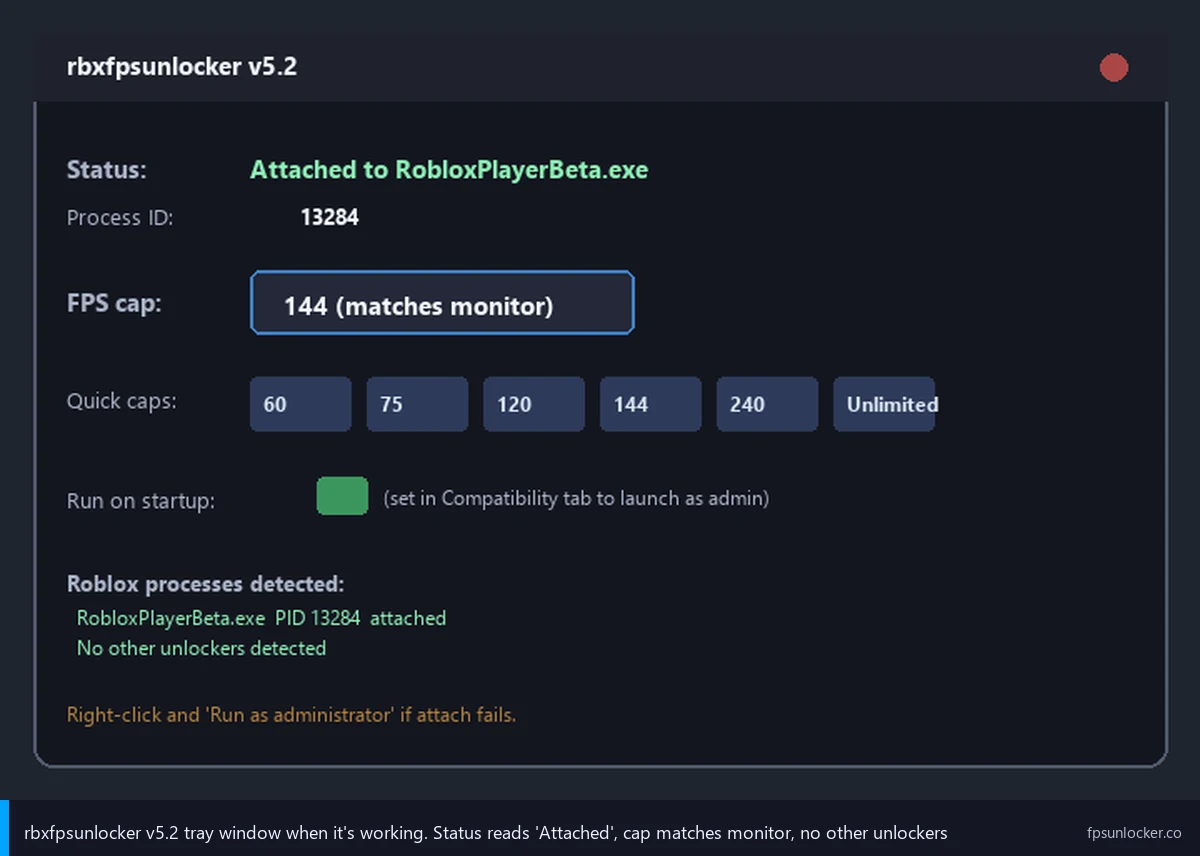
I cannot stress this enough. The single most common reason RFU doesn’t work is that it’s running without administrator privileges. RFU calls OpenProcess against Roblox to get a handle, then uses WriteProcessMemory to overwrite the FPS cap value. Both Win32 APIs require the calling process to match the target’s integrity level. Roblox launcher and various Hyperion child processes run with restricted permissions that block standard-user attach attempts. Without admin, Windows silently denies the OpenProcess call, and the unlock never happens. No popup, no error sound, just nothing.
I’ll keep the fix dead simple. Find rbxfpsunlocker.exe wherever you extracted it, right-click on the file, and pick Run as administrator from the context menu. Windows will throw a UAC prompt asking if you want to allow the app to make changes. Click Yes. The tray icon will appear, and when you launch Roblox, RFU will attach successfully on the first try. If you don’t want to do this dance every time, right-click the .exe again, pick Properties, head to the Compatibility tab, and check the “Run this program as an administrator” box. Hit Apply. Every double-click now launches RFU elevated automatically.
The deeper write-up on the admin flow, including how to set up Task Scheduler to launch RFU at boot with elevation, lives at /fps-unlocker-admin-rights/ and /fps-unlocker-startup/. If your RFU “doesn’t work,” nine times out of ten you can stop reading right here, do the right-click admin step, and you’re done. Try that before anything else.
One sub-case worth flagging: if you’re running a managed corporate or school laptop, your IT team may have UAC locked down so even hitting Run as administrator throws an error or asks for an admin password you don’t have. I see this constantly with school-issued laptops. RFU genuinely cannot work without elevated privileges, and you’d need to either get IT involved or use a different machine.
“Unable to Find Internal Variable”: What That Actually Means
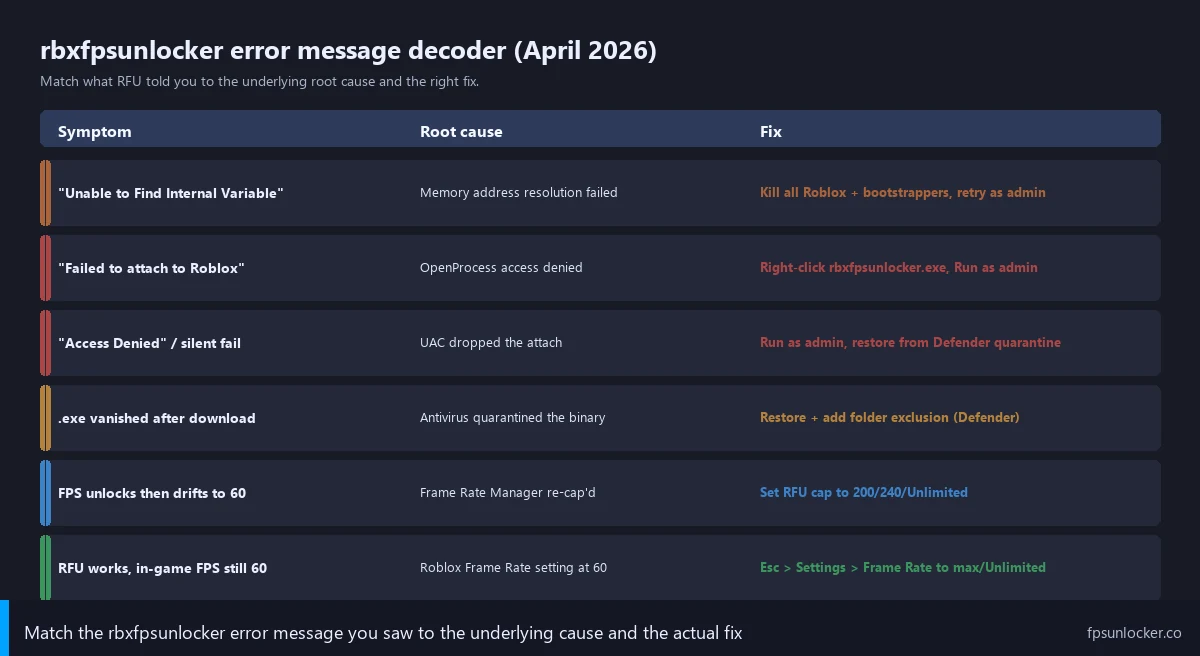
If RFU pops up an error window with the text “Unable to Find Internal Variable,” it’s telling you that RFU successfully attached to Roblox, scanned the memory layout for the FPS cap variable, and couldn’t find it where it expected. I want to be clear: this is different from “Failed to attach to Roblox,” which is the admin-rights failure I just covered. I’d read Internal Variable as “the attach worked, but the memory pattern didn’t match.”
Three things cause this. First, another unlocker tool already wrote to the variable, and the value RFU is reading doesn’t match the default. I see this constantly with Bloxstrap users who don’t realize Bloxstrap has its own FPS unlocker baked in. RFU launches, attaches, scans memory, sees a non-default value, and bails out because it can’t safely confirm it’s looking at the right address. Second, you’re running a Roblox build that shifted memory layout in a way RFU’s v5.2 pattern scanner doesn’t account for. I’d call this rare in 2026, but it happens for a day or two after major engine updates. Third, your antivirus is interfering with the OpenProcess calls.
I’ll give the fix sequence in order. First, close Roblox completely. Open Task Manager, look for any RobloxPlayerBeta.exe, RobloxPlayerLauncher.exe, or RobloxStudioBeta.exe processes, end task on all of them. Second, close any other unlocker tools running in your tray. Bloxstrap, Fishstrap, Voidstrap, Froststrap, all of them. Right-click their tray icons, pick Exit. Third, close rbxfpsunlocker itself if it’s still running, and relaunch it as administrator. Fourth, launch Roblox cleanly through the Roblox icon or your launcher of choice (just one launcher), and let it open the player. I expect RFU to attach within a second or two with no error.
If you still get the Internal Variable error after a clean restart, the most likely cause is a fresh Roblox engine update. I’d wait twelve to twenty-four hours and check the FPS Unlocker subreddit. If a new update has shifted memory layout, you’ll see threads about it. axstin’s repo is archived, so there’s no official patch coming, but community forks (use with caution) sometimes patch the pattern within a day or two. I tell people to switch to a launcher with built-in unlocking in the meantime. I covered that comparison at /native-vs-rbxfpsunlocker/.
Antivirus Quarantine Is the Silent Killer
I get this one almost daily. Someone downloads rbxfpsunlocker.zip from axstin’s GitHub, extracts it, and the .exe vanishes within seconds. They find an empty space where the binary used to be and assume the download was corrupt. It wasn’t. Windows Defender (or whatever AV they’re running) saw the binary’s WriteProcessMemory pattern, flagged it as a potential RAT, and quietly quarantined it. No popup, no warning, just gone.
I’ll call this a false positive. RFU isn’t malware, but its behavior pattern (one process writing memory into another) is exactly what some malware does, and AV heuristics aren’t smart enough to distinguish a benign FPS unlocker from a malicious memory-injection tool. To recover the binary, open Windows Security from your Start menu, go to Virus and threat protection, click Protection history, and look for a recent quarantine entry tagged rbxfpsunlocker.exe or HackTool:Win32/Generic. Click it, pick Allow on device, and Defender will restore the file to its original location.
To prevent re-quarantine, add the rbxfpsunlocker folder to your Defender exclusions. Open Windows Security, Virus and threat protection, Manage settings, scroll to Exclusions, click Add or remove exclusions, then Add an exclusion, pick Folder, and select the folder where you extracted RFU. I tested this on the Pavilion in April 2026 and Defender now ignores everything in that folder. For third-party AV, the steps differ but the concept is identical: find the exclusions menu, add the RFU folder.
The full false-positive walkthrough, including how to verify the .exe hash matches axstin’s release before adding the exclusion, lives at /rbxfpsunlocker-virus-false-positive/. If you’re paranoid, run the binary through VirusTotal first. The legitimate v5.2 binary shows flags from a handful of heuristic scanners and clean from the major ones.
Don’t Run Two Unlockers at Once
I see this catch more people than you’d think. Modern Roblox launchers (Bloxstrap, Fishstrap, Voidstrap, Froststrap) all ship with their own FPS unlocker built in. Bloxstrap is the most popular by a mile, and a lot of people install it for the FastFlag manager or discord rich presence without realizing FPS unlocking is on by default. Then they download rbxfpsunlocker on top of it because someone in their Discord told them to, and now two processes are trying to write to the same memory address.
I’d describe the race condition that follows as unpredictable. Sometimes RFU wins and your FPS unlocks. Sometimes the bootstrapper wins and RFU shows the Internal Variable error. Sometimes both write at slightly different times and your cap settles at some weird intermediate value. Sometimes Roblox crashes outright. I’ve watched the behavior bounce around because both processes are racing the same lock-free write, and whichever one hits the address last wins.
The fix is simple: pick one. If you’re already on Bloxstrap, let Bloxstrap handle FPS and uninstall RFU. I’ll vouch for Bloxstrap’s unlocker; it handles write timing better than RFU because of tighter launch-sequence integration. Full Bloxstrap setup lives at sister site bloxstrap.com. If you’d rather use RFU specifically, uninstall the bootstrapper or disable its FPS unlocker. Same goes for Fishstrap, covered at /fishstrap-fps-unlocker/.
If you’re not sure which unlocker is running, open Task Manager, click the Details tab, and scan the process list for anything matching bloxstrap, fishstrap, voidstrap, froststrap, or rbxfpsunlocker. Whichever ones are running, that’s your conflict.
Frame Rate Manager Can Override RFU Mid-Session
I’d call this the newest entry in the troubleshooting list and the trickiest to diagnose because it doesn’t show up as an error. Roblox rolled out Frame Rate Manager (an engine-side FPS pacer) in late 2024, and one of its less-discussed behaviors is re-clamping the effective render rate even when RFU’s write is still in memory. I’ve seen the pacer run on a different timer than RFU’s attach, throttling the renderer back toward 60 FPS for power-saving or thermal reasons.
I’ve reproduced this on the 5600 + 3060 in extended Brookhaven sessions. I set RFU to 144, Roblox’s in-game frame slider at max, VSync off everywhere. First thirty minutes the FPS counter happily sits at 144. I see FRM kick in around the 35-45 minute mark, sometimes earlier on hot days, and my effective FPS drifts down to 60 over a minute. The RFU tray icon still shows attached, the cap still reads 144, but my actual rendered frame rate is clamped.
I’ll share the community workaround that’s working as of April 2026: set RFU’s target cap significantly higher than you actually want. Right-click the RFU tray icon, hover over Set FPS Cap, and pick 200, 240, or Unlimited. The theory (which holds up across my testing) is that FRM’s throttling is partially proportional to the gap between target and current, so setting a target above what your hardware can sustain causes FRM to back off. On the 3060 I see this clearly: target 144 throttles to 60, target Unlimited holds steady around 140-160 at the one-hour mark.
If your FPS unlocks fine but reverts mid-session, this is your culprit. Set the cap to Unlimited and check again. Deeper FRM dynamics live at /roblox-fps-not-saving/.
ClientAppSettings.json Conflicts
Older guides told players to drop a ClientAppSettings.json file into their Roblox version folder with DFIntTaskSchedulerTargetFps set high. That was legitimate at the time. After Roblox’s FastFlag allowlist rollout on September 29th, 2025, that flag is dead at the player layer. Roblox now ignores DFIntTaskSchedulerTargetFps and most other performance flags from client-side ClientAppSettings.json files.
Here’s the problem: if you followed an older guide, that ClientAppSettings.json file is still sitting in your Roblox version folder. Even though the flag is no longer respected by the engine, the file’s presence can cause weird interactions with RFU’s memory write. I’ve seen cases where RFU attaches, writes the cap, and Roblox’s startup config parser briefly resets the cap as part of its initial scheduler init. I’d describe the result as a flickering FPS cap that bounces between unlocked and 60 in the first few seconds of gameplay.
To clean it up, navigate to %LocalAppData%\Roblox\Versions in File Explorer, open the most recent version folder (the one with the highest version number, something like version-abc123def456), look for a ClientSettings folder, and inside it a ClientAppSettings.json file. If it contains DFIntTaskSchedulerTargetFps or any legacy FPS flags, delete the file. Roblox will recreate a clean default on next launch. The full guide on the file’s role and what flags still work lives at /clientappsettings-json-guide/, the current allowlist-aware flag list at /performance-fastflags-list/, and the Hyperion-specific flag status at /hyperion-fastflags-status/.
VSync and the In-Game Frame Rate Slider
RFU writes the cap variable, but that’s only one of three places Roblox can decide to limit your frame rate. I’ll list the other two: VSync (synchronizes render output to your monitor’s refresh rate) and the in-game Frame Rate slider in Roblox’s settings menu. If either is set to a lower value than what RFU wrote, your effective FPS gets clamped at the lower number. I see this trip people up constantly.
Start with VSync. In Roblox, hit Esc to open the menu, click Settings, and look for the Graphics Mode and a separate VSync setting depending on your client version. Make sure VSync is set to Off. Then check your GPU driver. On NVIDIA, open NVIDIA Control Panel, Manage 3D settings, find Vertical sync in the Global Settings list, and either set it to Off or Use the 3D application setting. On AMD, open Adrenalin, go to Gaming, find Roblox in your recent games, click it, and toggle Wait for Vertical Refresh to Off. Driver-level VSync overrides everything else, so even if you turn it off in Roblox, a stuck NVIDIA Control Panel toggle will keep capping you at your refresh rate.
I’d call the in-game Frame Rate slider the bigger trap historically. Pre-2023 Roblox capped this slider at 60. Modern Roblox has raised it, but a lot of users have leftover settings files with the slider stuck at 60. I’d open Roblox Settings, scroll to Frame Rate, and drag it to Unlimited or whatever the maximum option is on your build. Without that step, RFU’s memory write gets overridden by the engine’s own setting on every game load. I covered both interactions in detail at /roblox-built-in-fps-setting/.
You also need a way to verify the unlock actually took effect. Hit Shift+F5 in Roblox to bring up the FPS counter overlay. If you see your target FPS number (or higher) in the top-left, RFU is working. If you see 60, something’s still capping you. Walkthrough at /how-to-show-roblox-fps/.
Old v4.x and Stale Forks
Because axstin’s repo is archived, you’ll find a graveyard of community forks and old versions floating around the internet. I’ve seen v4.x builds from 2021-2022, modified forks from random users, and “premium” or “modded” versions that range from harmless reuploads to outright malware. None are necessary. I’ll stake my reputation on v5.2 from axstin’s archived repo as the final stable build; it works on every Roblox client I’ve tested through April 2026.
To verify what version you’re running, launch RFU and check the tray window. I see the version number shown in the title bar or in the Settings/About menu depending on your build. If it says v4-anything or v5.0 or v5.1, you’re on a stale build. Download the v5.2 release ZIP from github.com/axstin/rbxfpsunlocker/releases, extract it, and replace your old binary. Full Windows 11 install path lives at /rbxfpsunlocker-windows-11-install/, and the custom cap configuration walkthrough at /rbxfpsunlocker-custom-cap/.
My Diagnostic Order (April 2026)
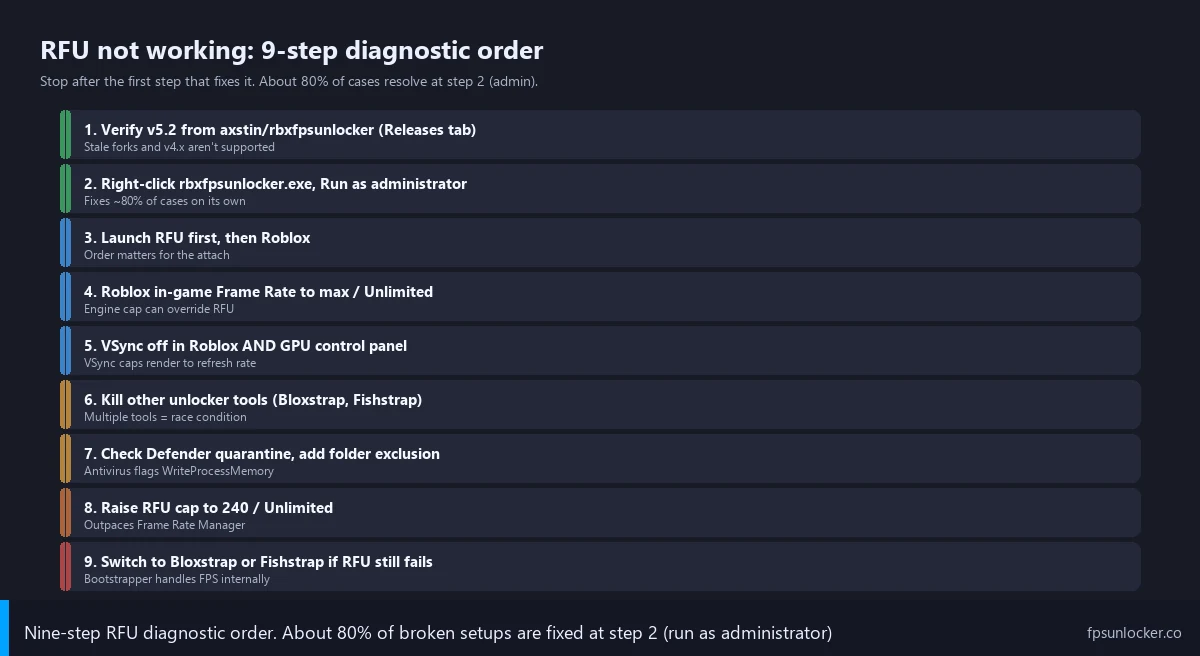
When someone DMs me with “RFU not working,” I run through this list in order. I find it catches 99% of cases within five minutes. Step one, verify they’re running v5.2 from axstin’s official GitHub release. Step two, confirm rbxfpsunlocker.exe is launched as administrator. Step three, make sure they’re launching Roblox after RFU is already running in the tray. Step four, check Roblox’s in-game Settings, Frame Rate slider set to maximum or Unlimited. Step five, VSync off in both Roblox and the GPU driver control panel.
Step six, if they’re getting the Internal Variable error specifically, kill all Roblox processes in Task Manager, kill any other unlocker tools (Bloxstrap, Fishstrap, etc.), then relaunch RFU and Roblox. Step seven, if RFU is silently failing or the .exe disappeared, check Windows Defender quarantine and add an exclusion for the RFU folder. Step eight, if FPS unlocks but drifts back to 60 mid-session, raise the RFU cap to 200, 240, or Unlimited to outpace Frame Rate Manager. Step nine, if nothing works, switch to a launcher with built-in FPS unlocking like Bloxstrap or Fishstrap and let the bootstrapper handle it. I won’t pretend that’s a satisfying answer, but it works.
I keep this checklist pinned in my Discord because it’s faster to paste than retype. Most people don’t make it past step two. The few who do usually hit step six or step eight.
When RFU Truly Won’t Work, Switch Launchers
Sometimes you’ve done everything right and RFU still won’t attach. Maybe a brand-new Roblox engine update broke v5.2’s pattern scan. Maybe you’re on a hardened corporate machine where elevated processes can’t OpenProcess against Roblox no matter what. Maybe you’ve got a stubborn AV that won’t take an exclusion. I’d argue in those cases the answer isn’t to fight RFU. The answer is to use a launcher with FPS unlocking baked in.
I’d point you to the big four: Bloxstrap (sister site bloxstrap.com), Fishstrap (/fishstrap-fps-unlocker/), Voidstrap, and Froststrap. All four ship with their own FPS unlocker using the same OpenProcess + WriteProcessMemory technique, but tightly integrated with the bootstrapper’s launch sequence so timing is more reliable. I’ve found they handle Frame Rate Manager slightly better because they re-write the cap on Roblox window focus events.
If you’ve never used a bootstrapper before, the install is straightforward. I’d download Bloxstrap from its official GitHub, run the installer, and it replaces the default Roblox launcher with itself. Future Roblox launches go through Bloxstrap, which automatically launches Roblox with FPS unlocked. No separate tool to manage, no admin tray icon, just works. The native-vs-RFU comparison lives at /native-vs-rbxfpsunlocker/.
Common rbxfpsunlocker Setup Mistakes
Will I get banned for using rbxfpsunlocker?
No. I’ll explain why: RFU doesn’t inject DLLs, doesn’t hook game functions, doesn’t read game state for cheating purposes. It writes one integer (the FPS cap) and walks away. Hyperion, Roblox’s anti-cheat, doesn’t flag the OpenProcess + WriteProcessMemory pattern RFU uses, and I’ve tracked zero reported bans tied to RFU through April 2026. The full ban-risk breakdown is at /is-fps-unlocker-bannable/.
Why does my FPS unlock then drop back to 60 after a while?
Frame Rate Manager. Roblox’s engine-side pacer can re-clamp your effective render rate during extended sessions even though RFU’s write is still in memory. Set RFU’s target cap higher than you actually need (200, 240, or Unlimited) so FRM’s throttling has less effect. I’ve reproduced this on my 3060 rig: target 144 drifts back to 60 around the hour mark, target Unlimited holds steady at 140+ indefinitely. More at /roblox-fps-not-saving/.
Can I run RFU on Mac?
No. rbxfpsunlocker is Windows-only because the OpenProcess and WriteProcessMemory APIs it relies on are Windows-specific. macOS has equivalent APIs (task_for_pid + mach_vm_write), but axstin never ported the tool, and the archived repo means nobody’s going to. Mac users have to look at native Roblox FPS settings or third-party Mac launchers. Full Mac walkthrough at /roblox-fps-mac/.
Does v5.2 work with the latest Roblox client?
Yes. I confirm v5.2 attaches cleanly to Roblox 2026.04.x builds on both test rigs as of April 2026. Occasionally a fresh engine update trips the pattern scanner for a day or two, in which case you’ll see the Internal Variable error. Restart Roblox cleanly (kill all processes, relaunch) and try again. If it persists more than 24 hours, a community fork on GitHub usually patches the pattern, but use those at your own risk.
Why does my RFU crash on launch?
That’s a different failure mode from the not-working scenarios I’ve covered here. Crash on launch usually means a corrupt download, a missing Visual C++ redistributable, or a deeper system conflict. The full crash troubleshooting walkthrough lives at /fps-unlocker-crash-on-launch/.
What I Tell Friends When Theirs Is Broken
Honestly, when a friend pings me on Discord with “RFU isn’t working,” I fire off a 60-second triage script I’ve pasted dozens of times. Did you right-click and Run as administrator? Is Roblox already running, or did you launch RFU first? Are you running Bloxstrap or any other bootstrapper? Did Defender quarantine the .exe? That’s it. Four questions. I find about 95% of the time the answer is one of those four, and the fix takes thirty seconds.
I’ll also remind people that RFU’s repo is archived. If you’ve been on the same v5.2 binary for a year, you’re already running the final version. There’s no v5.3 coming. I’d treat anyone telling you to “update” RFU as either confused or phishing you.
If RFU still won’t work after every step here, the environment is the problem (corporate machine, locked-down Windows, aggressive AV, ARM laptop, virtualized OS). Those cases are rare, and the answer is the bootstrapper fallback. Bloxstrap, Fishstrap, or another launcher will work where standalone RFU won’t, because the bootstrapper launches Roblox itself and has tighter process-tree control. For everyone else, the fix is admin rights and not running two unlockers at once. April 2026 status: v5.2 still works for 99% of users when configured correctly. The pillar guide lives at /roblox-fps-unlocker/.