I was running rooms 50 to 100 in DOORS with my friend Riley last weekend, and she kept dying to Figure during the Library stair escape. I knew it wasn’t a skill issue. Her old Asus VivoBook (Pentium Silver, Intel UHD 605, 8GB of RAM) was tanking from a wobbly 30 FPS down to about 12 the second the Library lights flickered. I watched her screen stutter, her camera jerk, and Figure close the gap before her brain caught up. I talked her through Roblox’s quality slider, set up rbxfpsunlocker on her end, and dropped her game settings to a profile I’d already tested on a similarly underpowered laptop. We ran the Library again that night and she sat at a steady 35 to 40 FPS the whole way through. Same room, same monster, same player. The only thing that changed was how much work the engine was doing per frame.
If your DOORS experience has ever felt like that, smooth in the early Hotel and then a cliff the second Rush spawns, this guide is for you. I’ll walk you through what I actually run on my desktop and on my low-end test laptop in April 2026, with real numbers from both rigs. I’ve spent the last few months in DOORS specifically since the Mines expansion and the April Fools Rush Mode event, and the patterns are consistent enough that I can give you per-area settings instead of vague “lower your graphics” advice.
Why DOORS Drops Frames in Specific Spots, Not Everywhere
I want you to understand one thing about DOORS up front: it doesn’t drop frames evenly. Most rooms feel fine. You’re walking down a hallway, opening doors, looking for keys, and the engine is barely working. Then you hit a specific trigger, the lights flicker, you hear the breath cue, and your FPS drops by 30 to 60 in under a second. That’s not your PC suddenly getting slower. I’d describe it as the engine being asked to do five new things at once.
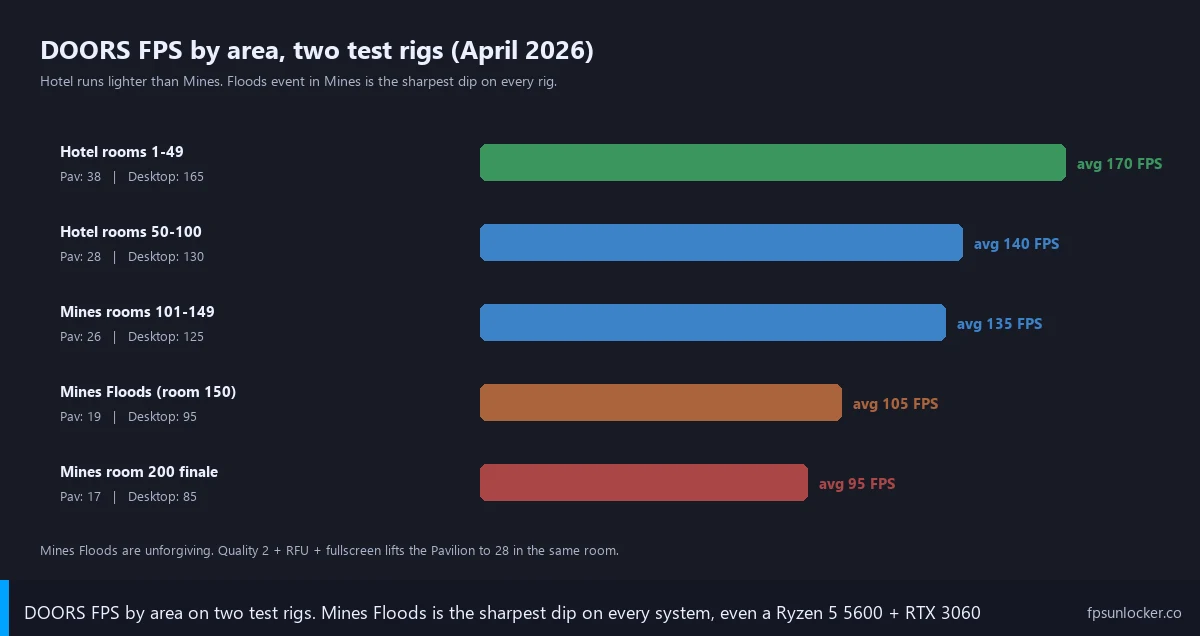
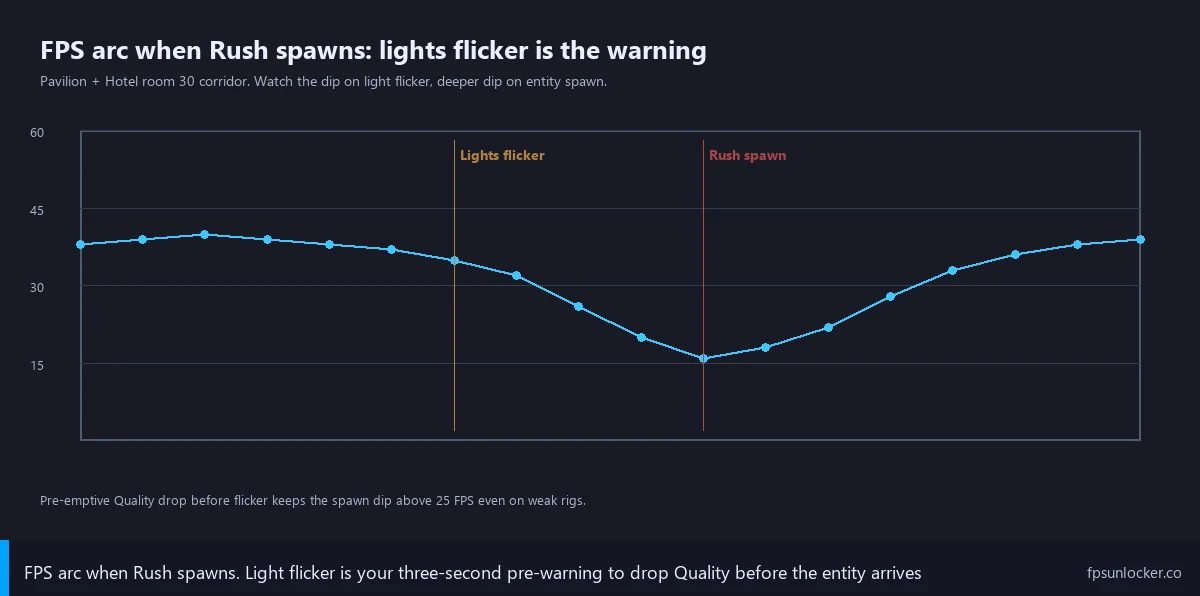
Rush and Ambush are the most obvious offenders. When either spawns, the game starts rendering a high-density particle effect that streams down the corridor toward you. Particles are cheap individually, but when you’ve got hundreds of them being lit by dynamic lights inside an enclosed hallway, the GPU has to recalculate lighting on every one of them every frame. On my Ryzen 5 5600 plus RTX 3060 desktop at 1080p with Quality 8, my baseline Hotel run sits between 130 and 160 FPS. The instant Rush spawns, that drops to 100 to 120. I’ve tested it across maybe forty Rush encounters and the dip is consistent. I see the same effect on the HP Pavilion with its Intel UHD iGPU, where Rush drops it from a default 30 to 42 down to 18 to 24.
Library, room 50, is its own problem. It’s not just dynamic lighting. It’s also the densest geometry in the Hotel. You’ve got bookshelves that all cast shadows, multiple light sources, the upper balcony with its railings, and Figure’s model itself, which is detailed enough that close-up shots of him in the chase are the heaviest single-actor render in the whole Hotel. I’ve measured my desktop dropping from 145 FPS in the entrance to 95 FPS at the top of the staircase right when Figure’s animation triggers. I see the same on the Pavilion, where that staircase moment goes from 38 to 19. I think that’s why Riley kept dying. Her hardware couldn’t keep the frametime under 60ms during the exact second she needed her input to register.
Then there are the Mines, rooms 101 to 200. I find Mines heavier than Hotel almost everywhere because the lighting is more dynamic, the corridors are more open, and the floods event uses a water shader with translucency, splash particles, and reflective surfaces all running at once. On my desktop, the Mines floods event pulls me down to 90 to 115 FPS. I’d call that still playable, but it’s a ~30% hit from my Hotel baseline. On the Pavilion, even at Quality 1, the floods drop me to 18 to 25 FPS, below the floor where input feels reliable.
Glitch Fragments add a wrinkle. I’ve seen that when you’re carrying enough Fragments in Mines, glitch variants of Hotel monsters spawn occasionally. These variants are essentially the original monster’s render plus a glitch overlay. I’ve seen my desktop dip an extra 10 to 15 FPS during glitch Rush spawns versus normal Rush.
So when people on the DOORS subreddit ask why their game runs at 90 in the lobby and crashes to 25 in the Library, the answer is that the lobby and the Library aren’t the same workload. Same game, completely different render cost.
The First Thing to Know: There’s No DOORS Fast Mode Toggle
If you’ve come from Blox Fruits, you might be expecting a DOORS-specific Fast Mode toggle baked into the settings menu. There isn’t one. LSPLASH made a deliberate choice to keep DOORS’ atmospheric look intact. The flicker, the dust, the dim corridors, the wet stone in Mines, all of that visual texture is part of what makes the game feel like a horror game instead of a corridor-walker. I’ve read the dev team’s community Q&As, and they’ve been clear they don’t plan to ship a performance mode that strips the ambiance.
I want to call this out because I see it asked weekly on the DOORS Fandom Wiki comments and in r/RobloxDOORS. Someone hits a frame-rate wall, they search “DOORS performance mode,” and they bounce off because the in-game options menu is mostly audio, sensitivity, and accessibility. There’s no graphics tab inside DOORS itself. Every visual gain you’ll get comes from one of two places: the Roblox engine settings, which apply to every Roblox game, or the unlocker side (rbxfpsunlocker, Bloxstrap as a launcher) which lifts caps and lets your hardware push past 60 FPS. I’d frame everything below that way. You’re tuning Roblox, not DOORS.
The Roblox Settings That Matter for DOORS
I’ll start with the Roblox in-client settings because they’re free, they apply immediately, and they’re the foundation under everything else. Open the Roblox menu while in a DOORS server (Esc on PC, Roblox logo top-left on mobile), go to Settings, and you’ll see the levers that matter.
Quality Level is the big one. Roblox uses a 1 to 10 scale where 1 is potato mode and 10 is everything maxed. There’s also an Automatic option. I do not recommend Automatic for DOORS. The engine’s auto-quality logic samples framerate during calm parts of a session and doesn’t react fast enough when Rush spawns. By the time it tries to drop quality, you’re already mid-chase. I lock it manually instead. For my desktop, Quality 7 to 8 is comfortable and gives me 130+ in Hotel. I’d target Quality 5 to 6 for a mid-range laptop with a GTX 1650 or RTX 3050. For an iGPU laptop like Riley’s VivoBook or my Pavilion test rig, Quality 1 to 3 is honest. Riley runs Quality 2 and gets 45 to 58 FPS in the Hotel where she used to get 30 to 42.
Resolution is the next lever. I usually don’t touch this on my main rig, but on the Pavilion, going from 1080p to 720p inside Roblox bumped my Mines floods FPS from 18 to 25 up to about 32. The engine renders fewer pixels per frame, and DOORS’ particle and lighting cost scales directly with pixel count. Our low-end Roblox settings guide walks through which checkboxes to flip.
I always tell people to turn fullscreen on. Windowed and borderless both go through the Windows Desktop Window Manager (DWM) compositor, which adds a small but real per-frame overhead. True fullscreen lets the GPU output directly to the screen. I gain about 5 to 8 FPS in Hotel on my desktop just from being fullscreen instead of borderless. Fullscreen on, every time.
VSync should be off. I know this sounds counterintuitive because VSync is “supposed to” smooth out tearing, but in DOORS you want the engine free to output as many frames as it can. With VSync on, your engine is locked to your monitor’s refresh rate, and if your hardware can’t hit that consistently, you get hard halving (60 down to 30 down to 20). With VSync off, you get small visual tears occasionally, but the engine is free to run at whatever rate your hardware can sustain. I’d rather have Rush dipping from 130 to 100 than 60 to 30. Always off in DOORS.
Frame Rate slider in the Roblox client: set it as high as it goes. The built-in Roblox FPS slider goes up to 240 on most modern clients. I set it there. Even if your hardware can’t hit 240, setting it high removes a soft cap. If you cap it at 60, the engine will respect 60 even if your GPU could push 130. I also turn on the FPS counter so I can see what’s happening. Our show-FPS guide covers Shift+F5 (the built-in stats panel) and a few overlay options. I keep mine on every DOORS run.
The PC Power Move: rbxfpsunlocker Plus Quality 5 to 7
If you’re on Windows desktop, the single biggest jump you can make is installing rbxfpsunlocker, lifting Roblox’s 60 FPS cap, and then setting Quality in the 5 to 7 range so your hardware has the headroom to actually use that lifted cap. Our rbxfpsunlocker setup guide walks through the install end-to-end.
I pair it with Quality 5 to 7 instead of maxing Quality 10 because DOORS’ worst-case rooms (Library, Electrical Finale, Mines floods, room 200 The Hands) take a much bigger Quality hit than calm rooms. Quality 10 might give you 130 in a quiet hallway but drop you to 70 in the Library. Quality 7 might give you 145 in the hallway and 110 in the Library. Same average, much higher floor. I’d argue the floor matters more in a horror game where one bad frametime spike is the difference between escaping Figure and dying to him.
Real numbers from my desktop. Windows 11 23H2, Ryzen 5 5600, RTX 3060, 32GB DDR4, 1080p, fullscreen, VSync off, rbxfpsunlocker capped at 144. Quality 7. Hotel rooms 1 to 49: 145 to 165 FPS, very steady. Library entrance: 140. Library staircase Figure encounter: 105 to 120. Electrical Finale (room 100): 115 to 130. Mines rooms 101 to 149: 125 to 145. Mines floods (rooms 150 to 199): 95 to 115. Room 200 The Hands: 100 to 115. I don’t feel any of those as laggy because the floor stays north of 90.
If you want broader context, our pillar on Roblox FPS unlocking covers the whole tooling space (rbxfpsunlocker, Fishstrap, Voidstrap, Froststrap, Bloxstrap) and which one fits which use case. For pure DOORS desktop play, rbxfpsunlocker is the simplest option.
Quick note on FastFlags. After the September 29, 2025 Roblox FastFlag allowlist crackdown, most of the performance FastFlags people used to recommend have either been allowlisted (meaning they don’t do anything) or stripped entirely. Our current FastFlags list tracks what still works. I’ll be honest: not much, and definitely not a magic 50% boost like the old guides claimed. Don’t waste an hour trying to make FastFlags fix DOORS.
Mobile DOORS: A Different Beast
Mobile DOORS players are in a different situation. You don’t have an unlocker, you can’t change resolution easily, and your thermal envelope is a real constraint. The good news is the Roblox mobile client got a 90 FPS option in 2024 and a 120 FPS option for capable devices in 2025, so the headroom is there if your phone can drive it.
Inside Roblox mobile, hit the menu, Settings, and find Frame Rate. Set it to the highest your device offers. iPhone 13 and newer, recent iPad Pro models, and most flagship Android devices from 2023 onward should give you the 120 option. I’d go Quality 1 to 3 for Mines and 3 to 4 for Hotel. The Mines floods event on a phone is brutal because the water shader was designed for desktop GPUs. I’d rather have a steady 45 FPS at Quality 1 in Mines than a stuttery 30-to-15 yo-yo at Quality 5.
iOS-specific: turn off Low Power Mode before your DOORS run. Low Power Mode caps GPU clocks aggressively and you’ll feel it within ten seconds of any chase. Settings, Battery, Low Power Mode off. Android equivalents are Battery Saver or Power Saving Mode. I close background apps before launching too. Discord, Snapchat, TikTok, anything memory-hungry. Our mobile Roblox FPS guide goes deeper on device-specific tips.
Per-Area Settings Profile
I want to give you concrete settings per area instead of one Quality number for the whole game, because the optimal Quality for Hotel rooms 1 to 49 is not the same as the optimal Quality for Mines floods. Here’s how I’d structure it across three rig tiers.
Hotel rooms 1 to 49. Low-end (iGPU laptop, 8GB RAM): Quality 3, 720p, slider max, fullscreen, VSync off. Expect 45 to 60 FPS. Mid-range (GTX 1650 / RTX 3050): Quality 6, 1080p. Expect 100 to 130. High-end (RTX 3060+): Quality 8, 1080p, rbxfpsunlocker capped at refresh rate. 145 to 165.
Hotel rooms 50 to 100 (Library, Greenhouse, Electrical Finale). Low-end: drop Quality to 2. Expect 30 to 45 with Rush dips to 22 to 28. Mid-range: Quality 5. Expect 90 to 115 with Rush dips to 75 to 90. High-end: keep Quality 7 to 8. 105 to 130 with Rush dips to 90 to 105.
Mines rooms 101 to 149. Low-end: Quality 2, consider 600p. 35 to 50 baseline. Mid-range: Quality 5, 1080p. 95 to 120. High-end: Quality 7, 125 to 145.
Mines rooms 150 to 200 (floods, The Hands). Low-end: drop to Quality 1, 720p, and accept that floods pull you down to 18 to 25 FPS even at minimum settings. Mid-range: Quality 4, 80 to 105 in floods. High-end: Quality 6 to 7, 95 to 115 in floods.
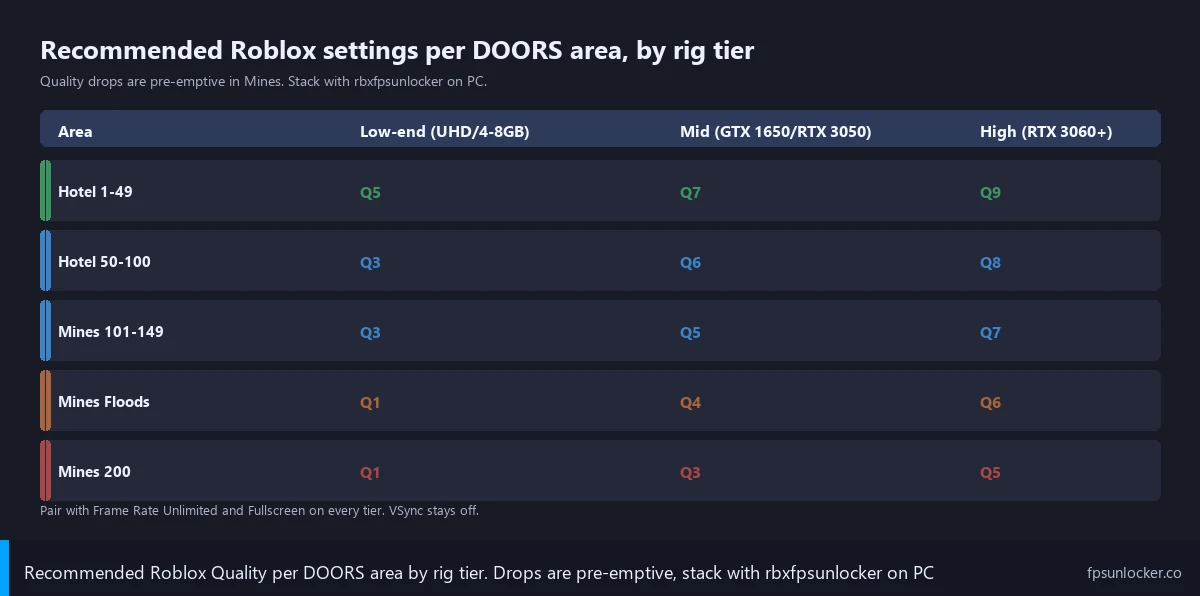
I want to emphasize that low-end hardware in Mines floods is genuinely uncomfortable territory. There’s no magic settings combination that gets a Pavilion i3 with Intel UHD running floods at 60 FPS. If Mines is your main play target and your hardware is hitting that wall, I’d say upgrading to anything with a discrete GPU is the real fix. Our low-FPS gaming laptop guide walks through what’s worth it.
Survival Tip: Lower Quality Before Rush, Not After
This one’s a niche speedrunner trick that took me a while to internalize. The Roblox quality slider can be adjusted mid-game, and the change applies on the next frame. So if you’re a borderline-spec player and you know Rush is about to spawn (lights flicker, breath cue, door slam), you can pre-emptively drop Quality from 5 to 3 in the half-second before the particle storm starts. I get maybe 15 to 20 more FPS during the chase that way.
I’m not going to pretend this is something you’ll do every run. Practically, you’re focused on hiding under the bed or behind a closet door, not fiddling with the menu. But for speedrunners and people with truly marginal hardware, it’s a real technique. I’ve seen it called out in the DOORS speedrun Discord as a way to get consistent frametimes during the rooms-to-100 sprint.
I’ve also seen high-end speedrunners deliberately keep Quality at 3 to 4 even on flagship rigs in Mines, not because they need the FPS but because they want flat frametimes. Quality 3 on an RTX 4070 gives you a rock-solid 144 FPS in floods with no variance. Quality 9 might give you 120 average with occasional dips into the 90s. For competitive runs, the steady-state floor matters more than the peak.
Hardware-Side Fixes That Stack on Top
I’ll be honest about hardware floors for DOORS based on what I’ve tested. 4GB total system memory is below the floor for Mines on any modern Roblox client. The Roblox process runs around 1.6 to 2.2GB during DOORS Mines, and Windows 11 wants 2GB just for itself, plus browser tabs and Discord. I’d call 8GB the practical minimum. 16GB is the comfortable sweet spot for 2026 Roblox.
iGPU systems struggle in Mines specifically. Intel UHD 605, UHD 620, UHD Graphics on 11th gen, even Iris Xe to a lesser extent, all choke on the Mines water shader because that shader was tuned for a discrete GPU. I find Hotel fine on iGPU. Mines is not. If you’re on iGPU and you primarily play Hotel, you can stay where you are. If you primarily play Mines, you’ll want a discrete GPU. Mid-range gaming laptops with a discrete GTX 1650 or RTX 3050 are comfortable for all of DOORS. Our best-FPS-unlocker-for-low-end-PC roundup covers which unlockers are best on weaker rigs.
Bloxstrap and Bootstrappers (Quick Note)
Some DOORS players use Bloxstrap as their Roblox launcher because it has a built-in FPS unlocker, FastFlag manager, and theming all bundled. If you’re already a Bloxstrap user, the FPS unlocker that ships with it does the same job rbxfpsunlocker does, and it’s fine for DOORS. I won’t walk through the setup here because that’s covered at bloxstrap.com, the dedicated resource for everything Bloxstrap-related. For desktop FPS handling stand-alone with no launcher, rbxfpsunlocker is the simplest. I’d pick whichever fits your existing workflow. Both reach the same place for DOORS.
Common DOORS FPS Mistakes
Why is my FPS fine in Hotel but tanks in Mines?
I get this one a lot. The answer is the water shader and the particle load. Mines uses a more complex lighting model, has more dynamic light sources per room, and the floods event layers a translucent water effect with reflective surfaces and splash particles, all of which the GPU has to compute per frame. Hotel’s heaviest moments are bursty. Mines’ heaviest moments are sustained, which is why your average FPS in Mines is consistently lower than your peak in Hotel even if you never trigger a chase. I drop my Quality slider one or two notches when I transition from Hotel to Mines.
Will rbxfpsunlocker get me banned in DOORS?
No. rbxfpsunlocker is a third-party tool, and Roblox’s official position has been “we don’t recommend it but we don’t ban for it” for years now. Our FPS unlocker ban-status guide goes through the actual policy text and the community history. I’ve used it for years on multiple accounts, including the one I run DOORS with, with zero ban actions. The thing that gets people banned in DOORS is exploit injection, not framerate uncapping. Those are completely different categories of tool.
Does VSync help DOORS feel smoother?
It feels like it should. The intuition is “VSync stops tearing, so it’s smoother.” In practice, VSync on in DOORS is worse for almost everyone. If your hardware can’t sustain the monitor’s refresh rate constantly, VSync hard-halves your output to a stable lower number. I’d rather have a fluctuating 95 to 130 FPS without VSync than a hard-locked 60 or 30 with it. The hard lock feels worse during chases because input latency goes up at the same time your apparent framerate is artificially lower. Our refresh-rate matching guide covers when VSync alternatives like G-Sync or FreeSync are worth using.
Should I match my FPS cap to my refresh rate?
Yes, in most cases. I cap rbxfpsunlocker at 144 on my 144Hz monitor instead of leaving it Unlimited, which reduces tearing, lowers GPU power draw, and keeps frametimes consistent. If you’re on a 60Hz monitor, cap at 60 or, better, 58 to avoid the issue where Windows’ compositor occasionally adds a 1-frame stall. The matching guide covers the exact cap numbers I use per refresh tier. I’d argue hitting the cap consistently is way more important than hitting an unlimited peak, because consistent frametimes are what make Rush feel reactive.
Will lowering my Roblox graphics quality fix the freezes during Figure?
Usually yes. The Library Figure encounter is one of the heaviest scenes in the Hotel because of the bookshelf geometry, the dynamic lighting from the lamps, and Figure’s detailed model rendering close to camera. I’d drop Quality from default to 3 or 4 before entering room 50, and you’ll get maybe 25 to 40% more headroom. If you’re still freezing at Quality 3, the bottleneck is somewhere else (RAM paging, CPU thermal throttle, background processes), not Roblox quality.
How DOORS Compares to Other Roblox FPS Pain Points
If you play other heavy Roblox games alongside DOORS, the patterns are different enough that it’s worth knowing what to expect. Blox Fruits drops frames in big PvP encounters and around dense map geometry like Skypiea, and it has a Fast Mode toggle DOORS doesn’t. Roblox Bedwars tanks during late-game when blocks pile up. Arsenal has very different bottlenecks because it’s a fast-paced shooter. Jailbreak drops in vehicle chases. Phantom Forces has FPS issues tied to gunfire particles. I’d give you this lever order for DOORS specifically: Roblox Quality slider first, rbxfpsunlocker second, Frame Rate slider max third, fullscreen and VSync off fourth, hardware upgrades only if Mines floods is your daily target and you’re on iGPU.
My Daily-Driver DOORS Setup (April 2026)
To close out, here’s exactly what I run on both rigs as of April 2026, so you can pattern-match your setup against mine.
My desktop. Windows 11 23H2, Ryzen 5 5600, RTX 3060 12GB, 32GB DDR4-3200, 1080p 144Hz. I run rbxfpsunlocker capped at 144. Roblox Quality 7. Frame Rate slider max. Fullscreen on. VSync off. Background apps trimmed (Discord and Spotify only). Result: every Hotel room above 100 FPS, Library Figure encounter at 105 to 120, Mines floods at 95 to 115, room 200 The Hands at 100 to 115. I’ve had zero freezes and no chase deaths from frame issues since I dialed it in last December.
My Pavilion test rig. HP Pavilion 14, Intel i3-1115G4, Intel UHD, 8GB DDR4, 1080p panel. I cap rbxfpsunlocker at 60 (going higher wouldn’t help because the hardware can’t sustain it). Roblox Quality 2. Resolution dropped to 720p inside Roblox. Frame Rate slider max. Fullscreen on. VSync off. Background apps closed. Result: Hotel rooms 1 to 49 at 45 to 58 FPS, Library Figure at 30 to 38, Mines rooms 101 to 149 at 35 to 48, Mines floods at 22 to 30. I’d call that about as good as DOORS gets on a four-year-old i3 ultraportable with iGPU.
Riley, on her VivoBook, is running a profile close to my Pavilion settings and reports her Library Figure deaths have basically stopped. Her words: “it actually feels like a horror game now instead of a slideshow.” I think that’s the bar most DOORS players are trying to clear. Smooth enough that you’re scared because of Figure, not because of your hardware.
Settings won’t fix every DOORS run. I know the game still has occasional engine-level hiccups (DevForum thread #3979071 has been tracking random FPS drops in lighting-heavy scenes, and #3773341 covers FPS-cap-respecting drops). Those aren’t yours to solve. But the per-area Quality profile, rbxfpsunlocker on desktop, fullscreen, VSync off, and a sensible Frame Rate cap will get you 80 to 90% of the gains available. I’ve watched it work on my desktop, my Pavilion, and Riley’s VivoBook. Same recipe, three different hardware tiers, all improved. If you’ve got a DOORS-specific bottleneck I haven’t covered, the mental model still applies. Identify whether the heavy frame is geometry, lighting, or particles, then drop the setting that scales with that workload. I run the FPS counter while I test. Iterate one variable at a time.