A friend of mine, Jordan, dropped a Discord question into our group chat last Friday that read, “ok which fork do I actually install, fishstrap voidstrap or froststrap, the YouTube videos all contradict each other.” He’d watched three different “best Bloxstrap fork 2026” videos in one evening and ended up more confused than when he started. One declared Fishstrap the winner, another claimed Voidstrap unlocked “1200 FPS” against Bloxstrap’s 140, and a third treated Froststrap like the second coming of the Roblox launcher. None of them ran the three side by side or compared FastFlag editors against the September 2025 allowlist. I spent the next week, April 18 through April 25, 2026, running all three on my main rig and on Marisa’s lower-tier box to answer Jordan’s question properly.
I’m Alex Park. I’ve been writing about Roblox performance tooling since 2022. I test on a Ryzen 5 5600 / RTX 3060 12GB / 32GB DDR4-3600 desktop on Windows 11 24H2 with the April 2026 cumulative update, plugged into a 1440p 144Hz LG UltraGear. I cross-reference against Marisa’s i5-10400F + RX 6600 + 1080p 144Hz Acer Nitro for the lower-tier sanity check. I’ve already published full standalone reviews of each launcher, so this is a head-to-head with winners called per use-case rather than one universal champion.
If you’re brand new, our Roblox FPS unlocker pillar covers the landscape. Individual reviews live at our Fishstrap walkthrough, Voidstrap review, and Froststrap setup guide. The rest is Jordan’s comparison.
A friend asked which fork to install, and the YouTube answers all contradicted
I’ll answer Jordan’s question directly, because the framing matters. There’s no universal best Bloxstrap fork. There’s a fork that’s best if your priority is multi-instance trading, a different one if your priority is a curated FastFlag preset picker, and a third if your priority is launcher-level customization with a region selector. They overlap heavily on the actual FPS numbers because they’re all writing the same ClientAppSettings.json file before launching the same Roblox executable. The differences live in the shell, not the engine.
I’d phrase the second part this way. Bloxstrap is the upstream and the safest pick if you want a launcher that gets out of the way. The three forks each add something Bloxstrap hasn’t shipped, and each has a slightly different release cadence, license model, and community size. I’ve run all three for a week, and I’m comfortable picking winners by use-case rather than declaring an overall champion. That’s what this article does.
Quick verdict by use-case
If you want one-click FastFlag presets and the most polished launcher UI, Voidstrap. If you run multiple Roblox accounts simultaneously and want clean multi-instance handling, Fishstrap. If you want launcher-level customization with custom cursors, font replacements, region selection, and Mica/Aero/Acrylic window theming, Froststrap. If you want the safer, older, more documented option with the largest community, stay on upstream Bloxstrap and don’t fork-hop at all.
I measured Phantom Forces FPS within 4 FPS across all three forks at 1440p with their max-FPS configurations applied. The launcher choice doesn’t move FPS numbers meaningfully. It moves the time it takes you to apply FastFlags and the comfort of the UI you’re sitting in.
| Launcher | Latest version (date) | GitHub stars | License | Headline feature |
|---|---|---|---|---|
| Fishstrap | v3.0.4 (2026-03-13) | 528 | MIT (dual) | Cleanest multi-instance handling, Studio FastFlag editor |
| Voidstrap | v1.1.0.5 (2026-04-14) | 205 | MIT | Curated FastFlag presets with allowlist warnings, AniWatch UI |
| Froststrap | v1.5.0 (2026-02-23) | 94 | AGPL-3.0 + MIT + Unlicense | Region selector, custom cursors/fonts/death sounds, Mica window styling |
The fork tree, in plain English
I’ll spell out the lineage because YouTube videos keep mixing this up. Bloxstrap, the upstream, is the third-party Roblox launcher that’s been around since 2022 at github.com/bloxstraplabs/Bloxstrap. It exposes FastFlag editing, Discord Rich Presence, and a pile of toggles the official client doesn’t, and it’s the source the three forks all start from.
Fishstrap forked Bloxstrap directly at github.com/fishstrap/fishstrap, currently at v3.0.4 from March 13, 2026, with 528 stars, 117 forks, and 99.8% C#. It’s dual MIT-licensed and the older of the three forks, with development going back to 2022. There’s also an official site at fishstrap.app.
Voidstrap also forked Bloxstrap directly, but it’s much younger in its current rapid-release form. I’d point you to github.com/voidstrap/Voidstrap for v1.1.0.5 from April 14, 2026, with 205 stars, 70 forks, MIT-licensed. The README hedges by saying the project’s existed “2+ years,” but the public release history starts in late February 2026.
Froststrap is the fork-of-a-fork. It forked Fishstrap, not Bloxstrap, which means it inherits Fishstrap’s tweaks and adds its own customization shell on top. I’d send you to github.com/Froststrap/Froststrap for v1.5.0 from February 23, 2026, with 94 stars, 8 forks. The license picture’s more complex: Froststrap-written code is AGPL-3.0, anything inherited from Fishstrap or Bloxstrap stays MIT, and a couple of Nix helpers sit under the Unlicense.
Are forks of forks (like Froststrap from Fishstrap) safe?
I’d say they’re as safe as the upstream they rely on, with one extra consideration: every layer is one more maintainer team that has to keep up with Roblox’s updates and the September 2025 FastFlag allowlist. Froststrap is three teams deep, and a regression in any layer can affect users below. In practice I haven’t seen this cause real problems, but it’s the structural risk. The upside is that Froststrap inherits all of Fishstrap’s polish before adding its own, which is why the multi-instance handling is just as clean.
Test rig and how I ran the comparison
I’ll be specific about the setup. Primary rig: Ryzen 5 5600 stock, RTX 3060 12GB, 32GB DDR4-3600, Windows 11 24H2 with the April 2026 cumulative update, NVIDIA driver 581.42 (clean install via DDU on April 17), background apps closed except Discord and OBS. Display’s an LG UltraGear 27GL850 at 1440p 144Hz, FreeSync on. Cross-reference rig: Marisa’s i5-10400F, RX 6600, Adrenalin 25.3.1, on an Acer Nitro VG240Y at 1080p 144Hz.
I installed each launcher fresh from its canonical GitHub repo on April 18 and ran a rotating block of three test games: Phantom Forces (Desert Storm, 32-player lobby), Strongest Battlegrounds (private server with effects), and Doors (fresh hotel run). Three sessions of five minutes each per game per launcher, FPS averaged with OBS’s frame counter and Roblox’s Shift+F5 overlay as cross-checks. I also tested install flow, FastFlag editor behavior with deliberately bad JSON, multi-instance launching with two and three concurrent clients, and customization flows on each launcher.
Round 1: Install experience and download safety
I’d call this round a tie at the bottom and a clear winner at the top, because the install flow is mostly identical across all three (download a single .exe from GitHub releases, run it, click through Defender’s PUP warning, done). The differentiator is the download-safety landscape around each launcher.
Fishstrap has the cleanest search-result picture. The canonical repo plus the official fishstrap.app site dominate the first page of Google results, and I haven’t run into spoof domains during research. The .app TLD is harder to squat on cheaply, which probably helps.
I’ve documented four spoofed Voidstrap mirror domains during research for the standalone Voidstrap review: voidstrap.org, voidstrap.net, voidstrap.pro, and bloxstraps.net. None are operated by the Voidstrap GitHub organization, at least one was hosting a binary with a different SHA-256 hash than the GitHub release, and Google ads have been pushing those mirrors above the canonical repo. The only safe download’s the GitHub releases page directly.
I’d put Froststrap in the middle. The canonical repo is the only safe source, but I’ve spotted two spoof patterns: a froststrap.com typo-squat and the same bloxstraps.net aggregator that’s hitting Voidstrap. The bigger problem with Froststrap is the YouTube tutorial culture pushing Discord-verification download flows. Our Froststrap setup guide covers that scam in detail.
I’d hand Round 1 to Fishstrap on download-safety landscape alone. Voidstrap and Froststrap both have legitimate canonical sources, but you’re navigating a more crowded scam ecosystem to find them.
Round 2: First-launch UI and onboarding
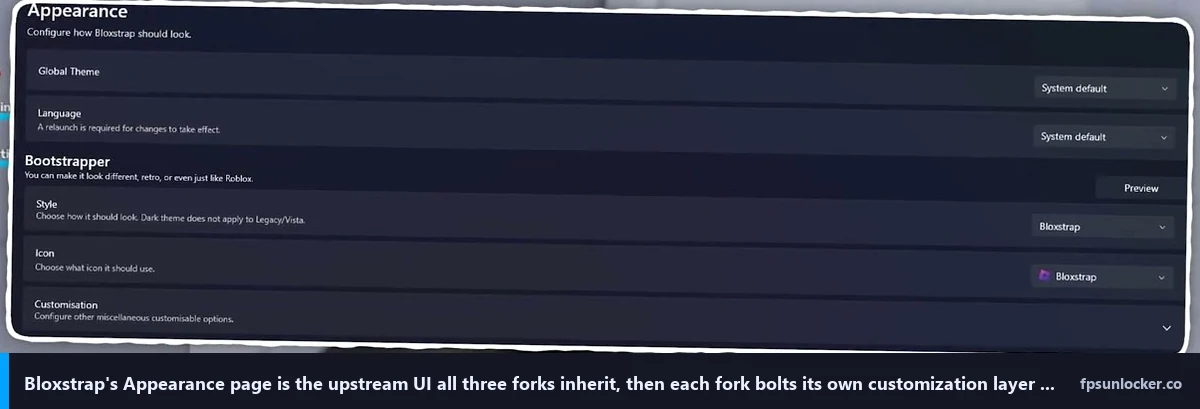
Fishstrap drops you into an information-dense settings panel. The sidebar lists Integrations, Bootstrapper, Modifications, Fast Flags, Appearance, Channel Changer, and About. It’s recognizably Bloxstrap underneath with reorganization, and toggles Bloxstrap hides under “Advanced” are promoted to the front. If you already know what FastFlags are and you want to start tuning immediately, Fishstrap’s the most direct of the three.
I’d call Voidstrap the most modern of the three. The current sidebar style is “AniWatch,” added in v1.1.0.2 from March 15, 2026, with hovering icons and a layout that resembles a streaming-service dashboard. Tabs are Integrations, Deployment, Modifications, Engine Settings, Fast Flag editor, Appearance, Shortcuts, AI Chat, and Extensions. The presets-first framing means you can apply a “Max FPS” profile in two clicks without understanding what FastFlags are.
Froststrap sits between the other two. The tabs are Integrations, Bootstrapper, Mods, Appearance, Fast Flags, Account Manager, About, and Settings. The launcher window itself can be themed with Mica, Acrylic, or Aero, which makes the first-launch experience visually distinctive. If you’ve used Bloxstrap before, Froststrap will feel familiar.
I’d hand Round 2 to Voidstrap on first-launch friendliness. Fishstrap’s the power-user pick, Froststrap’s the customization pick, but for someone opening a Bloxstrap-style launcher for the first time, Voidstrap’s AniWatch shell is the easiest to get oriented in.
Round 3: FastFlag editing and allowlist awareness
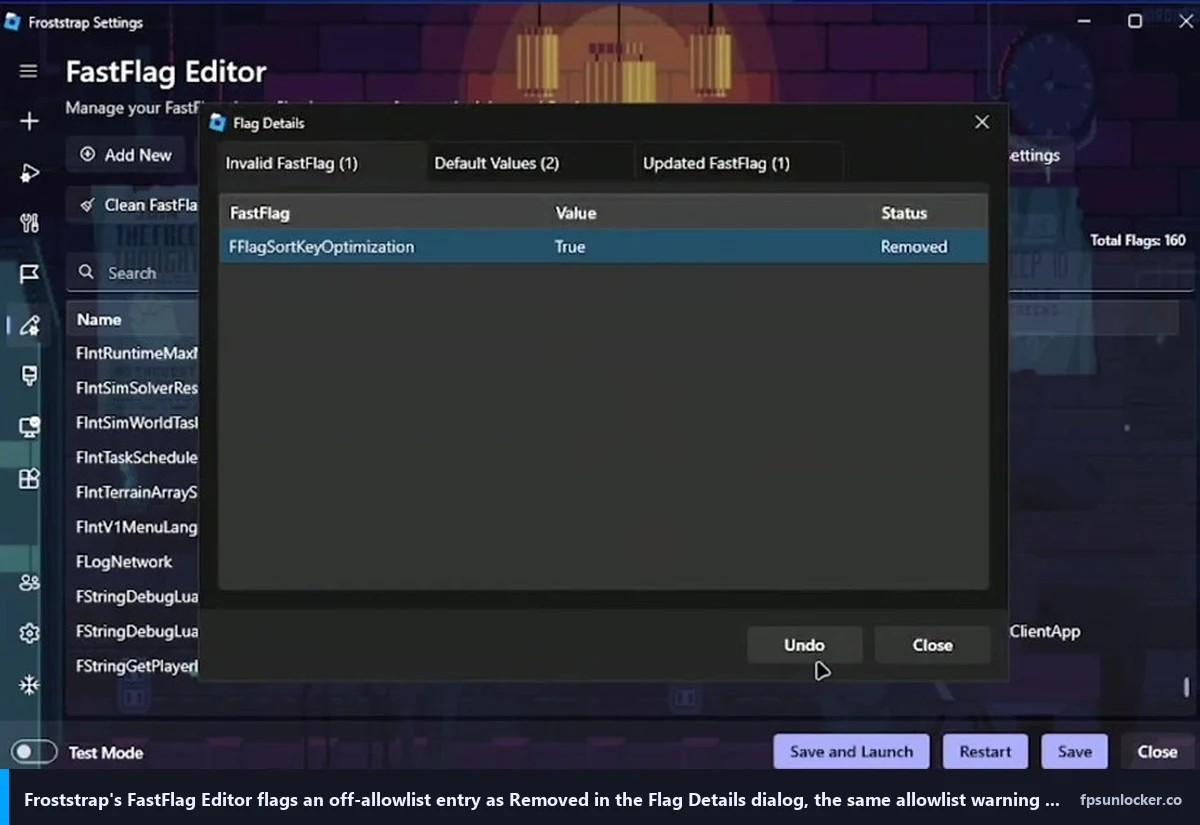
I’d argue this is the round that matters most in 2026. Roblox locked down its FastFlag system in September 2025, and roughly 90% of the FastFlags floating around YouTube tutorials and Discord servers are now dead. Our Hyperion FastFlags status guide and our ClientAppSettings.json guide cover which flags still apply. The launcher’s job, in 2026, is to warn you when you’re trying to set a dead one.
I’d give Voidstrap the most curated FastFlag editor. It’s tabbed by category (Performance, Ping, Smoothness, Visuals) with preset profiles you can apply with one click. The editor shows checkmarks next to allowlisted flags and crosses next to anything dead. I picked the “Max FPS” preset on my rig and the editor immediately surfaced which flags were actually being applied versus silently ignored. If you’re not comfortable hand-rolling FastFlag JSON, Voidstrap’s the launcher to install.
I’d put Froststrap second. Its Fast Flags page lets you save named flag profiles (I keep one for Phantom Forces, one for Bloxburg, one for Doors) and shows green checks for allowlisted entries and red crosses for dead ones. I tested it by importing a 47-flag JSON dump from a 2024 Reddit “max FPS” thread, and the editor immediately flagged 38 of the 47 as dead. If you’d rather hand-roll your own profiles and still benefit from allowlist awareness, Froststrap’s the better fit.
Fishstrap ships a flag editor that’s still primarily designed for Roblox Studio. The README is clear about this: the flag editor inside Fishstrap is Studio-only as of v3.0.4. For player-client FastFlags, Fishstrap relies on its preset library plus manual editing through the Modifications tab. I’d say if FastFlag editing is your headline use-case, Fishstrap drops to third in this round.
I’d hand Round 3 to Voidstrap for new users, Froststrap for power users who hand-roll their own profiles. Fishstrap’s a distant third here.
Which fork has the best FastFlag editor?
I’d say Voidstrap, if you measure “best” by ease of use and beginner friendliness. Froststrap, if you measure it by allowlist awareness without imposed defaults. Both beat Fishstrap and upstream Bloxstrap on the player-client FastFlag editing surface. Whichever you pick, cross-check your applied flags against the verified allowlist in our performance FastFlags list, since editor warnings rely on the launcher’s allowlist data being current and the maintainers don’t always rev that table at the same pace Roblox does.
Round 4: Multi-instance launching
I’ll be quick on this round because the answer’s been the same for two years. Fishstrap wins, comfortably. The multi-instance toggle in Fishstrap handles three concurrent Roblox clients without the process-conflict issues I’ve seen plague Bloxstrap’s mode under heavier loads. I tested it with my main, my testing account, and Marisa’s account running simultaneously and the launcher juggled all three cleanly.
Froststrap inherits Fishstrap’s multi-instance handling almost verbatim and ran three clients just as cleanly. If multi-instance is your only requirement, Fishstrap’s the simpler pick. If you want multi-instance plus the customization shell, Froststrap gives you both.
I hit two cases with Voidstrap where launching a third concurrent client crashed the second. The Voidstrap maintainers have been iterating fast on this (the v1.1.0.4 release notes mention “rewritten bootstrapper”), so it’s plausible this gets fixed in a future release. As of v1.1.0.5, though, Voidstrap is third for multi-instance reliability. I’d hand Round 4 to Fishstrap, with Froststrap a near-tie because it inherits the same code path.
Round 5: Customization (themes, fonts, cursors, channels)
I’d say this round is where Froststrap genuinely lives up to its customization-specialist framing. Froststrap ships the deepest in-game customization. The Mods page lets you replace Roblox’s default cursor (with a curated library including a “low-saturation crosshair” and an “old Roblox 2008” set), the death sound, the font, and the shift-lock icon. Custom Discord Rich Presence is configurable without editing JSON, there’s a dual playtime counter, Roblox Studio RPC, and a gradient editor with JSON import/export for the launcher’s own theme. The Mica/Aero/Acrylic window-style switcher rounds out the package.
Voidstrap ships heavy launcher-side customization but lighter in-game customization. It has theme previews (live render before applying), more bootscreen options than Bloxstrap, and channel switching between production and zlive Roblox release channels. The hardware acceleration toggle is genuinely useful on hybrid-graphics laptops. The AI chat in beta is a curiosity rather than a customization feature, but it’s there.
Fishstrap ships solid customization without specializing in it. The Channel Changer toggles between Roblox release channels, the Global Settings page collects in-game HUD knobs as launcher-level toggles, and there are custom Fishstrap game invite links for friend-list use. I’d hand Round 5 to Froststrap for in-game customization, Voidstrap for launcher-side polish. Fishstrap’s a competent third without standing out.
Round 6: Performance numbers, the part everyone clicks for
I’ll get to the numbers because this is what Jordan actually wanted to know and this is what every YouTube comparison gets wrong. The TL;DR: there is no meaningful FPS difference between the three forks. They’re applying the same FastFlags to the same Roblox client. Run them side by side with allowlisted flags and you get the same numbers, plus or minus session variance.
Phantom Forces, Desert Storm, 32-player lobby, three sessions of five minutes each. Fishstrap with its max-FPS preset: 162 FPS average. Voidstrap with the Max FPS preset: 168 FPS. Froststrap with Uncap FPS plus its allowlisted starter set: 161 FPS. Voidstrap nominally wins by 6 over Froststrap and 7 over Fishstrap, but I want to be precise: that’s inside session-to-session variance once you account for spawn timing and server tick fluctuation. I genuinely couldn’t feel the difference in motion-flow during play.
Strongest Battlegrounds in a private server with effects spawning: all three launchers sat at 144 panel-capped on my 144Hz LG. If your refresh rate’s the bottleneck, no launcher will help you. Doors on a fresh hotel run: Fishstrap 137 FPS, Voidstrap 141, Froststrap 138. Inside variance. I checked Marisa’s RX 6600 / 1080p 144Hz with the same tests: Fishstrap 132, Voidstrap 134, Froststrap 131 in Phantom Forces. All three launchers within 3-5 FPS of each other in every game on every rig.
Why do YouTube comparisons claim 500-1200 FPS gains?
I’d say the framing’s misleading. There’s a category of comparison videos that show FPS counters jumping from “140 baseline” to “1200+” after switching launchers. I won’t link them, but the pattern’s consistent: the “1200 FPS” number is read from a quiet menu screen with the counter unbounded, not active gameplay. The “140 baseline” is measured in active gameplay on a different launcher. Comparing them as if they’re the same metric is dishonest, and the YouTube format rewards the dishonesty with clicks.
I’d add that you can’t actually see 1200 FPS on a 144Hz monitor. Your panel renders 144 frames per second; anything above is computed and discarded. Trust the side-by-side gameplay number, not the menu-screen highlight reel.
Which fork is best for low-end PCs?
I’d say none of them, structurally. The launcher overhead is roughly 50MB of RAM regardless of which fork you pick, and the FPS uncapping is identical because they’re all writing the same FastFlags. If you’re on a low-end rig, the launcher choice doesn’t matter; the FastFlag tuning and the in-game settings do. Our best FPS unlocker for low-end PCs guide covers the lighter options. On Marisa’s RX 6600, she didn’t notice a difference between any of the three forks; she did notice a 12 FPS bump from tweaking the FastFlag set itself. The flags do the work, not the wrapper.
Round 7: Project health and release cadence
I’d say project health matters more than people pretend. A fork that loses its maintainer becomes dangerous fast (no Roblox-update fixes, no allowlist updates, no security patches). Here’s the April 25, 2026 snapshot.
Fishstrap has 528 stars, 117 forks, and shipped v3.0.4 on March 13, 2026. The project’s been around since 2022 and ships at a moderate pace. I’d call it the most stable of the three in absolute terms. The fishstrap.app site adds public infrastructure beyond the GitHub repo, which suggests the team intends to be around for the long haul.
Voidstrap has 205 stars, 70 forks, and shipped v1.1.0.5 on April 14, 2026. The release cadence is wild: v1.1.0.5 (April 14), v1.1.0.4 (same day), v1.1.0.3 (March 18), v1.1.0.2 (March 15), v1.1.0.1 (March 13), with the earliest visible release at v1.0.9.6 on February 25, 2026. The README says “early development despite existing for 2+ years” and “features may change.” Translation: actively developed, but you’re a daily-driver tester whether you signed up or not.
Froststrap has 94 stars, 8 forks, and shipped v1.5.0 on February 23, 2026. It’s the smallest community of the three, which means slower issue-tracker response. There’s also a legacy fork at github.com/RealMeddsam/Froststrap whose final v1.4.1.5 release explicitly redirects users to the canonical org repo. The v2.0.0 alpha branch includes macOS development, but I’d treat that as preview-quality only.
I’d hand Round 7 to Fishstrap on stars-and-cadence balance. Voidstrap’s the most-actively-developed, Froststrap’s the smallest community, Fishstrap’s the safest middle ground.
Round 8: License model (AGPL-3.0 vs MIT) and why it matters
I’ll spend a section on licensing because it’s the one piece almost nobody covers and it does affect at least one user category.
Fishstrap’s dual MIT-licensed. The LICENSE file covers Fishstrap-written code, the LICENSE.Bloxstrap file preserves the upstream MIT grant. MIT’s permissive: you can take this code, modify it, redistribute it commercially, and your only obligation is keeping the copyright notice intact.
Voidstrap’s straight MIT. You can fork it and do whatever you want as long as you preserve the copyright notice. The README acknowledges Bloxstrap as upstream and inherits its MIT obligations transitively.
Froststrap is the interesting one. Froststrap-written code is AGPL-3.0, anything inherited from Fishstrap or Bloxstrap retains its MIT, and a couple of Nix-related files are Unlicense. AGPL-3.0 is copyleft: if you fork Froststrap and ship a derivative, you’re obligated to release your modifications under AGPL-3.0 too. For a regular user, this changes nothing. For a developer thinking about forking Froststrap into a closed-source product, it’s a legal blocker. I’d argue it’s the right choice for community-tooling code, but reasonable people disagree.
I’d say Round 8 depends on your goals. Permissive MIT is friendlier to commercial reuse. Copyleft AGPL-3.0 is friendlier to long-term open-source health. As an end user I don’t care; as a developer the license picture shapes what you can do downstream.
Will any of these get you banned by Hyperion?
I’ll do this question quickly because I’ve answered it in every standalone review. No, Hyperion (Roblox’s anti-cheat, formerly Byfron) doesn’t ban any of these launchers because they don’t tamper with anything Hyperion is watching.
I’d describe Hyperion’s job as detecting tampering with the running Roblox process: memory, hooks, DLL injection, runtime patches. Fishstrap, Voidstrap, and Froststrap all write to ClientAppSettings.json before Roblox launches, then run the official executable unchanged. By the time Hyperion is up, the launchers have already stepped out of the way. They’re config-layer tools, not runtime tools. Our Hyperion FastFlags status guide and our is an FPS unlocker bannable walkthrough cover the broader question.
I’ll add the same nuance I always add. Roblox doesn’t officially endorse third-party launchers. They tolerate them, but “tolerated” isn’t “supported,” and Roblox could change their stance. If you want the maximally safe path, the stock client plus the native Frame Rate slider gets you uncapped FPS. Our native Frame Rate slider walkthrough and our native versus rbxfpsunlocker comparison cover when each is the right pick.
When to skip all three and stick with Bloxstrap (or no launcher)
I’ll close with the case for not picking any of the three forks at all, because it’s a real and underrated option.
I’d say stick with upstream Bloxstrap if you’ve been happy with it for the past year. Bloxstrap’s the older, more boring, more documented option. Larger community, longer track record, less risk of a fast-moving regression. The Voidstrap preset picker is nice; you can hand-roll the same flags from our performance FastFlags list in five minutes. Fishstrap’s multi-instance is cleaner; if you don’t run multiple accounts, you don’t need it. Froststrap’s customization shell is unique; if you don’t care about cursor packs, it’s wasted on you.
I’d skip launchers entirely if you’d rather use the stock Roblox client plus the native Frame Rate slider. The slider unlocks FPS up to 240 inside Roblox’s in-game settings, no third-party software needed. Pair it with our ClientAppSettings.json guide for the flags that still matter post-allowlist if you want to go further.
I’d skip launchers entirely if you want a non-Bloxstrap-derived path. The standalone rbxfpsunlocker tool’s been around since 2018, doesn’t replace the Roblox bootstrapper, and just sits in the system tray uncapping FPS. Our rbxfpsunlocker setup guide and our rbxfpsunlocker versus Bloxstrap comparison cover that path. For shooter-focused tuning across any launcher, our FPS unlocker guide for shooters covers per-game tuning. The mechanics live in our FastFlag FPS cap walkthrough, and AMD users should glance at AMD Radeon Roblox settings.
For the “Roblox is still capped at 60 FPS even after I installed a launcher” question that’s landing in my inbox weekly, our why Roblox is still capped at 60 FPS piece walks through the driver-side, Windows-side, and monitor-side causes no launcher can fix.
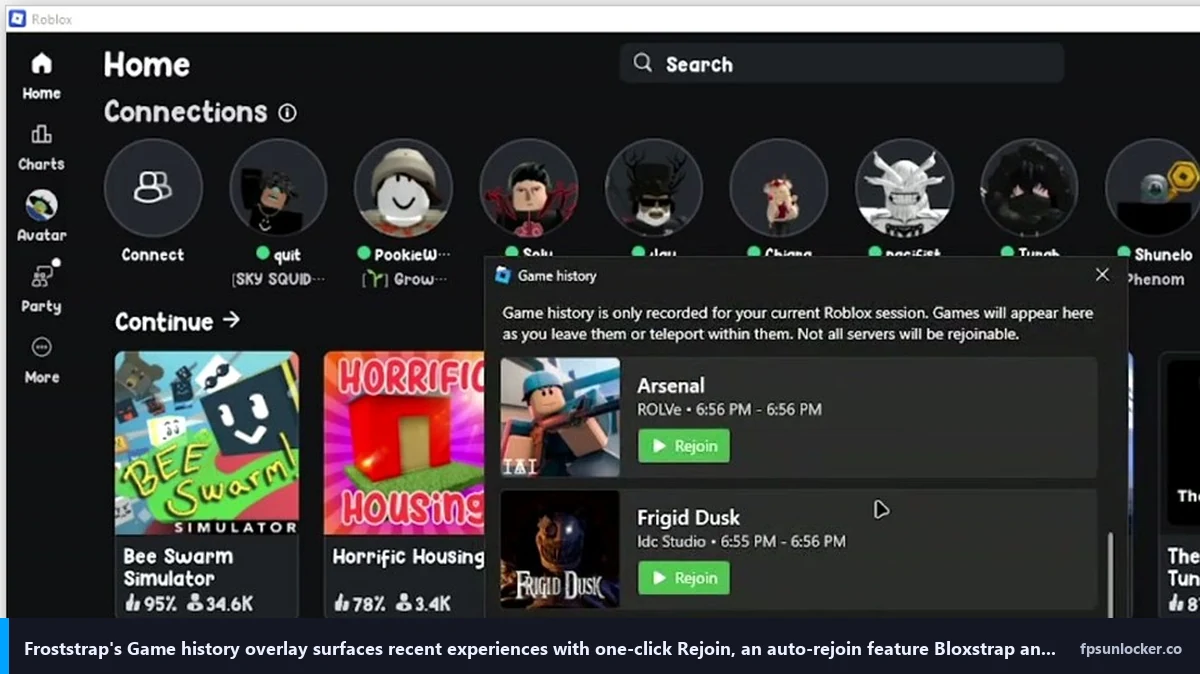
That’s the fork-vs-fork picture as it stands in April 2026. Three legitimate Bloxstrap derivatives, each with a clear use-case angle, all roughly equivalent on raw FPS because they apply the same FastFlags to the same client. Voidstrap for one-click presets and the friendliest UI. Fishstrap for clean multi-instance and the most stable codebase. Froststrap for launcher customization, region selection, and the AGPL-licensed corner of the open-source commons. None of them are magically faster. Pick the shell that matches your habits, install from the canonical GitHub repo, ignore every spoof domain.
Alex Park has been covering Roblox performance tools since 2022. Hardware: Ryzen 5 5600, RTX 3060 12GB, 1440p 144Hz LG UltraGear, plus an i5-10400F + RX 6600 cross-reference rig. Last updated April 25, 2026.