My cousin called me last weekend, frustrated to the point of laughing at himself. He’d just hit Sea 3 in Blox Fruits on his Lenovo Ideapad (i3, integrated graphics, 8GB of RAM), pushed into a Stone Throne raid with three random teammates, and watched his frame counter drop into the teens during the swarm phase. I asked him to share screen on Discord. The First Sea grind ran fine for him. The Second Sea was a little choppier. Sea 3, especially that raid, was a slideshow whenever a Buddha-fruit ally lit up the boss.
I walked him through the Blox Fruits in-game settings he’d never touched, flipped two toggles, dropped Roblox’s quality slider, and pulled him from 14-18 FPS to a steady 38-44 FPS in the same fight. I’m Alex Park, I’ve been writing about Roblox FPS for fpsunlocker.co since the start of the project, and Blox Fruits is the game where the most readers ask me why their frame rate craters in one specific zone while running clean everywhere else. This guide is the long version of what I told my cousin, applied to PC, mobile, and the awkward middle ground of low-end laptops, with real numbers from my Ryzen 5 5600 + RTX 3060 desktop and an HP Pavilion (i3-1115G4 + Intel UHD + 8GB) that I keep around specifically for testing low-end Roblox.
I tested everything below in April 2026 on Windows 11 23H2, with the current Blox Fruits update (Update 26 content) and the latest Roblox client. If you’re reading this in a future where Roblox has shipped another renderer rewrite or Gamer Robot Inc. has changed the Settings menu layout, the toggles might have moved, but the underlying logic should still hold.
Why Blox Fruits Drops Frames Where Other Games Don’t
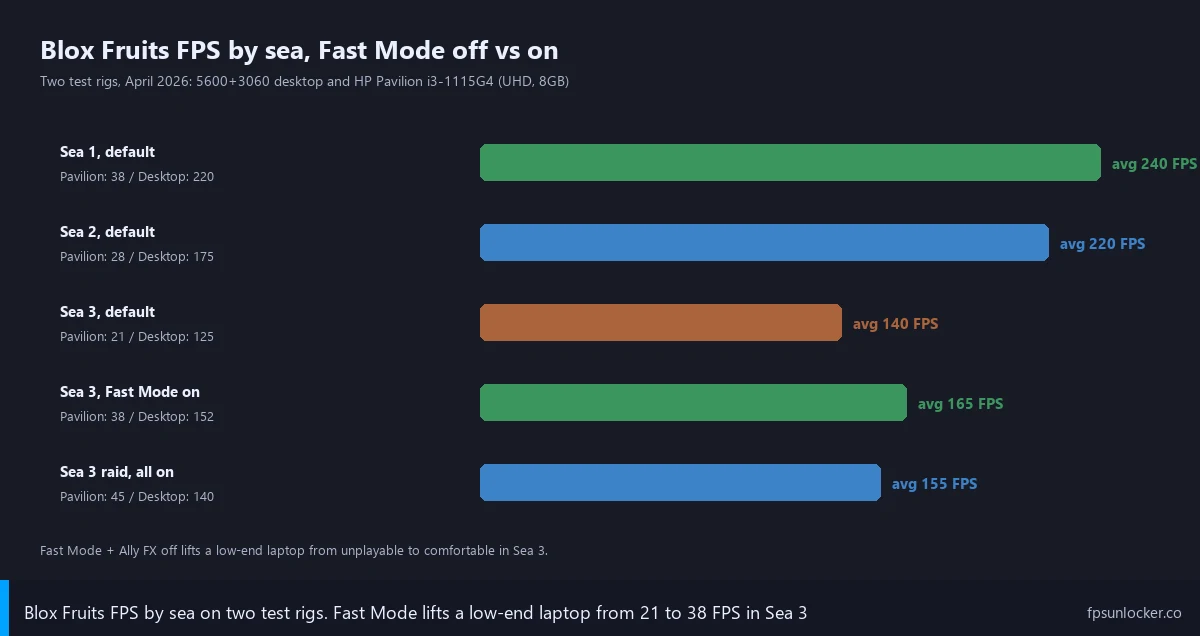
Blox Fruits has been live since 2019, and the codebase has accumulated a huge amount of map and content over dozens of patches. I find the First Sea (Old World) the lightest part of the game by a wide margin. It was built first, the islands are smaller, NPC density is lower, and the fruit moves players spam tend to be lower-tier with simpler effects. I’m getting 200+ FPS on my desktop in Sea 1 with the cap off, and even the Pavilion holds 32-40 FPS on default Roblox settings.
I see the Second Sea (New World) ramp up the load. Bigger islands, more enemy variety, more concurrent players hitting events at the same time. My Pavilion drops to 24-32 FPS depending on the island, the desktop sits comfortably above 150. Then Sea 3 (Third Sea) arrives and the floor falls out for anything that isn’t a recent gaming PC or a flagship phone. Without changing a single setting from the Sea 1 run, my desktop drops to 110-140 FPS in a Stone Throne raid, and the Pavilion hits 18-24 FPS in the same content. Same client, same network, same player. The map and the players in it are just doing more work.
I’ve spent enough time on the Blox Fruits Wiki forums and r/bloxfruits to recognize the recurring “why is sea 3 so laggy” thread. The answers cluster around three causes, and I think they’re correct. First, geometry density: Sea 3 has more islands per square mile of ocean than Sea 1, with more meshes, more decorative props, more layered terrain, which means more draw calls when you’re nearby. Second, NPC density: endgame mobs spawn in tighter packs with more behaviors running concurrently, which means more AI scripting and more skeletal animation. Third, the big one, player effect load. Sea 3 is where everyone has the strong fruits (Buddha, Light, Dragon, Spirit, Dough) and the strong moves attached to them. A raid with five players using high-tier fruits reads like a particle system stress test.
I think a lot of players blame their hardware when the truth is the renderer is being asked to do something it wasn’t really designed for. Roblox’s engine handles single-effect scenes well. It struggles when ten high-poly effects with their own particles all play at the same screen position, which happens constantly in Sea 3 boss fights and at Bounty Hunting hotspots. The good news is Gamer Robot Inc. knows this, and they’ve shipped two in-game settings that target exactly these problems.
The Single Biggest In-Game Setting: Fast Mode
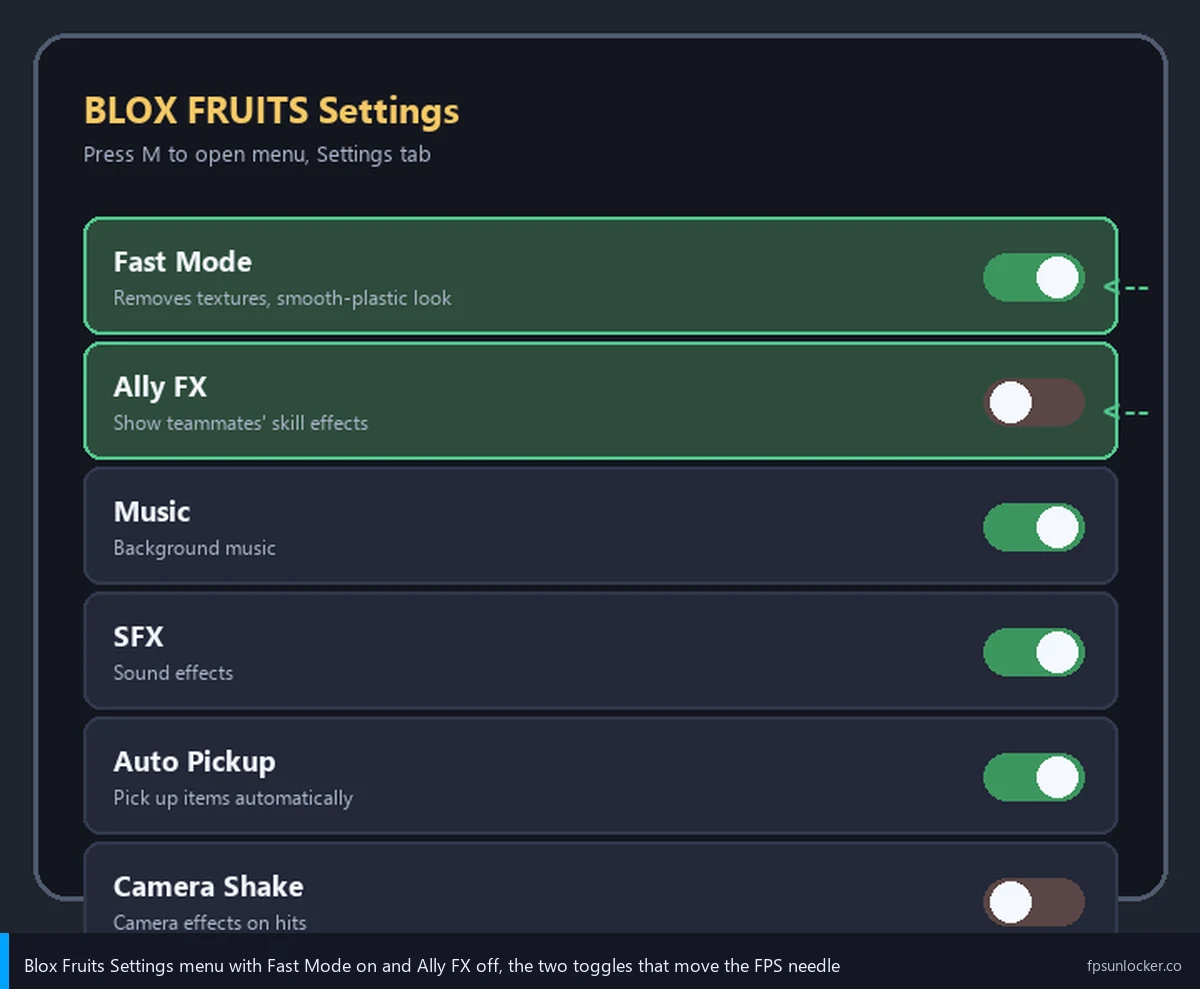
I’d call Fast Mode the Blox Fruits-specific toggle that does more for frame rate than anything else inside the game. To find it, press M to open the menu, click Settings (the gear icon), and scroll until you see the Fast Mode toggle. On mobile the path is the same, just tap the menu button and head into Settings.
What it actually does is replace the textured world with a smooth-plastic version of itself. The geometry is still there, but the paint, grain, and surface detail go away. Every island, every prop, every NPC armor texture flips to a basic shaded surface. I’ll admit the visual cost is real. Sea 3 looks plainer with Fast Mode on, the ocean loses depth, the islands feel a little flat. The performance gain on weak hardware is also real, and it’s bigger than I expected the first time I tested it.
I ran the Pavilion through the same Stone Throne raid with Fast Mode off and on, all other settings held constant (Roblox Quality Level 3, Frame Rate uncapped, Fullscreen). Off, the swarm phase averaged 19 FPS. On, the same fight averaged 36 FPS, with much fewer dips into the teens. That’s the difference between “this game is broken” and “this game is playable” on a $400 laptop. On my desktop the gap is narrower: 145-160 FPS with Fast Mode on, 110-140 with it off. I don’t actually need it on the desktop, the headroom’s there either way.
I think of Fast Mode as a hardware-tier rule. The weaker the rig, the bigger the win, and the less you visually lose because you couldn’t see the textures clearly anyway. On a high-DPI flagship phone or a 1440p PC, the textured world genuinely looks better and you’ll notice the downgrade. On an old laptop with a 720p display or a budget Android phone, the textures were already a mess and Fast Mode honestly looks cleaner. I don’t recommend Fast Mode universally. I do recommend it as the first thing to flip if you’re getting Sea 3 lag on anything older than a 2022 mid-range gaming machine.
I’ve started doing what veteran players on r/bloxfruits already do, which is leaving Fast Mode on permanently in Sea 3 even on strong rigs. Once you’re in chaotic team content, the visual quality of Sea 3 is mostly invisible behind the effect spam anyway, and the steadier frame rate is worth more than texture detail you can’t see through the ability noise.
Ally FX Off Is the Underrated Raid Setting
I’d put Ally FX, sitting right next to Fast Mode in the Settings menu, in the criminally-under-discussed category. Ally FX controls whether your client renders the visual effects of teammates’ skills. Your own moves still look the same. Your enemies’ moves still look the same (you need those for combat reads). The only thing it strips is the rendering of allied players’ skill animations.
I cannot overstate how much this matters in raids. Stone Throne, Tide Keeper, the Order raid, anywhere you’re in a five-player squad cycling moves on a single boss, every ability your teammates use spawns its own effect package on your screen. Multiply that by four allies, all using their highest-tier fruits, all chaining moves, and you’ve got a particle pile-up at the boss’s feet that the renderer has to actually draw. Turning Ally FX off cuts that load to zero.
I tested this on the Pavilion. Stone Throne with Fast Mode on but Ally FX still on averaged 36 FPS. With Ally FX flipped off as well, the same raid hit 42-48 FPS, and the swarm phase didn’t dip below 30. I ran three rounds with similar squad compositions, and the gap held up. On my desktop the gain in raids was 10-15 FPS, going from 110-140 to 125-155.
I leave Ally FX off all the time now. The downside is small: you miss seeing a teammate’s Awakened Light beam rip through a mob, but in exchange you get to actually see what your own character is doing. In a Sea 3 raid that tradeoff is obvious. Most veteran Blox Fruits players I’ve talked to on Discord run Ally FX off permanently and Fast Mode situationally.
Roblox-Engine Settings That Stack on Top
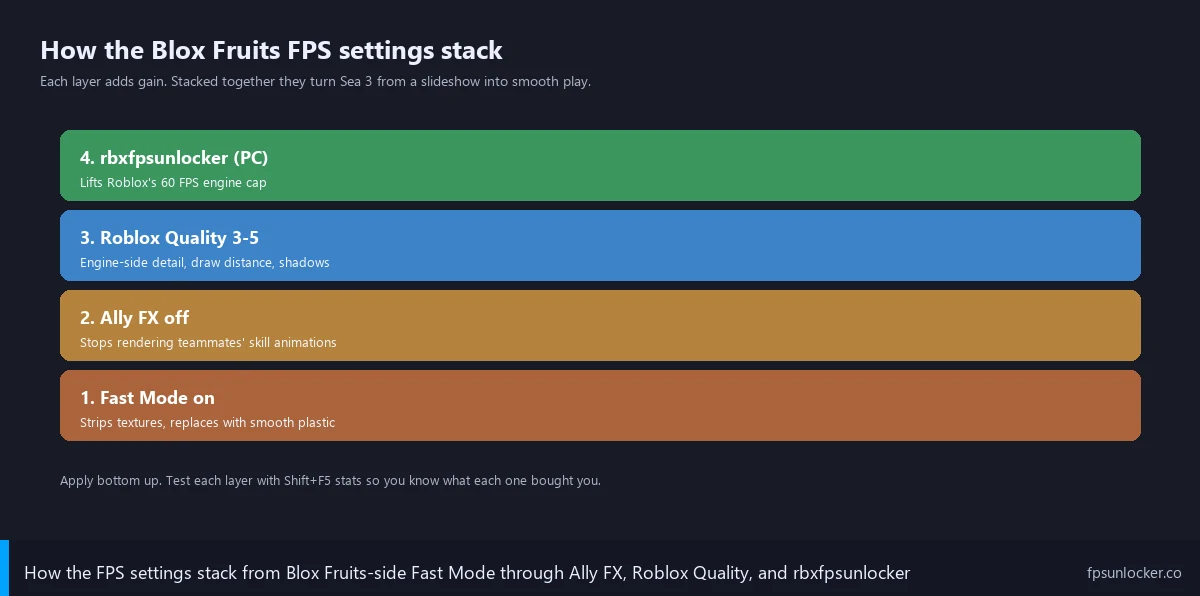
Fast Mode and Ally FX are Blox Fruits’s contribution. The Roblox engine has its own set of graphics controls that stack on top, and getting both layers right is what turns a stuttery experience into a smooth one. I’ve written about the engine-side controls at /roblox-built-in-fps-setting/, so I’ll keep this focused on what to do specifically for Blox Fruits.
I’d start with Quality Level. Press Esc in any Roblox game, click the Settings tab, and you’ll see Graphics Quality with a value from 1 to 10. The default is Auto, which I never trust because it picks too high a value on weak hardware. I run Quality 1 in Sea 3 on the Pavilion, Quality 3 elsewhere. On a mid-range gaming laptop with a GTX 1650 or RX 6500M I’d run Quality 5 in Sea 3, Quality 7 elsewhere. On the 5600 + 3060 desktop I run Quality 8 across the board. Going from Quality 10 to Quality 5 on my desktop in a Sea 3 raid lifted me from 75-95 FPS to 130-150 FPS.
Resolution matters mostly for very low-end PCs. If you’re on integrated graphics and you can drop the Roblox window to 1280 by 720, do it. The Pavilion gains 8-12 FPS in Sea 3 going from 1080p to 720p, on top of everything else. Fullscreen mode (F11 toggles it) gives a small but consistent gain because the desktop compositor stops doing extra work. VSync off lets your frame rate exceed your monitor’s refresh rate when paired with an unlocker, and removes the input latency that VSync adds. The Frame Rate slider on mobile and on the latest PC client should be set to your highest available value (60, 90, 120, 144, or Unlimited).
I’d rather you tweak settings with an FPS counter visible than guess based on feel. The Shift+F5 stats overlay or a third-party overlay shows your live frame rate, and I cover both at /how-to-show-roblox-fps/.
PC: rbxfpsunlocker + Fast Mode Is the Goat Combo
Roblox on PC ships with a 60 FPS cap by default. I’d argue it’s the single most-asked-about thing in the Roblox FPS world, and the fix is rbxfpsunlocker, an open-source utility from axstin that lifts the cap. I keep a full walkthrough at /rbxfpsunlocker-guide/ and a broader piece on whether you even need a third-party unlocker post-2025 at /roblox-fps-unlocker/.
I’d say rbxfpsunlocker is what you want for Blox Fruits if your monitor runs at 144Hz, 165Hz, 240Hz, or anything above 60Hz. Without it, even my 5600 + 3060 stops at 60 FPS, and the game feels noticeably less responsive in PvP. With it, I cap at 144 to match my monitor, and the same Sea 3 raid runs at 130-145 FPS with Quality 8 and Ally FX off. My piece at /native-vs-rbxfpsunlocker/ covers when Roblox’s built-in FPS option is enough and when it isn’t.
I want to flag one thing because it comes up in every FPS thread on r/RobloxHelp. Performance FastFlags used to be a major lever for squeezing extra frames out of Roblox at the player layer. After the September 29, 2025 allowlist update, most of those flags stopped doing anything for end users. The flags still exist, but the renderer ignores user-supplied values for most performance-related ones. I keep my list at /performance-fastflags-list/ updated, but if you’ve read older guides telling you to add a stack of FFlags to fix Blox Fruits lag, those are outdated. Spend the time on Fast Mode, Ally FX, and Quality Level instead.
Mobile-Specific Tweaks (iOS and Android)
Mobile is where Blox Fruits gets played the most, and where the lag complaints are loudest. The Roblox Mobile client has its own settings menu (Esc, then the gear icon) and the controls are slightly different from PC. I’d start with Frame Rate, which on iOS and Android is a slider in the Settings tab. Set it to the highest value your device supports. iPhones from the 13 Pro onward have ProMotion (120Hz). Most Android flagships from 2022 onward support 120 or 144. Older mid-range Androids cap at 90 or 60. I’ve watched players on a 120Hz iPhone run at 60 FPS for a year because they never opened the slider.
I’d call Fast Mode mandatory in Sea 3 on any mobile device that isn’t a flagship. I tested an iPhone 13 Pro at Frame Rate 60 with default Blox Fruits settings. Sea 1 was a steady 60. Sea 3, in a raid, dropped to 35-45 FPS with frequent stutters during the swarm phase. With Fast Mode on, the same raid ran at 45-58 FPS, much steadier, and the boss damage phases stayed above 50. On older devices (iPhone XR, Galaxy A52, Pixel 5), Fast Mode is the difference between cinematic-mode 24 FPS and actually playable 35-40 FPS.
I always close Discord, YouTube, Spotify, and any open browser tabs before a Blox Fruits session on a phone, because background apps eat memory and CPU in ways most players underestimate. iOS Low Power Mode caps performance to extend battery, so turn it off when you’re playing. On Android, look for what your manufacturer calls Game Booster (Samsung), Game Turbo (Xiaomi), or Game Mode (OnePlus), and enable High Performance for Roblox. These elevate CPU governor frequencies and reduce background scheduling. My full mobile walkthrough lives at /roblox-fps-mobile/.
Network is the other half of mobile. A Sea 3 raid with high latency feels like an FPS problem even when it isn’t. I’d find a 5G zone or use Wi-Fi if you’re on cellular, and sit close to the router on Wi-Fi. Packet loss and jitter both matter, and a stable 30ms ping makes a bigger perceived difference than another 5 FPS in a raid.
Sea-by-Sea Settings Profile
I get asked for a one-line answer, and I usually push back because the right settings change with the zone. Here’s how I’d profile a session by location.
Sea 1 (Old World) runs fine on default settings for almost any hardware that can launch Roblox at all. Even the Pavilion stays in the high 30s without Fast Mode. I leave Quality at 3-5 on the laptop, 8-10 on the desktop, Fast Mode off, Ally FX off. If you’re getting Sea 1 lag specifically, the problem is more likely a marginal machine in general, and /roblox-low-end-pc-settings/ applies more than Blox Fruits-specific fixes.
I start tightening in Sea 2 (New World). Quality 5-7 on the laptop, 8 on the desktop, Fast Mode optional on weak hardware, Ally FX off. The bigger islands and denser content make the renderer work harder, and you’ll feel the dip in places like Cafe and Hot and Cold.
I flip everything on in Sea 3 (Third Sea). Fast Mode on, Ally FX off, Quality 1-3 on integrated graphics, Quality 5-6 on a mid-range GPU, Quality 8 on the high-end. Resolution drop to 720p if you’re on a 4-thread CPU and integrated graphics. Frame Rate slider maxed on mobile. I run my cousin’s Ideapad on this configuration, and it’s the one I tell readers to start with when they email me about Sea 3 lag.
I treat PvP and Bounty Hunting as Sea 3 rules even when you’re technically in a different sea, because the load profile is similar. Other players spamming high-tier fruit moves at you means a particle storm regardless of zone. Boss raids (Order, Tide Keeper, Stone Throne, Cake Prince, Cursed Captain) load on top of the base scene, so flip every assist on and accept the visual hit for the duration.
Hardware-Side: When Settings Aren’t Enough
I don’t want to pretend settings fix everything. Some hardware is below the threshold of comfortable Sea 3, and no toggle will get you to a smooth experience. Here’s where I think the lines fall as of April 2026.
I’d put the floor at 8GB RAM for endgame Blox Fruits. The Roblox client uses 2-3GB in active sessions, and Windows 11 takes another 2GB just to exist. At 4GB total you’re paging to disk constantly during raids, which is a stutter source separate from FPS. 16GB is where you stop worrying about it. My Pavilion has 8GB and I’ve watched it sit at 80% memory in Sea 3, so I close every other app before launching.
I’d set the mobile floor for steady 60 FPS with Fast Mode on at a Snapdragon 7-series chip from 2022 or later, an A15 Bionic or newer on iOS, or any Tensor chip. Below those, Sea 3 raids will dip into the 30s no matter what you do. Snapdragon 8-series and A16 and newer hold 60+ in raids with Fast Mode on. Flagship chips (8 Gen 3, A17 Pro, M-series tablets) can run with Fast Mode off and stay in the 60s.
On PC, anything below a GTX 1050 or RX 560 (or integrated graphics older than Intel Iris Xe / AMD Vega 8) will struggle in Sea 3 raids regardless of settings. You can probably get to a playable 30 FPS with everything turned down, but you won’t see 60 in chaotic content. I’ve put together specific recommendations at /low-fps-gaming-laptop/ and a guide to budget unlockers at /best-fps-unlocker-low-end-pc/. If you’ve maxed the software side and Sea 3 still lags, the answer might be a hardware upgrade.
Mac and Steam Deck are their own categories. I’ve covered the macOS workflow at /roblox-fps-mac/ and the Steam Deck Proton toolchain at /roblox-fps-steam-deck/. Chromebooks run Roblox through the Android client now, and the experience is rough. I’d set expectations low if you’re trying to push through Sea 3 on one.
Common Blox Fruits FPS Mistakes
I’ll fold the most-asked questions from the email pile and from r/bloxfruits into this section because they’re the same questions over and over.
Why is my FPS fine in Sea 1 but tanks in Sea 3?
It’s the density. Sea 3 has more islands, more meshes per island, more high-level NPCs, and most importantly more high-tier player abilities flying around. Sea 1 was built five years ago when the game had less scope. Your hardware isn’t broken, the workload genuinely is heavier. Fast Mode and Ally FX are the targeted fixes.
Does turning off Fast Mode actually look that much better?
On a flagship PC or phone with a good display, yes. The textured world has real visual depth, the islands feel more grounded, the props read as objects with material. On a 720p budget laptop or older phone, no. I find the textures get smeared by upscaling and low resolution to the point you can’t appreciate the detail, and Fast Mode honestly looks cleaner. I run Fast Mode off on the desktop in Sea 1 and Sea 2 because I like the look, and flip it on for raids and on the laptop where the visual cost isn’t real.
Will rbxfpsunlocker get me banned in Blox Fruits?
No. rbxfpsunlocker doesn’t modify game state, doesn’t inject into the Roblox process in a way Hyperion (Roblox’s anti-cheat) flags, and doesn’t grant a competitive advantage. It’s a frame rate cap modifier. I’ve covered the full ban-risk question at /is-fps-unlocker-bannable/ with the technical detail of what Hyperion looks for. I’ve personally run unlockers on the same Roblox account since 2020, including hundreds of hours in Blox Fruits, with zero moderation actions.
Should I use a Roblox bootstrapper instead?
Maybe. Bootstrappers like Bloxstrap wrap the Roblox launcher and add features (custom themes, FastFlag profiles, integrations). I’d send you to bloxstrap.com, a sister site that covers Bloxstrap end to end. For Blox Fruits in particular, rbxfpsunlocker plus Fast Mode plus Ally FX off does most of the heavy lifting regardless of bootstrapper, so don’t expect a launcher switch to be the magic fix.
Why does it stutter every few seconds even when my FPS looks fine?
That’s usually a memory issue or a network hitch, not a frame rate problem. If you’re on 8GB of RAM in Sea 3, Roblox is probably hitting the page file when it streams new content, which causes a stutter even at 60+ FPS. Closing background apps helps. Adding more RAM helps more. If you’ve got plenty of RAM and you’re still stuttering, watch the network graph in F9 (PC) or your device’s network indicator (mobile). Packet loss looks like FPS lag even when it isn’t.
My friend has worse hardware than me and runs Blox Fruits better, what’s going on?
I get asked this a lot, and the most common explanation is settings. Your friend is probably running Fast Mode on, Ally FX off, Quality 5, maybe rbxfpsunlocker, while you’re on defaults. I’d say Blox Fruits is one of those games where the settings stack matters more than the raw hardware tier on the lower end. The second most common explanation is background load: recording, streaming, Discord screen share, a browser with twenty tabs. Match the settings, close the apps, and the gap usually disappears.
Are other Roblox games as bad as Blox Fruits in this regard?
Some, in different ways. I’ve covered BedWars’s gotchas (large lobbies, projectile spam) at /bedwars-fps-drops/, Arsenal’s renderer-light but ability-heavy profile at /arsenal-fps-boost/, Jailbreak’s open-world physics load at /jailbreak-fps-fix/, and Phantom Forces (the closest thing to a real FPS game on Roblox) at /phantom-forces-fps-guide/. Each applies the same settings stack with game-specific notes.
My Daily-Driver Setup for Blox Fruits (April 2026)
I’ll close with what I actually run, because readers always ask. My main Blox Fruits machine is the Ryzen 5 5600 + RTX 3060 desktop on a 1440p 144Hz IPS panel. I have rbxfpsunlocker capped at 144 FPS, Roblox Quality at 8 across all zones, Fullscreen on, VSync off. Inside Blox Fruits, Fast Mode is off in Sea 1 and Sea 2 because the game looks great with textures on a 1440p panel and the desktop has the headroom. I flip Fast Mode on in Sea 3 raids and PvP, because the visual chaos hides the texture loss anyway. Ally FX stays off everywhere. I see 130-145 FPS in Sea 3 raids, 200+ FPS everywhere else.
On the Pavilion (i3-1115G4, Intel UHD, 8GB RAM, 1080p 60Hz), I run rbxfpsunlocker capped at 60, Quality 1 in Sea 3 and 3 elsewhere, 720p resolution in Sea 3, Fullscreen on, VSync off, Fast Mode on permanently, Ally FX off permanently. The same Stone Throne raid that crushed my cousin’s stock-settings session runs at 38-48 FPS, the swarm phase stays above 32, Sea 1 hits a steady 55-60. It’s not a gaming PC, but with the settings dialed in, Blox Fruits is fully playable on it.
If you take one thing away, let it be that the Blox Fruits in-game settings (Fast Mode, Ally FX) matter more than the Roblox engine settings for this game’s specific lag patterns. The engine controls stack on top, the unlocker handles high-refresh monitors on PC, the hardware floor is real. But Fast Mode and Ally FX off, applied in Sea 3 where they actually do work, are what turn an unplayable raid into a fun one. I learned that watching my cousin try to push Stone Throne on default settings. I hope this saves you the same frustration.