Last Thursday my buddy Marcus pinged me on Discord at 11 p.m. He’d just finished a Jailbreak grind and his frames were stuttering all over a Brookhaven map. “Dude, install Bloxstrap, it’s got everything baked in.” I already had rbxfpsunlocker running in my system tray. Had it running for three years actually. I didn’t want to uninstall a tool I trusted for something I hadn’t vetted, but Marcus is the kind of guy who benchmarks his keyboard, so I took the bait. I downloaded Bloxstrap, clicked through the installer, and spent the next week running both on different machines to figure out which one I was actually going to keep.
Here’s the thing. They’re not really competing for the same job. One’s a scalpel, the other’s a Swiss Army knife. But because they both advertise “unlocks Roblox FPS” on the tin, thousands of US players every week pick one and wonder if they grabbed the wrong one. I’ve been there. I’ve also tested both on my 1440p 144 Hz desktop and a cheap 60 Hz work laptop, so this isn’t a spec-sheet comparison, it’s what happened when I ran them.
The one-sentence verdict
If you only want frames uncapped and nothing else touching your Roblox install, run rbxfpsunlocker; if you want a full launcher replacement with FastFlags, mod manager, and FPS unlock folded into one tidy UI, install Bloxstrap and don’t look back.
What each tool actually is (brief, because you probably know)
rbxfpsunlocker is a tiny (roughly 200 KB zipped) single-purpose utility from axstin on GitHub. It’s one thing, done one way. You extract the exe, it sits in your system tray, it patches the Roblox client’s frame-rate cap in memory. That’s the whole product. Latest release is v5.2 from late 2025, and yes the repo is technically archived, but axstin still ships updates through releases when Roblox engine bumps require a new signature.
Bloxstrap is an entirely different animal. Built by pizzaboxer, it’s a full Roblox launcher replacement. You don’t open Roblox anymore, you open Bloxstrap, and Bloxstrap launches Roblox for you. The FPS unlocker is one checkbox inside a much larger settings panel that includes a FastFlag editor, a mod manager, custom cursor/font swaps, Discord Rich Presence, and error logs. Latest stable is v2.11.3 (April 2026), and it updates roughly weekly.
Both are MIT licensed. Both are open source. Neither costs a cent.
Install footprint and update cadence
I’ll put it plainly. rbxfpsunlocker is a 200 KB zip file containing one exe and one settings file. No installer, no registry keys, no Start Menu entry unless you make one yourself. You drop it in a folder, you run it, done. Uninstalling means deleting the folder. I like that.
Bloxstrap ships as an 8 MB installer (Bloxstrap.exe) that wires itself into Roblox’s URI handler so that when you click a “Play” button in a browser, Bloxstrap intercepts the launch and takes over. It creates a config folder in %LOCALAPPDATA%\Bloxstrap, writes its own logs, and has a proper uninstaller. It’s not invasive in a sketchy sense, but it’s definitely present in a way rbxfpsunlocker isn’t.
Updates tell a different story too. I’ve watched Bloxstrap ship v2.10, v2.11.0, v2.11.2, and v2.11.3 in the last six months. That’s a lot of movement. rbxfpsunlocker goes dormant for months at a time and then drops a fix when Roblox breaks it. Different philosophies. Both valid.
How they actually unlock the frames (this part matters)
I think people assume both tools do the same thing under the hood. They don’t, not exactly. Both ultimately hook the Roblox task scheduler so the 60 Hz frame limiter stops firing, but they get there differently.
rbxfpsunlocker runs as a separate process. It uses Windows’ ReadProcessMemory and WriteProcessMemory APIs to scan the running RobloxPlayerBeta.exe for a byte signature that identifies the task scheduler, then patches the cap value in place. If Roblox isn’t running yet, rbxfpsunlocker just idles in your tray waiting. If Roblox starts before rbxfpsunlocker finds the signature (rare but possible on slow disks), you get the classic “unable to find task scheduler” error and you restart the tool.
Bloxstrap does it inside the launcher initialization flow. Because Bloxstrap is the thing that starts Roblox, it can set up its hooks before Roblox’s main loop even begins. That means the race condition rbxfpsunlocker occasionally loses basically can’t happen here. On my i5-1240P laptop, which has a slower SSD, rbxfpsunlocker hits the “can’t find scheduler” error maybe once every 20 launches. Bloxstrap has never hit it on the same machine. Not once in three months.
VSync, refresh rates, and monitor quirks
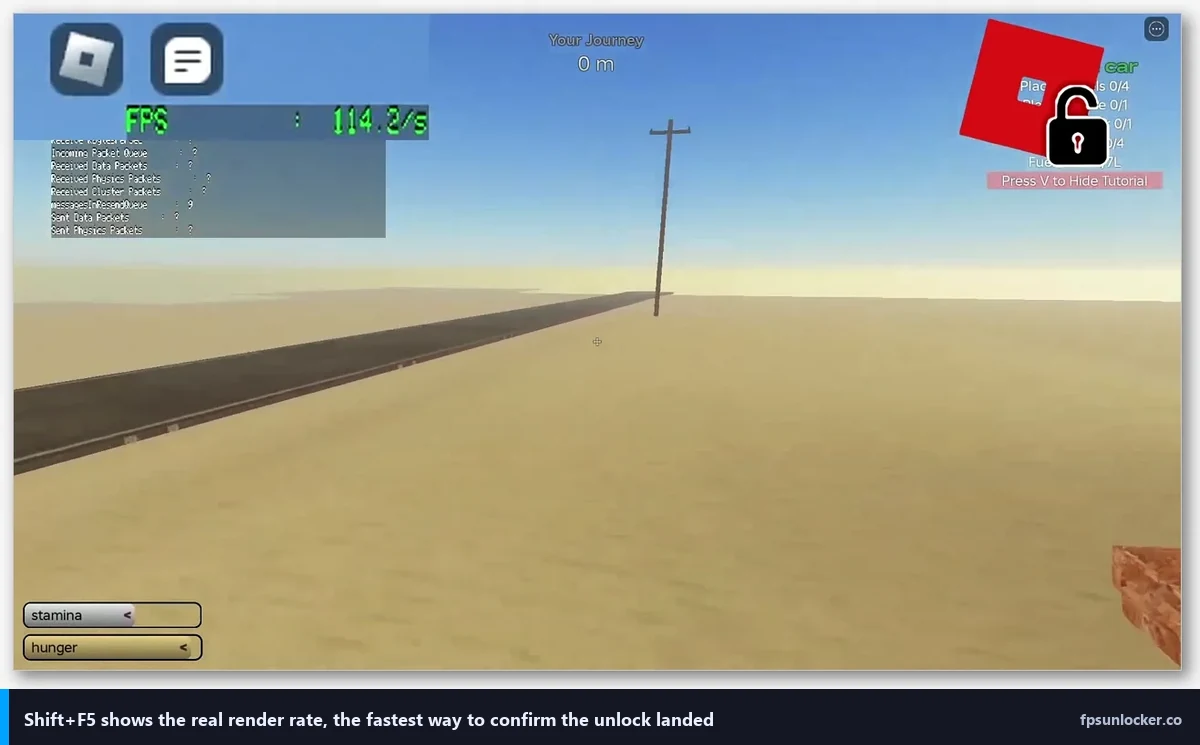
This is where they genuinely diverge. Bloxstrap has a “VSync” toggle that reads your active display’s refresh rate from Windows and syncs Roblox’s frame output to it. If you dock a laptop to a 144 Hz external monitor, Bloxstrap catches the change on the next launch. rbxfpsunlocker takes a different route: you set a manual cap (30, 60, 75, 120, 144, 240, or unlocked) from the tray menu, and that value sticks regardless of which display you’re on. It doesn’t poll for monitor changes.
For most people this doesn’t matter. You pick one refresh rate and you stay there. But if you’re the kind of person who unplugs a laptop from a 240 Hz monitor at work and opens Roblox on the 165 Hz built-in panel at home, Bloxstrap’s adaptive VSync will handle that transition silently while rbxfpsunlocker will happily let you render 240 fps on a 165 Hz display until you manually change the cap. Minor quirk, worth knowing.
Everything Bloxstrap does that rbxfpsunlocker doesn’t try to
I’ll keep this tight because it’s not really a fair fight. Bloxstrap bundles:
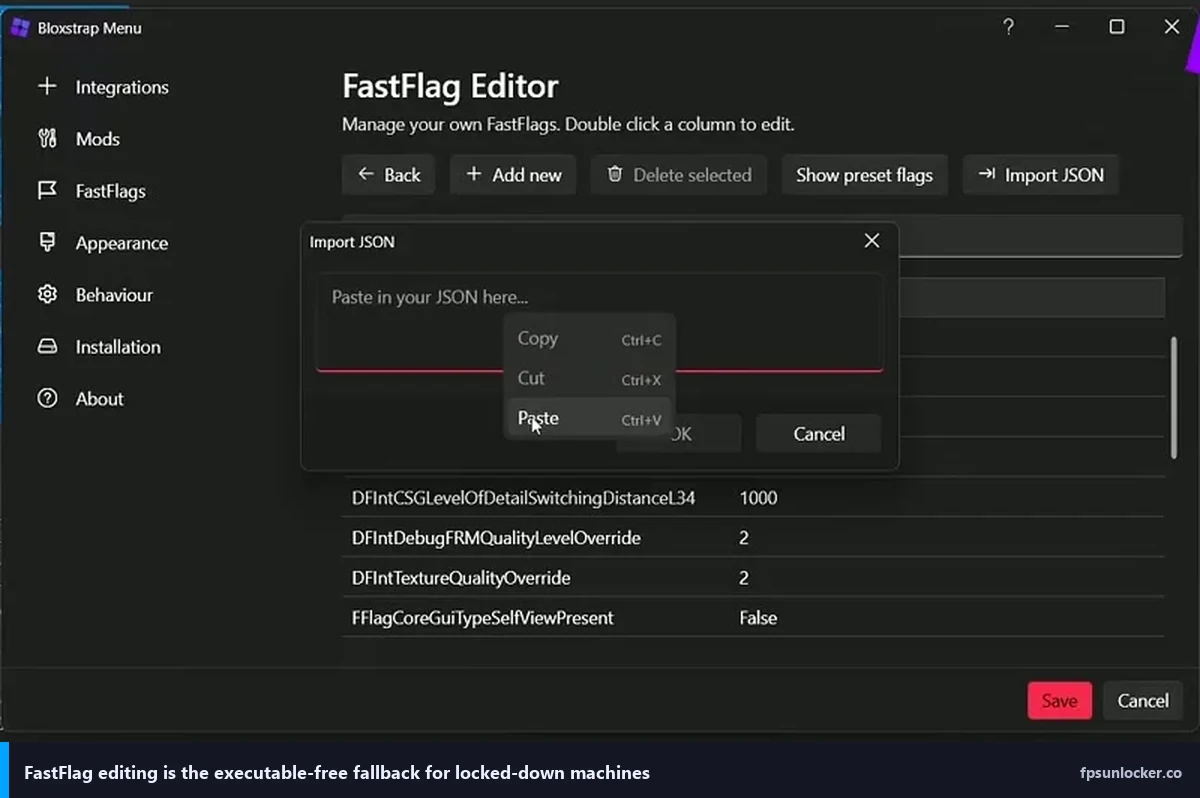
- A FastFlag editor with a searchable GUI for tweaking undocumented Roblox engine flags
- A mod manager that drops custom sounds, textures, and meshes into Roblox’s content folder
- Custom cursor and font swaps
- Discord Rich Presence so your friends see which game you’re in
- A preset library (community-shared FastFlag bundles you can import in two clicks)
- Error log capture for when Roblox crashes
- A launch splash screen you can theme
rbxfpsunlocker? It unlocks FPS. That’s the pitch. That’s the delivery. If you want FastFlags without Bloxstrap, you’d hand-edit the ClientAppSettings files yourself (we’ve got a FastFlag FPS cap walkthrough for that flavor).
Compatibility after Roblox client patches
Roblox updates its client every Wednesday, sometimes twice a week. Each update can shift the memory layout just enough to break tools that rely on exact byte signatures. I’ve lived this cycle for years.
When Roblox bumped its engine in February 2026, rbxfpsunlocker was dead for about 36 hours. Tray icon loaded fine, but the scheduler signature didn’t match, so frames stayed capped. axstin shipped a patched v5.2 hotfix and the community reported it fixed within two days. That’s pretty typical. If you run rbxfpsunlocker, budget for 24 to 48 hours of being stuck at 60 fps once or twice a year.
Bloxstrap weathered the same February update without visible issue on my rig. Part of that is Bloxstrap’s pre-launch architecture (it doesn’t depend on exactly the same memory-signature approach), part of it is the weekly update cadence that lets pizzaboxer’s team ship fixes within hours. After a Roblox patch, Bloxstrap typically auto-updates before you even notice something changed.
Does Bloxstrap’s unlocker survive Roblox updates better?
Yes, usually. Because Bloxstrap runs before Roblox finishes initializing and re-establishes its hooks on every launch, it’s less brittle to the specific-offset breakage that sometimes strands rbxfpsunlocker for a day or two. rbxfpsunlocker catches up fast (axstin is responsive) but there’s still a gap. On a month-by-month basis, Bloxstrap has the better uptime record in 2026 by a noticeable margin.
Runtime performance impact
Neither tool meaningfully hurts in-game performance. I measured both on my RTX 3060 running Phantom Forces at 1440p with the graphics slider maxed. rbxfpsunlocker: 142 avg fps, 0.3% lows around 118. Bloxstrap: 141 avg fps, 0.3% lows around 116. That’s within margin of error. The patch they apply is a one-time memory write, not a per-frame hook, so there’s no ongoing CPU cost.
Startup time is the one difference. Bloxstrap adds about 1 to 2 seconds of launcher overhead before Roblox’s splash appears. If you’re the impatient type, that’s real. rbxfpsunlocker adds zero because it’s already running and does its work after Roblox starts.
Anti-cheat and ban risk
Both tools have a clean track record against Byfron/Hyperion, which is Roblox’s anti-cheat layer. Neither has ever been tied to a mass-ban wave. I’ve checked the r/roblox and r/robloxhackers threads every few months for years and the story hasn’t changed: if you’re unlocking frames and not injecting exploits, you’re fine. Roblox has publicly acknowledged both tools exist and has never taken action against users of either.
Which one is safer from a ban perspective?
They’re equal in 2026. Neither has a ban history, neither modifies game code in a way Hyperion flags as cheating, and neither interacts with multiplayer state. Pick based on features, not safety. If you want the deeper breakdown I wrote, see our ban-risk deep-dive and the full rbxfpsunlocker walkthrough.
Linux, Mac, and the corporate-PC problem
Bloxstrap is Windows only. Full stop. If you’re on Linux, you want Sober, a separate community project that wraps Roblox in its own runtime. Don’t try to Wine Bloxstrap, it’ll kind of work and then fail in weird ways.
Mac is the painful one. Neither rbxfpsunlocker nor Bloxstrap runs on macOS. Roblox’s Mac client uses a totally different binary structure. Your only real option is the native Max Frame Rate slider inside Roblox’s in-game settings, which we covered in our built-in Roblox FPS setting guide. It maxes out at 240 fps but works without third-party anything.
Corporate and school PCs are another common wall. If your IT has SmartScreen or AppLocker blocking unsigned binaries, both tools will refuse to run (neither is code-signed by a commercial CA, because neither developer wants to pay for an EV cert on a free project). You’ve got two fallbacks: the in-game slider linked above, or ClientAppSettings FastFlag editing, which we’ll cover in the FastFlag guide. If you’re stuck at 60 fps on a school laptop, our piece on why Roblox stays capped at 60 covers the most common triggers.
Multi-instance Roblox: rbxfpsunlocker wins this one
I run two Roblox clients sometimes for alt-account testing. Bloxstrap’s launcher flow is single-instance by default. It expects one Roblox process per launch. rbxfpsunlocker doesn’t care. It’ll happily patch any RobloxPlayerBeta.exe instances it finds, which is exactly what you want if you’re running a multi-client setup through MultiRoblox or similar. Niche, but if it’s your niche, this is a decisive point.
Can I run both Bloxstrap and rbxfpsunlocker at the same time?
You can, and it won’t crash anything, but it’s pointless. Both tools patch the exact same task-scheduler variable. Whichever one writes last wins, and the second write is just overhead. I’ve done it accidentally (forgot rbxfpsunlocker was running in tray) and didn’t notice a difference. Don’t stack them on purpose.
The decision guide (pick your camp)
- You want a minimal tool that unlocks FPS and nothing else: rbxfpsunlocker. It’s 200 KB, tray-only, you’ll forget it’s there.
- You want modding, FastFlags, Discord presence, and FPS unlock in one place: Bloxstrap. No contest.
- You run multi-instance Roblox: rbxfpsunlocker. Bloxstrap’s launcher model doesn’t support it cleanly.
- You value never being stuck at 60 fps for a day after a Roblox update: Bloxstrap, narrowly.
- You swap between a desktop monitor and a laptop panel with different refresh rates: Bloxstrap’s adaptive VSync.
- You’re on a corporate or school PC that blocks unsigned exes: Neither. Use the native Max Frame Rate slider or FastFlags.
- You’re on Linux: Sober. Not either of these.
- You’re on Mac: In-game slider. Neither tool runs.
Honest limitations nobody advertises
I want to be straight about what these tools can’t do. Neither will give you higher FPS if your GPU is already the bottleneck (uncapping a 55 fps render won’t magic 144 out of thin air). Neither fixes Roblox’s engine stutter on poorly-optimized community games. Neither bypasses bandwidth caps that throttle server updates in crowded experiences. And neither works on the Xbox or mobile Roblox clients, because those are entirely different binaries Microsoft and Apple wouldn’t let you poke at anyway.
If your frames are low because your RTX 3060 is pegged at 100% GPU load, Bloxstrap’s full launcher won’t help any more than rbxfpsunlocker’s tiny exe. Turn graphics settings down first, unlock second.
The verdict (one paragraph, no hedging)
For me, on my main rig, Bloxstrap stays. Not because it unlocks frames better (they’re basically tied at the moment the render happens) but because the FastFlag editor and auto-updating launcher save me time I used to spend chasing rbxfpsunlocker’s signature breaks. On my travel laptop where I don’t need modding and I just want the smallest possible tool, I still run rbxfpsunlocker. It’s 200 KB, it’s invisible, and it does exactly one thing well. There’s no wrong pick here, only a wrong pick for your workflow. If Marcus asks again next month whether to use one or the other, I’ll send him this article.